

Lead-Gen now on Auto-Pilot withBuild My Campaign
Valasys Media — Empowering marketers with powerful insights

Using an Attendance Management System to Increase Accountability and Productivity

Boost accountability and productivity with an Attendance Management System. Track employee attendance efficiently and enhance your workplace performance.

Guest Author
Guest Author
Last updated on: Dec 12, 2025
Using an Attendance Management System to Increase Accountability and Productivity

Effective management of employee attendance is essential to the success of a firm in the modern corporate environment. Businesses can manage, record, and evaluate attendance with ease with the use of an Attendance Management System (AMS), which helps them stay compliant and increase productivity. Numerous components of attendance tracking are automated by this system, which lessens administrative work and offers insightful data on worker trends. This essay explores the elements, advantages, difficulties, and potential applications of attendance management systems, emphasizing their crucial function in modern workplaces.

The elements of a system for managing attendance

A successful AMS consists of the following essential elements

Time tracking

Keeping track of when workers begin and end their work is the fundamental duty of any AMS. Numerous tools, such as web-based systems, mobile apps, RFID cards, and biometric scanners, can be used to do this.

Data Integration

By integrating with other HR and payroll software, modern systems make sure that attendance information is easily included into compliance reporting, performance reviews, and paycheck computations.

Management of Leaves

AMS usually has features for handling leaves, including personal days, sick leave, and vacation time. This facilitates the automation of leave request procedures and helps to maintain accurate leave balances.

Reporting and Analytics

Advanced AMS provide detailed reports and analytics, helping managers identify trends in attendance, such as frequent absences or tardiness, and their impact on productivity.

Notifications and notifications

Automated notifications have the capability to apprise managers and staff of attendance-related matters, like the authorization of leave requests or the failure to punch in.

Compliance Management

One of the key components of AMS is ensuring that labor laws and regulations are properly followed. Through our compliance management processes, companies can stay organized and meet local, state, and federal requirements related to overtime and working hours.

The advantages of putting in place an attendance management system
Organizations can gain a lot from implementing an AMS.

Accuracy and Reliability

Automated systems significantly reduce the risk of human error associated with manual attendance tracking. This ensures that the attendance data is accurate and reliable.

Time and Cost Efficiency

Organizations that automate attendance monitoring save a significant amount of time and money compared to manual approaches. This effectiveness results in financial savings and frees up HR staff members to work on other strategic duties.

Enhanced Productivity

Managers can detect and resolve absenteeism issues quickly with the help of real-time attendance tracking and reporting, which improves workforce management and productivity.

Enhanced Employee Accountability

By informing staff members that their attendance is being closely watched, AMS promotes an environment of accountability. This may lessen tardiness and absenteeism.

Accessibility

Self-service portals make it simple for staff members to view their attendance records, leave balances, and status requests, which increases satisfaction and transparency.

Regulatory Compliance

By precisely documenting working hours and guaranteeing appropriate documentation for audits and inspections, AMS assists enterprises in remaining in compliance with labor laws.

Data-Driven Decision Making

Managers can make well-informed decisions regarding scheduling, workforce management, and policy modifications by utilizing the analytical powers of AMS, which offer insightful information about attendance trends.

Implementing Attendance Management Systems Presents Difficulties
Even with the obvious benefits, AMS implementation might come with a number of difficulties.

Interface with Current Systems

It can be difficult and time-consuming to guarantee a smooth interface with current payroll and HR systems. It needs to be carefully planned and carried out.

Employee Resistance

Concerns about privacy, heightened surveillance, or alterations to established routines may cause employees to oppose the implementation of a new system. To overcome this reluctance, training and effective communication are essential.

Cost

Purchasing and deploying an AMS can have a significant upfront cost, particularly for small and medium-sized businesses. But this needs to be balanced against the long-term cost reductions and increased output.

Data security

It’s critical to safeguard the private data that AMS collects. For the purpose of preventing data breaches and illegal access, organizations need to invest heavily in security measures.

Customization

Different organizations have unique attendance policies and requirements. Customizing the AMS to meet these specific needs can be challenging and may require significant effort and resources.

Best Practices for Successful Implementation

To maximize the benefits of an AMS, organizations should follow these best practices.

Thorough Needs Assessment

Conduct a detailed analysis of organizational needs and challenges related to attendance management. This helps in selecting a system that aligns with specific requirements.

Stakeholder Involvement

Engage key stakeholders, including HR, IT, and employees, in the selection and implementation process to ensure buy-in and address concerns.

Comprehensive Training

Provide extensive training for both administrators and end-users to ensure they are comfortable with the new system and understand its functionalities.

Pilot Testing

Implement the system on a small scale initially to identify and address any issues before a full-scale rollout.

Continuous Improvement

Regularly review the system’s performance and gather feedback from users to make necessary adjustments and improvements.

Data Security Measures

Implement stringent security protocols to protect employee data and comply with data protection regulations.

As technology evolves, AMS are likely to incorporate several emerging trends and advancements

Artificial Intelligence and Machine Learning

AI and ML can enhance AMS by predicting attendance patterns, identifying potential issues, and providing actionable insights for workforce management.

Mobile Integration

With the increasing prevalence of remote work, mobile-friendly AMS that allow employees to clock in and out from their smartphones are becoming essential.

Biometric Advancements

New biometric technologies, such as facial recognition and voice recognition, offer more secure and convenient methods for attendance tracking.

Cloud-Based Solutions

Cloud-based AMS provide greater flexibility, scalability, and cost-effectiveness, making them an attractive option for organizations of all sizes.

Block chain Technology

Block chain can enhance the security and transparency of attendance records, ensuring that data is tamper-proof and verifiable.

Integration with Wearable Devices

Wearable technology can offer new ways to track attendance and monitor employee well-being, contributing to a more holistic approach to workforce management.

A modern organization’s most important tool for increasing productivity, guaranteeing responsibility, and keeping accurate records is an attendance management system. Even though implementation can be difficult, there are considerably more advantages than disadvantages. Through the implementation of best practices and further technical innovation, enterprises may use AMS to promote a workplace that is more productive, transparent, and compliant. The capabilities and significance of attendance management systems will grow along with the workplace, making them a crucial part of efficient human resource management.

Related Posts

Facing Construction Delays? Experienced Lawyers Help Address Contractual Disagreements Effectively

Facing Construction Delays? Experienced Lawyers Help Address Contractual Disagreements Effectively

Guest Author

Most delay disputes are lost on paper, before any hearing. A single missed notice can sink an otherwise strong claim. When schedules slip, both sides reach for the contract. A seasoned construction attorney treats that document as a recovery map. Clauses on extensions, damages and dispute procedure each carry weight. Excusable delays, notice rules and shared fault all shape outcomes. So does choosing the right forum for resolution. Field records, written months earlier, can carry the decisive proof. Paperwork, in short, decides who absorbs the cost of lost time. Delay Claims Start With Contract Wording Each agreement allocates the risk of lost time differently. Some grant extra days without extra money; others allow both. Liquidated damages clauses set a fixed daily charge for late completion. A lawyer studies these terms before anyone files a claim. That early review can reveal leverage a site team overlooks. Which Setbacks Justify a Time Extension? Not every holdup earns extra days. Courts and arbitrators separate excusable events from contractor-caused ones. Recognized grounds for relief include: Owner-directed design changes alter the original scope of work. Unforeseen site conditions differ sharply from the bid documents. Severe weather exceeds the averages the contract anticipated. Late owner approvals halt crews waiting on decisions. Missed Notice Deadlines Destroy Valid Claims Here, timing matters more than merit. Standard forms demand written notice shortly after a delay begins. Courts enforce those windows strictly, even against legitimate claims. A construction attorney builds a notice calendar at project kickoff. Each letter then cites the clause, cause and expected impact. Such discipline turns routine correspondence into admissible evidence. What If Both Parties Caused the Slippage? Concurrent delay is where disputes turn technical. Picture an owner releasing drawings late while crews sit short-staffed. Neither side can pin the whole period elsewhere. Experts run critical path analysis against the baseline schedule. Superintendent daily logs supply the raw evidence for that analysis. Counsel then apportions responsibility one day at a time. Why Try Mediation Before Filing Suit? Litigation can outlast the project it concerns. Mediation brings a quicker, confidential route: Work continues while talks proceed. Costs stay far below trial. Business relationships survive the dispute. Parties control the final terms. If talks collapse, arbitration remains available. Many contracts mandate this stepped sequence. A neutral mediator tests each side’s numbers privately. The Superintendent’s Logbook Settles More Disputes Delay disputes look like legal battles from the outside. In practice, the superintendent’s daily log decides most of them. Critical path experts and polished briefs rest on those entries. A crew count noted at dawn can outweigh testimony. Lawyers can argue only what someone recorded at the time. Sloppy logs leave sharp advocates with little to prove. So real protection begins long before counsel enters the room. FAQs When should a contractor contact a lawyer about delays? Before signing is best, while risky clauses remain negotiable. At minimum, call once the first schedule slip surfaces. Prompt advice protects notice rights with short expiry windows, and waiting costs leverage. Can an owner recover money for late completion? Yes, through liquidated damages or proven actual losses. The contract decides which route applies. Excused delays can reduce those charges, and penalty-style amounts may face court challenge. Does a no-damages-for-delay clause bar all compensation? Such a clause does not settle every case. Courts recognize exceptions for active interference or bad faith. Enforceability shifts between jurisdictions, making legal review essential before conceding anything. How long does a delay dispute take to resolve? Mediation can conclude in a few weeks of focused sessions. Arbitration and litigation can stretch across months or years. Schedule complexity and expert involvement drive that timeline.

Cloud-Based LinkedIn Prospecting Tools_ Features and Safety Compared

Cloud-Based LinkedIn Prospecting Tools: Features and Safety Compared

Guest Author

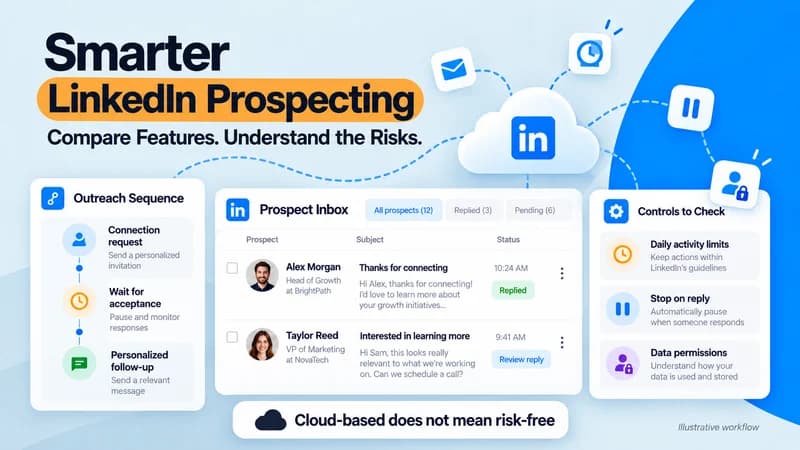
Follow-ups slip when your calendar fills up. Campaigns stop when your laptop sleeps. And every vendor page calls its tool “safe,” so no claim is easy to trust. The short answer: cloud-based tools keep sequences running without your device, but none removes account risk. Compare them on targeting, sequence logic, pacing controls, reply handling, and data practices. Below are the rules to know first, the features worth paying for, the safety settings to check, and a pilot test to run before you commit. Start with the rules, because they shape every safe setup. Know the Rules Before You Automate LinkedIn’s User Agreement prohibits bots and unauthorized automated activity, so every third-party tool carries some account risk. A vendor can reduce that risk through pacing and design, but cannot remove it. Privacy law matters too. Business contacts are still people, and these rules for business-to-business marketing explain when messaging them needs a lawful basis. Under UK data protection law, serious breaches can bring fines of up to £17.5 million or 4% of global annual turnover, whichever is higher. LinkedIn Message Automation: What It Does and What to Automate Managing connection requests, messages, and follow-ups takes time. With LinkedIn message automation, software handles these tasks based on rules you set. It does not pick your audience or write a strong offer for you. Teams use it to automate LinkedIn connection messages and set up automated LinkedIn follow-ups, helping them keep conversations moving after a request is accepted. Good candidates to automate: A short, truthful connection note, or no note A first message after acceptance One or two follow-ups with delays Stop-on-reply logic Keep these human: replies, objection handling, and anything that needs judgment. Cloud-Based vs. Desktop vs. Browser Extension Tools Where the software runs affects reliability and how your activity looks to LinkedIn. Cloud-based LinkedIn automation tools: run on vendor servers, so campaigns continue when your device is off. Ask how the vendor handles IP addresses and sessions. Desktop apps: run on your computer and usually need it on. Browser extensions: run inside your LinkedIn session and typically need the browser open. LinkedIn’s rules cover third-party software and extensions alike. Cloud deployment doesn’t make a tool safe. It only makes steady pacing easier to control. Features That Matter When You Compare Tools LinkedIn reports more than 1.3 billion members, so volume is never your constraint. Targeting is. Compare these features: Lead sourcing: LinkedIn search, Sales Navigator lists, CSV imports, or a built-in database Sequence logic: delays and if/else conditions that branch on acceptance or reply Personalization: variables you can verify, plus AI drafts you can edit Reply handling: a unified inbox, labeling, and stop-on-reply Multichannel flow: LinkedIn and email in one sequence, so the same prospect isn’t contacted twice Team controls: workspaces, permissions, and white-label options Integrations: CRM sync or API access, so replies reach your system of record Skylead, for example, runs LinkedIn messages, InMails, and email in one sequence with if/else conditions. It adds a B2B database, AI enrichment, and an AI SDR for replies. Safety Settings to Compare LinkedIn publishes no single universal message limit, so a tool’s controls matter more than any headline number. Look for: Adjustable daily limits per account A gradual ramp-up for new or inactive profiles Sending windows that match the prospect’s working hours Randomized delays between actions Automatic pause when LinkedIn shows warnings or actions fail Stop-on-reply on every follow-up Clear documentation on how sessions and IPs are handled A practical rule: the pattern to avoid is a sudden jump from no activity to full volume. Steady, gradual increases look far more like normal use. Treat any safety guarantee as a red flag. No vendor controls LinkedIn’s decisions. How Pricing Models Differ Prices change, so compare structure instead of numbers. Check whether you pay per seat, per LinkedIn account, flat for a team, or by usage credits for data and AI. Then ask what is included, such as email sending, enrichment, AI replies, extra accounts, and white-labeling. Model cost at the number of accounts you expect to run in 12 months. Which Setup Fits Your Team The right tool depends on who is sending. Solo founder or small sales team: choose simple 2 to 3 step sequences, warm segments, and strong pacing controls. Recruiting team: prioritize a shared inbox, permissions, and careful handling of candidate data. Agency: look for workspaces, per-client permissions, white-labeling, and pricing that doesn’t grow with every seat. Larger or regulated company: ask for written documentation on data handling before procurement review. The Pilot Test Most Comparisons Skip Feature lists don’t show how a tool behaves under real conditions. Before rolling out to a team, run a small pilot: Pick one warm, well-defined segment, such as people who engaged with a relevant post. Start below the vendor’s suggested limits and raise them gradually while watching acceptance and warnings. Reply to your own test campaign from a second account and confirm the sequence stops. Change one variable at a time, such as the first message or send time. Check export options, so your data can leave with you. Then score each tool from 1 to 5 on stability, control clarity, support response, and data export. Here is an illustrative example, not real results. Tool A scores 5, 4, 4, and 5, for 18 out of 20. Tool B scores 4, 3, 3, and 2, for 12. Tool A wins even if both tools had similar early replies. Data Privacy Rules for US Prospecting US teams face state privacy laws too. If you handle personal information about California residents, California privacy law requirements may apply to how you collect, store, and delete prospect data. Collect only what you need, honor deletion and opt-out requests, and confirm the details with legal counsel. Where to Start Pick one warm segment, shortlist two or three tools, and run one pilot. Confirm the safety controls work before you add volume. If running LinkedIn and email from one sequence is your gap, Skylead’s free trial is an

Exploring Montana MSB Insights and Future Potential Opportunities

Exploring Montana MSB Insights and Future Potential Opportunities

Guest Author

To maximize your experience with this innovative financial tool, familiarize yourself with its intuitive interface, which prioritizes user engagement. Its layout is designed for seamless navigation, enabling immediate access to various functionalities without unnecessary complexity. Take advantage of the real-time analytics functionalities available. These insights allow users to monitor transactions and assess performance metrics, providing a clear picture of financial standing and facilitating informed decision-making. The integration of advanced reporting tools can significantly enhance your ability to manage finances effectively. Consider utilizing the customizable features tailored to meet specific business needs. By adjusting parameters and options, users can align the system with their operational objectives, ensuring a personalized approach to transaction management and client relations. For optimal security, leverage the multi-layered protection protocols in place. This system employs cutting-edge encryption methods and regular security audits to safeguard personal and financial information, instilling confidence in users regarding data integrity. Engagement with available support channels is recommended for troubleshooting and maximizing the platform’s capabilities. Real-time assistance and extensive resource libraries can provide clarity and enhance overall functionality, ensuring users can navigate any challenges confidently. Understanding the User Interface of Montana MSB Begin with the dashboard, which acts as the central hub for navigation within the Montana MSB platform. Familiarize yourself with key sections such as transactions, reports, and user management that are easily accessible from the main menu. Utilize the search functionality for quick access to relevant data; this feature is particularly beneficial during high-traffic periods. Pay attention to customization options available in settings, allowing users to tailor notifications and preferences. Tooltips offer immediate guidance on various features, simplifying the learning curve. Regularly review updates to ensure you maximize the utility of modifications, as user feedback often leads to enhancements in layout and functionality. Integrating Payment Solutions within Montana MSB Choosing suitable payment gateways is critical for streamlined operations. Focus on integrating solutions that support multiple currencies and payment methods. Compatibility with popular options like credit cards, e-wallets, and bank transfers increases accessibility for users globally. API Integration Utilize robust APIs for seamless payment processing. This allows for real-time transaction handling, which enhances user experience and reduces waiting times. Ensure your development team is well-versed in API documentation to facilitate smooth integration. Security measures cannot be overlooked. Implement strong encryption protocols, such as SSL, to protect sensitive data during transactions. Regularly update security features to guard against potential threats and comply with industry standards. User Interface and Experience Design an intuitive user interface for payment processes. Simplifying the steps reduces cart abandonment rates. Consider features like one-click payments or saved payment methods to enhance user satisfaction. Monitoring transaction performance through analytics tools offers valuable insights into customer behavior. Analyze data to identify popular payment methods and adjust strategies accordingly. This ensures resources are allocated efficiently and user preferences are met. Collaboration with payment service providers is beneficial. Establish partnerships with reputable firms to access exclusive rates or services. This can give you an edge in competitive markets and enhance your offerings. Regular testing of payment systems is advisable to ensure compatibility and functionality. Conducting these tests post-integration will help identify any issues before they affect users. Continuous improvements keep the transaction process running smoothly. Security Protocols Implemented in Montana MSB Utilizing advanced encryption standards is critical to securing sensitive financial data. The encryption process converts information into a format that can only be read by authorized entities, thus preventing unauthorized access. Adopting AES-256, which is widely recognized for its robustness, ensures that data remains protected throughout transactions. Multi-Factor Authentication Incorporating multi-factor authentication (MFA) significantly enhances security layers. By requiring users to provide two or more verification factors, such as something they know (password) and something they have (a one-time code sent to their mobile device), the risk of unauthorized access diminishes. This method adds complexity to the login process, deterring potential breaches. Regular security audits are indispensable for identifying vulnerabilities. Conducting these assessments at predetermined intervals allows for timely updates to security protocols, ensuring alignment with current threats. The feedback from audits should inform continuous improvement in protection measures. Real-Time Monitoring Systems Implementing real-time monitoring systems allows for immediate detection of suspicious activities. These systems analyze user interactions and flag anomalies that could indicate fraud or cybersecurity threats. Quick response capabilities to detected issues minimize potential damage and ensure a prompt reaction to incidents. Analyzing Customer Support Options on Montana MSB To enhance user experience, consider utilizing live chat features for immediate assistance. This instant communication facilitates real-time problem resolution and can significantly boost user satisfaction. Support Channels Email Support: Allows for detailed inquiries and documentation. Response times can vary, so users should be prepared for potential delays. Phone Support: Ideal for urgent matters, offering direct contact with support agents. Check operating hours to maximize availability. FAQs: A well-structured FAQ section can address common concerns efficiently. Regular updates are key for accuracy. Evaluating response times is paramount. Generally, live chat offers the quickest turnaround, while email may require a longer wait, typically ranging from a few hours to a couple of days. Additional Resources Knowledge Base: Access to articles and guides can empower users to solve issues independently. Community Forums: Engaging with fellow users fosters knowledge sharing and may lead to quicker solutions. Feedback mechanisms play a vital role in service improvement. Encourage users to rate their support experiences and provide comments to refine offerings over time. Finally, comprehensive training for support staff is essential. Ensuring representatives are knowledgeable about the services and common issues can enhance the efficiency of assistance provided.