
Lead-Gen now on Auto-Pilot withBuild My Campaign
Valasys Media — Empowering marketers with powerful insights

Guest Blog Posts

Corporate Website Design in 2026: Best Practices & Examples

What makes corporate website design effective in 2026? Insights from Halo Lab

Guest Author- November 24, 2026

Prospects, investors, job candidates, and journalists often check a company’s website before they ever speak to anyone there. Within a minute, they decide whether the business looks credible, understandable, and worth contacting. Effective corporate website design turns that first visit into confidence by combining clear positioning, easy navigation, and visible proof of expertise. The principles below draw on Halo Lab’s work on more than 500 projects since 2013, including corporate sites for fintech, HR tech, healthcare, insurance, marketing companies, and other industries. What makes a corporate website effective? Visual polish draws attention, yet a corporate website becomes effective through less visible work: wording, structure, evidence, and technical quality. The following principles cover these layers. Clear messaging and brand identity The homepage headline should state what the company does and for whom in one plain sentence. Visual identity then reinforces that message through consistent color, type, and imagery across every page. Sometimes the gap runs deeper than copy. When Halo Lab worked with Stay, a Munich-based insurance brokerage for expats, the company’s former name, MW Expat, no longer matched the credibility it had built. The rebrand introduced speech-bubble elements as a symbol of open dialogue, and the website carried that motif straight into its hero section. Afterward, visitors could find the right type of coverage faster, and the brand looked the same across the website, client portals, and other channels. A useful check: if the logo were removed, would visitors still recognize the business from its tone and visuals? Simple navigation and user experience Navigation works when the menu mirrors how visitors think about the company rather than how its departments are organized. Five to seven top-level items usually cover the essentials, such as solutions, industries, customers, resources, and company information. Structure comes before screens. Experienced teams draft the sitemap and test it before any page gets designed: a short tree test with people from the target audience shows whether they can find pricing, a relevant case study, or open positions by labels alone. When a page proves hard to find, the wording of its label is often the cause, so renaming usually fixes more than moving items around. It also pays to treat navigation as a system rather than a single menu. The same pattern for product, industry, and company pages keeps the site predictable when new sections appear years after launch. Trust signals and relevant content Corporate buyers look for proof before they request a call. Signals that answer their doubts include: Client logos and case studies with measurable outcomes. Specific figures about scale, such as transaction volume or the number of integrations. Certifications, security standards, and compliance details. Named leadership and clear contact information. Placement matters as much as the proof itself. Teams experienced in website design services tend to put each signal next to the claim it supports: an integration count beside the product overview, a security badge beside the contact form, a short case result beside the related service. Proof gathered on a single About page rarely reaches visitors at the moment their doubts appear. Mobile experience, speed, and accessibility Many first visits happen on a phone, often after a link in an email or a LinkedIn post. A layout that works on small screens, loads fast, and stays readable for people with visual or motor impairments keeps those visitors from leaving early. Several benchmarks, three of them from Core Web Vitals, make these goals measurable: Largest Contentful Paint within 2.5 seconds, so the main content appears quickly. Interaction to Next Paint under 200 milliseconds. Taps and clicks get a fast response. Cumulative Layout Shift below 0.1, so elements stay in place while the page loads. Compliance with WCAG 2.2, covering contrast, keyboard navigation, and alt text. Animation needs special care on mobile. A practical rule is to keep the motion that orients visitors, such as a page-load effect or a menu transition, and drop decorative effects that make small screens heavier. Testing on a mid-range Android phone over a throttled connection, rather than on the team’s latest devices, shows how the site behaves for a large share of real visitors. That balance is typical of thoughtful corporate web design. Corporate website design ideas and examples No single visual style suits every company, so the right direction depends on the audience, the market, and how competitors already look. The corporate website examples below show approaches and the situations where each pays off. Minimalist and clean design Minimalism relies on generous white space, a restrained palette, and few elements per screen. It suits enterprise software, consulting, and financial services, where buyers value clarity and calm over spectacle. The business benefit lies in focus: with less competition for attention, the value proposition and calls to action stand out. Minimalism also demands discipline in the details, because flaws that a busy layout hides become obvious on an empty screen. Consistent spacing, a strict type scale of three or four sizes, and high-quality photography carry the visual weight that decoration would otherwise provide. The main risk is sameness. When most competitors use similar airy templates, minimalism stops setting a company apart, and a stronger visual voice becomes worth considering. Bold typography and visual identity Large, expressive types and strong accent colors help a company stand out in a crowded category. This approach fits creative agencies, consumer-facing brands, and challengers entering a market dominated by look-alike sites. Stone, a brand strategy studio from Colorado, faced exactly that problem. Before designing anything, Halo Lab’s team spent two days analyzing four competitors and found that most relied on minimalist layouts built around case-study imagery. To break from that pattern, the designers replaced Stone’s black-and-white palette with red accents for calls to action and paired a tall condensed headline font with the Neue Plak grotesque for body text. They also built an unusual grid that highlights key data, introduced a stone-shaped graphic language, and added transitions in which media shrinks into the text on scroll. Within three months, Stone received a launch-ready site


How to Track AI Video Assets Across B2B Campaigns

Guest Author- November 23, 2026

A video called warehouse-final.mp4 appears in a paid-social campaign, a webinar email and a landing page. Two weeks later, someone changes its opening caption and uploads another file under the same name. The campaign report still says “warehouse video,” but nobody can tell which version each placement used. The missing piece is a shared identity record. B2B campaign tracking needs a way to connect the exact creative file with its distribution records and the fields collected in reporting. Folder names alone cannot maintain that connection. Start with a small registry: stable campaign IDs, immutable creative-version IDs, and a deployment table describing where each version is used. The example below applies that structure to an illustrative warehouse-technology campaign. Give campaigns and creative versions different IDs Use campaign_id for the marketing initiative, such as cmp-042 for a warehouse-demo campaign. Its name, owner and dates belong in the campaign record. A wording change should not silently create a new campaign identity. Use creative_id for an exact, tracked creative version. In this schema, cr-017-v01 and cr-017-v02 identify different delivery files. A changed caption, crop or ending creates a new version record. Renaming an unchanged file does not. These are internal IDs. Keep native advertising-platform IDs in separate fields, including the platform and account that issued them. An internal initiative can span several platform campaigns, and a platform’s creative ID is not automatically the same as the team’s creative-version ID. Store identifiers as text so spreadsheet formatting does not remove leading zeros or alter long numeric values. Record each deployment separately A creative can appear in more than one campaign. Give each use a deployment_id that connects the campaign, creative, channel and destination. The following rows illustrate planned placements, not live delivery. Deployment Campaign Creative Channel Destination dep-001 cmp-042 cr-017-v01 LinkedIn paid social Demo page dep-002 cmp-042 cr-017-v02 LinkedIn paid social Demo page dep-003 cmp-043 cr-017-v02 Newsletter Webinar page Version two appears twice, so the table contains three deployments but only two unique creatives. A report that counts rows as assets would overstate production volume. Add the native campaign and ad IDs when those placements are created. Keep the asset location, destination identifier, tracking values and deployment status alongside them. Reuse creates another deployment row; it does not require another creative ID unless the file changes. Register the video exports as they are produced The warehouse example uses a scanner product clip generated in Astorie. The supplied video is 1280 x 720 pixels, runs at 24 frames per second and lasts about 5.04 seconds. Two captioned versions were prepared from that one source clip in postproduction. The first export was registered as cr-017-v01; its revision became cr-017-v02. Their opening captions read “Warehouse workflow preview” and “Connected warehouse workflow preview.” Both files retain the source dimensions and duration. Matching filenames, such as cr-017-v01__16x9.mp4, connect each export to its registry row. Store generation settings when the source is produced, along with file metadata and a SHA-256 checksum. Maintain the IDs in the registry rather than assuming the generation tool assigns them. A brief change log records the difference: “v02 replaces the opening caption; source footage unchanged.” The exported files have different checksums despite sharing the same source. This identifies the revision without turning the asset record into a creative review. Figure 1. Matched frame excerpts at 0.50 seconds. The caption revision creates a new creative version; these are production examples, not live campaign results. Keep released files immutable. If a new export arrives with an existing creative ID but a different checksum, investigate before replacing the stored asset. If two differently named files have the same checksum, they contain identical bytes and may be duplicate copies. A checksum identifies file contents, not the campaign purpose or visual meaning. Carry the registry keys into manual tracking links For manually tagged placements, define a consistent mapping between registry fields and UTM parameters: Parameter Example value Purpose utm_id cmp-042 Internal campaign identifier utm_campaign warehouse_demo Readable campaign name utm_source linkedin Traffic source utm_medium paid_social Channel classification utm_source_platform linkedin Sending or buying platform utm_content cr-017-v02 Tracked creative version Use the same convention wherever links are built. UTM values are case-sensitive, so warehouse_demo and Warehouse_Demo should not become accidental aliases for one initiative. Generate tracking values from the deployment record rather than retyping them in each platform. Check that any dynamic parameters expand into the intended values. For campaigns using auto-tagging, inspect the platform-specific and manual reporting fields separately; manually adding UTMs does not mean every traffic-source field will use them. The parameters describe the click’s campaign context. They do not attach a checksum to the video, identify a viewer who never clicks, or automatically populate a CRM record. Those connections require their own instrumentation and field mapping. Check naming collisions and lost parameters When two exports share a filename, compare their creative IDs, checksums and change-log entries. Rename the files around their registered IDs and update the deployment records. Sorting by upload date cannot establish which file a running placement uses. Test tracking links through the complete redirect path. A valid starting address can still reach a landing page with its query string missing. A controlled local HTTP check for this workflow exercised three paths: Figure 2. Actual local redirect checks. All six UTM fields arrived on the forwarding path, none on the dropping path, and all six after repair. The check establishes URL transport in the local fixture. Production redirects and analytics collection still need to be tested in their own environment. Compare the generated link, redirect destination and landing request to locate the first loss. If all six values arrive but the report remains empty, inspect collection, filters, reporting delay and the dimensions selected. Rebuilding the creative file will not repair a tracking failure. Join reports at the level the data supports For manually tagged sessions in GA4, inspect Session manual campaign ID and Session manual ad content. Match those values to the campaign and creative registry, together with the relevant source and medium. Check that the lookup keys resolve to one defined creative record. Native ad-delivery data

What B2B Marketers Can Learn From Real Estate About Speed to Lead

What B2B Marketers Can Learn From Real Estate About Speed to Lead

Guest Author- November 23, 2026

B2B marketers spend heavily to generate demand: content, paid media, events and intent data. Yet one of the biggest drivers of conversion is often treated as a sales-ops detail: how quickly someone actually responds when a prospect raises their hand. Few industries feel this more sharply than US residential real estate. A buyer who submits an inquiry on a listing at 9pm is often contacting several agents at once, and research from Zillow published in December 2025 found that 47% of buyers hired the first agent they spoke with. That pressure has pushed real estate teams to rethink lead response from the ground up. Here are five lessons B2B marketers can borrow. 1. Measure response time like a funnel metric Most B2B dashboards track MQLs, SQLs, pipeline and win rates. Far fewer track time from form fill to first human conversation, broken down by source. The best real estate teams treat response time as a core KPI. They measure the median and the slowest 10% of responses, separate business hours from evenings and weekends, and compare close rates across response-time buckets: under five minutes, under an hour, same day and later. Building the same view in B2B is straightforward with CRM timestamps. It often reveals that a large share of inbound demo requests wait hours, especially when they arrive late in the day, on Fridays or across time zones. Industry benchmarks, such as these lead response time statistics, are useful for context, but your own data is what will convince sales leadership. 2. Cover the hours when buyers actually research Real estate leads cluster in evenings and weekends, when buyers have time to browse. Teams that only respond during office hours leave their most engaged prospects waiting. B2B buyers behave similarly. Decision-makers research vendors between meetings, after hours and across time zones. A prospect in California who submits a demo request at 4pm local time may be hitting an East Coast team’s inbox after hours. Real estate teams solved this with on-call rotations and, increasingly, AI assistants that make the first contact instantly. B2B teams can apply the same principle: guarantee a meaningful first response at any hour, even if a human takes over the next morning. 3. Make the first touch a conversation, not an acknowledgement An automated “Thanks, someone will be in touch” email technically responds in seconds, but it does not start a conversation. Real estate teams learned that instant auto-texts help, but the teams that win are the ones that actually talk to the buyer quickly, confirm what they want and book a next step. For B2B, that might mean letting prospects book a meeting instantly on the confirmation page, routing high-intent leads straight to an available rep, or using conversational tools that qualify and schedule in real time. 4. Route by intent, not just by territory Not every lead deserves the same urgency. Real estate teams prioritise buyers who are pre-approved, have a short timeline or asked about a specific property. Those leads get the fastest, most senior response. B2B marketers already have richer signals: intent data, firmographics, pages viewed and engagement history. The lesson is to use them in routing, not just in reporting. A demo request from an account that has been researching your category all week should not sit in a round-robin queue behind a student downloading an ebook. 5. Hand off with full context In real estate, nothing frustrates a buyer more than repeating the same answers to an assistant and then an agent. The best teams make sure the agent sees a summary of every earlier conversation before calling. B2B handoffs suffer from the same problem. When an SDR qualifies a lead and passes it to an account executive, the prospect should never be asked the same discovery questions twice. Notes, call recordings and intent signals should travel with the lead in the CRM. Where AI fits Real estate has become an early testing ground for AI in lead response. Voice AI assistants now call new property inquiries within a minute, ask a few qualifying questions, book appointments and write a summary into the CRM. Companies such as Mergro build exactly this for US real estate teams. The broader lesson for B2B is not to copy the tool, but the principle: let automation guarantee speed and consistency on the first touch, and let people focus on conversations that need judgement. Takeaway Demand generation does not end at the form fill. Real estate teams have shown that the minutes after a prospect raises their hand often matter as much as the campaign that brought them in. B2B marketers who measure response time, cover after-hours demand, route by intent and hand off with context will turn more of their pipeline into revenue.

Managed IT help desk services_ A smarter approach to business IT support

Managed IT help desk services: A smarter approach to business IT support

Guest Author- November 23, 2026

Technology has become an integral part of most businesses today, bringing significant improvements across all areas, from routine tasks to complex processes, and making daily operations run more efficiently. But the obvious benefits that digital technologies provide come at the cost of increasing complexity. The more tech tools and systems companies integrate into their workflows, the harder it becomes for IT teams to keep all these tech components safe and functional, so they can deliver the expected results.  When managing tech ecosystems and the issues and challenges that inevitably arise becomes too much for your company to handle, you can either hire more staff and invest in training your in-house team, or you can switch your approach and resort to managed IT help desk services instead.  IT help desk outsourcing can be a more advantageous choice for various reasons that we’re going to discuss below.  Managed IT help desk services explained  Managed IT help desk is a type of outsourced service where a third-party company provides ongoing tech support for businesses and handles a variety of IT-related issues and requirements. These services can complement the efforts of internal teams and fill in the gaps when there’s a lack of specialized skills, or they can replace them altogether.  The concept is simple: when the company that has contracted the service encounters an issue or requires tech assistance, they can contact the managed service provider (MSP) via phone, live chat, or email, offering details about the situation they’re dealing with. The help desk technicians will offer prompt guidance and step in to fix the problem. If the issue they have to address is more complicated, they will immediately get in touch with senior engineers who have the necessary expertise.  Working with an MSP usually involves remote collaboration as the contracted specialists handle most tasks from their own quarters, only traveling to clients’ locations when hardware fixes are necessary.  Most managed IT help desk services operate under a subscription-based model, where you have to pay a recurring monthly fee, depending on your company’s specific support needs and the package you opt for. The services included vary from one provider to another, but they typically cover the following:  Troubleshooting – Diagnosing and fixing basic issues, such as log-in problems, application errors, or faulty hardware, across a company’s tech infrastructure  Ticket management – Keeping track of issues and requests, organizing and routing them in the order of their importance  Software installation and access – Setting up tech tools and programs, tracking licenses, managing permissions and passwords   User onboarding – Integrating new employees into the company’s IT systems  Escalation – Redirecting complex network, software, and hardware issues that require expert intervention to specialized engineers  The advantages of outsourcing IT support   Partnering with an external IT support company instead of maintaining an internal team comes with various advantages. Options like FlairsTech managed IT help desk services can make a significant difference in terms of budgeting, support availability, resource access, scalability, and security.  Between hiring and training staff, paying monthly salaries, and investing in software and other tech products, maintaining an in-house IT support team can be rather costly. With a managed IT help desk, on the other hand, you only need to pay a predictable monthly fee, and you can also adjust the level of support you receive depending on how your business’ IT needs evolve over time.  The flexibility that outsourcing provides means that you can benefit from a tailored support plan that aligns with your company’s requirements, and you won’t ever have to spend money on things you don’t actually use, which can lead to considerable savings in the long run.  It’s also helpful and reassuring to be able to contact the help desk at every hour of the day and night, especially if your business operates internationally, and not be limited to standard business hours, which is usually the case with in-house teams. This ensures problems are fixed right away and reduces the risk of downtime considerably.  Having immediate access to a team of certified IT experts and advanced tech tools is another advantage that managed IT services offer. By contrast, internal teams often fall short in terms of skills and resources, as most companies cannot afford to keep a large number of specialists or invest in the latest technologies, two areas where MSPs excel.  Security is an aspect that managed IT support can help with as well. Having a team of dedicated tech professionals monitor company systems around the clock and proactively address vulnerabilities and issues before they escalate into something bigger leads to a stronger and safer tech infrastructure.  Ultimately, letting a third-party provider handle IT support can free up in-house teams, allowing them to handle more complex aspects related to strategic development rather than wasting time resetting passwords and debugging software.  Choosing a managed IT help desk service that is right for you  Outsourcing IT support makes sense when you want to cut back on costs and ensure your tech systems stay safe and efficient in the long run. But how do you go about choosing a service that is right for your business?   First of all, you need to figure out what support model works best for you. Consider your company’s tech needs and decide whether you’d benefit more from letting an MSP handle all your support requirements, or if it would be best to maintain a hybrid arrangement where you split tasks between your internal team and an external partner.  Make sure you evaluate the services that providers claim to offer thoroughly, and pay particular attention to how they handle after-hours calls and emergencies, as well as their Service Level Agreement (SLA) and the guidelines they follow for managing services.  If they offer demos for their tools or pilot programs, take advantage of them before you enter a partnership.  As your business grows and your tech ecosystem expands with it, switching to managed IT help desk services can prove a smart move, helping you navigate challenges with ease

Facing Construction Delays? Experienced Lawyers Help Address Contractual Disagreements Effectively

Facing Construction Delays? Experienced Lawyers Help Address Contractual Disagreements Effectively

Guest Author- November 20, 2026

Most delay disputes are lost on paper, before any hearing. A single missed notice can sink an otherwise strong claim. When schedules slip, both sides reach for the contract. A seasoned construction attorney treats that document as a recovery map. Clauses on extensions, damages and dispute procedure each carry weight. Excusable delays, notice rules and shared fault all shape outcomes. So does choosing the right forum for resolution. Field records, written months earlier, can carry the decisive proof. Paperwork, in short, decides who absorbs the cost of lost time. Delay Claims Start With Contract Wording Each agreement allocates the risk of lost time differently. Some grant extra days without extra money; others allow both. Liquidated damages clauses set a fixed daily charge for late completion. A lawyer studies these terms before anyone files a claim. That early review can reveal leverage a site team overlooks. Which Setbacks Justify a Time Extension? Not every holdup earns extra days. Courts and arbitrators separate excusable events from contractor-caused ones. Recognized grounds for relief include: Owner-directed design changes alter the original scope of work. Unforeseen site conditions differ sharply from the bid documents. Severe weather exceeds the averages the contract anticipated. Late owner approvals halt crews waiting on decisions. Missed Notice Deadlines Destroy Valid Claims Here, timing matters more than merit. Standard forms demand written notice shortly after a delay begins. Courts enforce those windows strictly, even against legitimate claims. A construction attorney builds a notice calendar at project kickoff. Each letter then cites the clause, cause and expected impact. Such discipline turns routine correspondence into admissible evidence. What If Both Parties Caused the Slippage? Concurrent delay is where disputes turn technical. Picture an owner releasing drawings late while crews sit short-staffed. Neither side can pin the whole period elsewhere. Experts run critical path analysis against the baseline schedule. Superintendent daily logs supply the raw evidence for that analysis. Counsel then apportions responsibility one day at a time. Why Try Mediation Before Filing Suit? Litigation can outlast the project it concerns. Mediation brings a quicker, confidential route: Work continues while talks proceed. Costs stay far below trial. Business relationships survive the dispute. Parties control the final terms. If talks collapse, arbitration remains available. Many contracts mandate this stepped sequence. A neutral mediator tests each side’s numbers privately. The Superintendent’s Logbook Settles More Disputes Delay disputes look like legal battles from the outside. In practice, the superintendent’s daily log decides most of them. Critical path experts and polished briefs rest on those entries. A crew count noted at dawn can outweigh testimony. Lawyers can argue only what someone recorded at the time. Sloppy logs leave sharp advocates with little to prove. So real protection begins long before counsel enters the room. FAQs When should a contractor contact a lawyer about delays? Before signing is best, while risky clauses remain negotiable. At minimum, call once the first schedule slip surfaces. Prompt advice protects notice rights with short expiry windows, and waiting costs leverage. Can an owner recover money for late completion? Yes, through liquidated damages or proven actual losses. The contract decides which route applies. Excused delays can reduce those charges, and penalty-style amounts may face court challenge. Does a no-damages-for-delay clause bar all compensation? Such a clause does not settle every case. Courts recognize exceptions for active interference or bad faith. Enforceability shifts between jurisdictions, making legal review essential before conceding anything. How long does a delay dispute take to resolve? Mediation can conclude in a few weeks of focused sessions. Arbitration and litigation can stretch across months or years. Schedule complexity and expert involvement drive that timeline.

Cloud-Based LinkedIn Prospecting Tools_ Features and Safety Compared

Cloud-Based LinkedIn Prospecting Tools: Features and Safety Compared

Guest Author- November 20, 2026

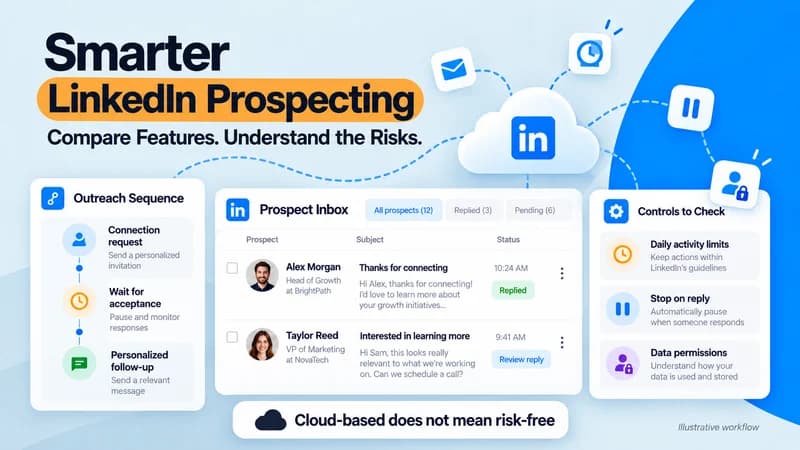
Follow-ups slip when your calendar fills up. Campaigns stop when your laptop sleeps. And every vendor page calls its tool “safe,” so no claim is easy to trust. The short answer: cloud-based tools keep sequences running without your device, but none removes account risk. Compare them on targeting, sequence logic, pacing controls, reply handling, and data practices. Below are the rules to know first, the features worth paying for, the safety settings to check, and a pilot test to run before you commit. Start with the rules, because they shape every safe setup. Know the Rules Before You Automate LinkedIn’s User Agreement prohibits bots and unauthorized automated activity, so every third-party tool carries some account risk. A vendor can reduce that risk through pacing and design, but cannot remove it. Privacy law matters too. Business contacts are still people, and these rules for business-to-business marketing explain when messaging them needs a lawful basis. Under UK data protection law, serious breaches can bring fines of up to £17.5 million or 4% of global annual turnover, whichever is higher. LinkedIn Message Automation: What It Does and What to Automate Managing connection requests, messages, and follow-ups takes time. With LinkedIn message automation, software handles these tasks based on rules you set. It does not pick your audience or write a strong offer for you. Teams use it to automate LinkedIn connection messages and set up automated LinkedIn follow-ups, helping them keep conversations moving after a request is accepted. Good candidates to automate: A short, truthful connection note, or no note A first message after acceptance One or two follow-ups with delays Stop-on-reply logic Keep these human: replies, objection handling, and anything that needs judgment. Cloud-Based vs. Desktop vs. Browser Extension Tools Where the software runs affects reliability and how your activity looks to LinkedIn. Cloud-based LinkedIn automation tools: run on vendor servers, so campaigns continue when your device is off. Ask how the vendor handles IP addresses and sessions. Desktop apps: run on your computer and usually need it on. Browser extensions: run inside your LinkedIn session and typically need the browser open. LinkedIn’s rules cover third-party software and extensions alike. Cloud deployment doesn’t make a tool safe. It only makes steady pacing easier to control. Features That Matter When You Compare Tools LinkedIn reports more than 1.3 billion members, so volume is never your constraint. Targeting is. Compare these features: Lead sourcing: LinkedIn search, Sales Navigator lists, CSV imports, or a built-in database Sequence logic: delays and if/else conditions that branch on acceptance or reply Personalization: variables you can verify, plus AI drafts you can edit Reply handling: a unified inbox, labeling, and stop-on-reply Multichannel flow: LinkedIn and email in one sequence, so the same prospect isn’t contacted twice Team controls: workspaces, permissions, and white-label options Integrations: CRM sync or API access, so replies reach your system of record Skylead, for example, runs LinkedIn messages, InMails, and email in one sequence with if/else conditions. It adds a B2B database, AI enrichment, and an AI SDR for replies. Safety Settings to Compare LinkedIn publishes no single universal message limit, so a tool’s controls matter more than any headline number. Look for: Adjustable daily limits per account A gradual ramp-up for new or inactive profiles Sending windows that match the prospect’s working hours Randomized delays between actions Automatic pause when LinkedIn shows warnings or actions fail Stop-on-reply on every follow-up Clear documentation on how sessions and IPs are handled A practical rule: the pattern to avoid is a sudden jump from no activity to full volume. Steady, gradual increases look far more like normal use. Treat any safety guarantee as a red flag. No vendor controls LinkedIn’s decisions. How Pricing Models Differ Prices change, so compare structure instead of numbers. Check whether you pay per seat, per LinkedIn account, flat for a team, or by usage credits for data and AI. Then ask what is included, such as email sending, enrichment, AI replies, extra accounts, and white-labeling. Model cost at the number of accounts you expect to run in 12 months. Which Setup Fits Your Team The right tool depends on who is sending. Solo founder or small sales team: choose simple 2 to 3 step sequences, warm segments, and strong pacing controls. Recruiting team: prioritize a shared inbox, permissions, and careful handling of candidate data. Agency: look for workspaces, per-client permissions, white-labeling, and pricing that doesn’t grow with every seat. Larger or regulated company: ask for written documentation on data handling before procurement review. The Pilot Test Most Comparisons Skip Feature lists don’t show how a tool behaves under real conditions. Before rolling out to a team, run a small pilot: Pick one warm, well-defined segment, such as people who engaged with a relevant post. Start below the vendor’s suggested limits and raise them gradually while watching acceptance and warnings. Reply to your own test campaign from a second account and confirm the sequence stops. Change one variable at a time, such as the first message or send time. Check export options, so your data can leave with you. Then score each tool from 1 to 5 on stability, control clarity, support response, and data export. Here is an illustrative example, not real results. Tool A scores 5, 4, 4, and 5, for 18 out of 20. Tool B scores 4, 3, 3, and 2, for 12. Tool A wins even if both tools had similar early replies. Data Privacy Rules for US Prospecting US teams face state privacy laws too. If you handle personal information about California residents, California privacy law requirements may apply to how you collect, store, and delete prospect data. Collect only what you need, honor deletion and opt-out requests, and confirm the details with legal counsel. Where to Start Pick one warm segment, shortlist two or three tools, and run one pilot. Confirm the safety controls work before you add volume. If running LinkedIn and email from one sequence is your gap, Skylead’s free trial is an

Exploring Montana MSB Insights and Future Potential Opportunities

Exploring Montana MSB Insights and Future Potential Opportunities

Guest Author- November 20, 2026

To maximize your experience with this innovative financial tool, familiarize yourself with its intuitive interface, which prioritizes user engagement. Its layout is designed for seamless navigation, enabling immediate access to various functionalities without unnecessary complexity. Take advantage of the real-time analytics functionalities available. These insights allow users to monitor transactions and assess performance metrics, providing a clear picture of financial standing and facilitating informed decision-making. The integration of advanced reporting tools can significantly enhance your ability to manage finances effectively. Consider utilizing the customizable features tailored to meet specific business needs. By adjusting parameters and options, users can align the system with their operational objectives, ensuring a personalized approach to transaction management and client relations. For optimal security, leverage the multi-layered protection protocols in place. This system employs cutting-edge encryption methods and regular security audits to safeguard personal and financial information, instilling confidence in users regarding data integrity. Engagement with available support channels is recommended for troubleshooting and maximizing the platform’s capabilities. Real-time assistance and extensive resource libraries can provide clarity and enhance overall functionality, ensuring users can navigate any challenges confidently. Understanding the User Interface of Montana MSB Begin with the dashboard, which acts as the central hub for navigation within the Montana MSB platform. Familiarize yourself with key sections such as transactions, reports, and user management that are easily accessible from the main menu. Utilize the search functionality for quick access to relevant data; this feature is particularly beneficial during high-traffic periods. Pay attention to customization options available in settings, allowing users to tailor notifications and preferences. Tooltips offer immediate guidance on various features, simplifying the learning curve. Regularly review updates to ensure you maximize the utility of modifications, as user feedback often leads to enhancements in layout and functionality. Integrating Payment Solutions within Montana MSB Choosing suitable payment gateways is critical for streamlined operations. Focus on integrating solutions that support multiple currencies and payment methods. Compatibility with popular options like credit cards, e-wallets, and bank transfers increases accessibility for users globally. API Integration Utilize robust APIs for seamless payment processing. This allows for real-time transaction handling, which enhances user experience and reduces waiting times. Ensure your development team is well-versed in API documentation to facilitate smooth integration. Security measures cannot be overlooked. Implement strong encryption protocols, such as SSL, to protect sensitive data during transactions. Regularly update security features to guard against potential threats and comply with industry standards. User Interface and Experience Design an intuitive user interface for payment processes. Simplifying the steps reduces cart abandonment rates. Consider features like one-click payments or saved payment methods to enhance user satisfaction. Monitoring transaction performance through analytics tools offers valuable insights into customer behavior. Analyze data to identify popular payment methods and adjust strategies accordingly. This ensures resources are allocated efficiently and user preferences are met. Collaboration with payment service providers is beneficial. Establish partnerships with reputable firms to access exclusive rates or services. This can give you an edge in competitive markets and enhance your offerings. Regular testing of payment systems is advisable to ensure compatibility and functionality. Conducting these tests post-integration will help identify any issues before they affect users. Continuous improvements keep the transaction process running smoothly. Security Protocols Implemented in Montana MSB Utilizing advanced encryption standards is critical to securing sensitive financial data. The encryption process converts information into a format that can only be read by authorized entities, thus preventing unauthorized access. Adopting AES-256, which is widely recognized for its robustness, ensures that data remains protected throughout transactions. Multi-Factor Authentication Incorporating multi-factor authentication (MFA) significantly enhances security layers. By requiring users to provide two or more verification factors, such as something they know (password) and something they have (a one-time code sent to their mobile device), the risk of unauthorized access diminishes. This method adds complexity to the login process, deterring potential breaches. Regular security audits are indispensable for identifying vulnerabilities. Conducting these assessments at predetermined intervals allows for timely updates to security protocols, ensuring alignment with current threats. The feedback from audits should inform continuous improvement in protection measures. Real-Time Monitoring Systems Implementing real-time monitoring systems allows for immediate detection of suspicious activities. These systems analyze user interactions and flag anomalies that could indicate fraud or cybersecurity threats. Quick response capabilities to detected issues minimize potential damage and ensure a prompt reaction to incidents. Analyzing Customer Support Options on Montana MSB To enhance user experience, consider utilizing live chat features for immediate assistance. This instant communication facilitates real-time problem resolution and can significantly boost user satisfaction. Support Channels Email Support: Allows for detailed inquiries and documentation. Response times can vary, so users should be prepared for potential delays. Phone Support: Ideal for urgent matters, offering direct contact with support agents. Check operating hours to maximize availability. FAQs: A well-structured FAQ section can address common concerns efficiently. Regular updates are key for accuracy. Evaluating response times is paramount. Generally, live chat offers the quickest turnaround, while email may require a longer wait, typically ranging from a few hours to a couple of days. Additional Resources Knowledge Base: Access to articles and guides can empower users to solve issues independently. Community Forums: Engaging with fellow users fosters knowledge sharing and may lead to quicker solutions. Feedback mechanisms play a vital role in service improvement. Encourage users to rate their support experiences and provide comments to refine offerings over time. Finally, comprehensive training for support staff is essential. Ensuring representatives are knowledgeable about the services and common issues can enhance the efficiency of assistance provided.

How to Choose the Right Team Management Software for Your Marketing Department

How to Choose the Right Team Management Software for Your Marketing Department

Guest Author- November 20, 2026

At 10 a.m., the marketing manager discovers that the social media campaign is behind schedule, the designer is waiting for feedback, and two employees have somehow been assigned the same task. Meanwhile, someone has sent a message asking for an update on a project nobody remembers discussing. It’s going brilliantly. Marketing departments move quickly. Campaigns change, priorities shift, creative requests pile up, and several people may be working toward the same deadline without sharing the same information. When responsibilities aren’t clear, even a capable team can lose hours sorting out confusion instead of getting meaningful work done. That’s where team management software can help. The right platform gives managers a clearer view of assignments, workloads, schedules, and progress. More importantly, it gives employees a shared system for understanding what needs to happen next. Choosing the right one takes a little more thought than picking the platform with the prettiest dashboard. Start With the Problems Nobody Has Time to Fix Before browsing software options, identify the issues slowing your department down. Perhaps managers spend too much time asking employees for progress updates. Are designers being pulled in several directions by multiple departments asking them to do something quickly? Or are you struggling to keep up with the ever-changing editorial deadlines? Or is it simply a case of not knowing who is responsible for what? Depending on the issues you’re facing. Your small marketing team might just need to assign tasks, share calendars and have deadlines. A larger department coordinating content, design, advertising, and external contractors may need more detailed workload management and reporting capabilities. Talk to employees as well as managers. The people doing the daily work often know exactly where the process breaks down. And they may have a few opinions about it. Look Past the Task List A basic task manager can show who has an assignment and when it is due. That’s useful, but it doesn’t necessarily tell a manager whether the workload is reasonable or whether the department has enough capacity to meet its commitments. Good team management software should make it easier to understand how work is distributed and how responsibilities connect. Consider these capabilities: Workload visibility: This helps managers to see if workloads are distributed evenly across your team and to identify any who are taking on too much. Clear task ownership: Identifies who is responsible for carrying out tasks. Scheduling tools: Helps you organise regular tasks, project deadlines, and when your employees are available. Progress and performance tracking: Provides managers with an overview of what has been achieved and what could require more attention. Imagine you have a marketing team working on a new product launch. The content writer has finished the copy for your campaign. However, your designer has 3 other urgent tasks to complete. With visibility of what everyone is working on, your manager will be able to identify where there is a bottleneck and change priorities to avoid causing delays to your launch schedule. That’s the kind of visibility worth paying for. More Features Don’t Automatically Mean Better Management Software demonstrations have a way of making every feature look essential. Automated workflows, custom dashboards, advanced reporting, endless integrations. It can all sound wonderful. Until employees have to use it. A platform that is difficult to understand may create more administrative work than it removes. If employees need several steps to update a simple task, they may stop keeping the system current. Once that happens, managers are back to chasing information through messages and meetings. Look for software that accommodates different working styles without becoming unnecessarily complicated. Marketing teams may need separate processes for editorial planning, creative production, campaign coordination, and routine administrative work. Customizable workflows, flexible reporting, straightforward navigation, and practical permission settings can make a significant difference. The best feature is sometimes the one people don’t need instructions to use. Manage Employee Growth, Not Just Deadlines Marketing managers naturally focus on getting projects completed. Deadlines are visible, campaign results are measurable, and unfinished work has a habit of attracting attention. But employee development deserves a place in the management process, too. Everyone will have varying strengths. Perhaps one member has great strength in editorial planning, whilst another may be great at research, design management or campaign analysis. Knowing what each member can do well will help you to delegate tasks better and will help you identify areas of development. You may also find that tracking goals and completed tasks can highlight patterns. If one member consistently receives high priority tasks, they could benefit from having more of a balanced workload. If one member is consistently good at something, they may be ready for more responsibility. A team is made up of people, after all. Treating everyone as a row in a spreadsheet misses the point. Don’t Ignore Security, Growth, or the Actual Cost Whilst your software may be right for you now, you want to ensure that it can scale as your department grows. Consider how adding more staff, contractors, projects and tasks will affect your system. Security should also be considered. Your marketing teams may be storing campaign plans, internal documents, customer information and other sensitive business information within their management system. Check to see what security options are available, what user permissions can be set and what data protection information the provider has. Consider the costs carefully. Whilst you may be paying a certain amount per month, there may be extra costs for adding more users, setup, integrations and extra features. A platform that initially appears inexpensive may become less attractive once the department needs its essential capabilities. A little comparison now can prevent an expensive headache later. Test the Platform With Real Work A polished presentation is not proof that software will work in your department. Let employees try out some standard tasks on the platform. Do they understand what they need to do? Can managers easily see how work is spread across the team? Can you easily update and view what matters? Ask your employees

Gaming Ad Spend Hit $25 Billion and Attention Became the Bottleneck

Gaming Ad Spend Hit $25 Billion and Attention Became the Bottleneck

Guest Author- November 19, 2026

Mobile game companies spent about $25 billion on user acquisition in 2025, according to the State of Gaming for Marketers report that the attribution company AppsFlyer published in January, which put the increase over 2024 at 3.8%. Installs that publishers paid for rose by roughly a tenth over the year, while the ads they ran were seen about a fifth more often. According to the report, the largest game advertisers each produced between 2,400 and 2,600 versions of their ads per quarter in 2025. Part of this work is done by outside art studios, and Innovecs Games lists key art, store screenshots, social media visuals and motion graphics for ads among the services on its game marketing art page. Where the $25 billion was spent in 2025 About 35% of the money came from publishers based in China, whose spending on Android rose by 29% in 2025 and on iOS by 10%, according to AppsFlyer. The report also found that 57% of paid game installs worldwide were on Android devices, a share that AppsFlyer linked to lower costs in markets outside the West. Spending fell by about 5% in the United States, which still accounts for close to half of the total, and rose by 29% in Turkey and by 19% in India. Publishers based in China increased their share of global spend by 22% over the year. Year Paid installs Ad impressions 2024 100 100 2025 110 120 On iOS, paid installs made up 44% of all game installs in 2025, AppsFlyer said, while the rest came from people who found a game in the App Store, through friends or in some other way without clicking on an ad. Paid installs by genre in 2025 Purchases inside games were still concentrated in Western markets, which produced 55% of in-app purchase revenue on Android and 66% on iOS in 2025, and the United States alone produced about 45% of the iOS total, according to AppsFlyer. According to AppsFlyer, casual games took more than half of all acquisition budgets in 2025, and their Android spending fell by 7%. Hypercasual publishers bought 81% of their Android installs and 67% of their iOS installs, according to the report. Hypercasual games cut iOS spending by 14% On iOS, spending on hypercasual games fell by 14%, while the genre kept growing on Android, where an install costs less. On Android the share of casual game installs that were bought through ads went up by 18%, while the amount casual publishers spent there dropped by 7%. Brazil and Mexico were among the fastest growing markets for paid installs in 2025, according to AppsFlyer, with most of the growth on Android. AppsFlyer linked that growth to games that earn money both from in-app purchases and from ads shown to their players. Midcore games on iOS Midcore games, a group that includes strategy and role playing titles, grew strongly on iOS, where their acquisition budgets rose by 26% and the share of their installs that came from paid ads grew by more than 30%. Players of these games spend more money over time than casual players, so publishers can afford to pay more for each install. Publishers of midcore games have found it harder to reach these players on iPhones since April 2021, when iOS 14.5 began asking users whether each app could track them across other companies’ apps and websites. Flurry Analytics, then owned by Verizon, reported in May 2021 that 96% of users in the United States had said no, and Meta told investors in February 2022 that the change would cost it about $10 billion in revenue that year. What business to business advertisers can take from the games market LinkedIn, where many B2B companies buy much of their advertising, says it has more than one billion members in over 200 countries and territories. Those members are also among the people who saw 20% more game ads in 2025 than a year earlier, according to the AppsFlyer report. At 2,400 to 2,600 versions per quarter, the largest advertisers in the AppsFlyer data made between 185 and 200 new versions of their ads each week in 2025, about a quarter more than in 2024, while paid installs across the games market grew by about a tenth.

How to Standardize IT Procurement Across Multiple Countries

How to Standardize IT Procurement Across Multiple Countries

Guest Author- November 19, 2026

The first time a company opens an office in a second country, procurement usually still feels manageable. Someone emails a local supplier, someone else approves the invoice, and the laptops turn up. By the fifth country, that same improvised habit has quietly become five purchasing cultures, five hardware standards, and a finance team that cannot say with confidence what the business spent on equipment last quarter. Standardizing procurement across borders is not about forcing every office to buy the identical machine from the identical vendor. Customs rules, power standards, keyboard layouts and local warranty coverage make that fantasy expensive. What it actually means is building one shared set of rules about how buying decisions get made, so the outcome stays predictable even when the supplier on the invoice does not. Done well, the result is boring in the best possible way. A new hire in Manila receives the same class of device as a new hire in Madrid, the approval takes a day rather than a fortnight, and nobody has to reconstruct the logic of a purchase eight months after the fact. Centralized Policy Beats Centralized Purchasing The instinct, when procurement gets messy, is to pull every purchase into headquarters. It rarely survives contact with reality. A regional manager who needs a replacement laptop on Thursday will not wait nine days for a committee in another time zone, so they buy one on a corporate card and the policy loses credibility the first week it exists. Centralizing the policy instead of the transaction solves the same problem without the bottleneck. The central team owns the specification, the approved supplier list, the spend thresholds and the record that has to exist afterwards. Local teams keep the authority to execute inside those rails, which is where their knowledge of local lead times and import paperwork is worth far more than any central process could be. Hardware Standards Work Better as Tiers Than as Model Numbers A standard that names one exact model breaks the moment that model goes out of stock in one market, which happens constantly. Tiers hold up better. Define three or four profiles by what the work demands: a light profile for sales and support, a standard profile for most knowledge workers, a heavy profile for engineering and design, and a shared or loaner pool for contractors and short assignments. Each tier gets minimum specifications rather than a part number: memory, storage, processor class, warranty length, encryption support and the management features your endpoint tooling needs to enroll the device. Now a buyer in São Paulo can satisfy the standard with whatever is genuinely available there, and the fleet stays coherent anyway. The secondary benefit is negotiating power, because tiered demand is forecastable demand, and suppliers discount volume they can predict. Supplier Databases Are the Piece Most Companies Skip Every multinational accumulates supplier knowledge, and almost all of it lives in individual inboxes. A supplier database is unglamorous insurance against that: one record per vendor, covering the countries they actually ship to, negotiated pricing, typical lead times, warranty terms and who last dealt with them. It is also where the regulatory detail belongs, because that detail varies enormously and nobody memorizes it. Importing communications equipment into Indonesia, for instance, requires local testing and a certificate from the national digital infrastructure authority, as the U.S. Commerce Department’s import documentation guidance sets out. Tariffs are a softer constraint than most teams assume, since the WTO’s Information Technology Agreement covers participants representing roughly 97 percent of world trade in IT products and commits them to eliminating duties on covered goods. Knowing which of those two worlds a given shipment sits in is the difference between a week and a month. Approval Workflows Should Turn on Thresholds The last piece is the one people overbuild. An approval workflow exists to catch the unusual purchase, not to re-examine the ordinary one. If a request matches an approved tier, comes from a listed supplier and falls under a set value, it should clear automatically with a record written and the budget holder notified. Anything outside those lines routes to a human, and because that queue is now small, the human can look at it properly. Workflows only stay honest if the record is automatic. Ask people to update a spreadsheet after the fact and you will have partial data within a month, which is worse than none, since partial data still gets used for budgeting. Running the process through a single global it procurement platform keeps the request, the approval, the order and the resulting device assignment attached to each other, which is exactly what auditors and finance ask for and exactly what scattered email threads cannot produce. Where the Groundwork Pays Off Standardization tends to get sold as a cost exercise, and it does save money, mostly by ending duplicate purchases and emergency retail buying at list price. The larger return is speed. A company that can equip a new office in three weeks instead of three months can open offices more willingly, and that changes what the business is able to attempt. Infrastructure choices compound the same way, which is why it helps to read procurement alongside the physical and hosted infrastructure decisions sitting underneath it. None of this has to land at once. Most teams get the largest gain from the first two steps alone, because a written policy and a tiered specification remove most of the ambiguity that makes cross-border buying slow. The supplier database and the workflow stop that gain from eroding as staff change and country count grows. The test is simple enough to run today. Pick a country you entered in the last two years and ask who approved the most recent hardware order there, what was bought, and where those machines are now. If answering takes more than a few minutes, the problem is not the people; it is that nothing in the process was ever designed to hold the answer.

Checking Geo-Targeted Campaigns Before Launch: A Practical QA Routine for B2B Marketers

Checking Geo-Targeted Campaigns Before Launch: A Practical QA Routine for B2B Marketers

Guest Author- November 19, 2026

Multi-region campaigns fail in quiet ways. The German landing page loads in English. The UK form routes leads to the US sales team. The ad that should run in Singapore never shows at all. These are examples of launch defects worth catching before paid traffic arrives. A useful QA routine checks the ad, the landing page and the lead handoff separately. No single preview reproduces every buyer’s experience, but each check can catch a different kind of failure. Why Geo QA Matters for ABM and Multi-Region Campaigns Account-based and multi-region campaigns depend on precision. You’re paying to reach specific companies in specific places, often at high cost per click. A mismatch in currency, language or form behaviour can lose a lead even when the targeting is right. For ABM, confirming that the enquiry reaches the correct account owner matters as much as confirming that the page looks right. Some of these errors are easy to miss from your own desk. Ad platforms, websites and search engines adjust what they show by location, so the version you see in the office isn’t the version your buyers see. Spot-Check IP-Based Regional Behaviour A Free VPN can help spot-check IP-based regional behaviour when its available exit locations include the country you need. Check the current plan and app first: location choice varies by service and platform, and a free plan is not automatically suitable for every market. Connect to an available target region, then open the campaign’s landing-page URL directly. Changing the public IP is only one part of the test. Browser language, cookies, account settings and device location can influence what appears. A VPN does not change GPS coordinates or turn your device into a local buyer’s phone. If a result is important or unexpected, ask a colleague in the market to reproduce it. Two rules keep this clean: Avoid searching for and clicking your own live ads. Use the platform’s preview tools and open the destination URL directly, rather than creating unnecessary impressions or clicks. Start a fresh private browser session without signing in. This reduces carry-over from ordinary browsing, but does not remove every location or personalisation signal. Test returning-visitor behaviour separately when it matters. Record the exit region, browser language, device and consent state alongside each result. Without those details, two testers may be comparing different conditions rather than finding an intermittent bug. Use the Built-In Previews First For ad eligibility, use the platform’s own tools before drawing conclusions from a live search. A missing ad in one VPN session is not proof that a campaign is broken. Google Ads’ Ad Preview and Diagnosis tool shows whether your search ads are eligible to appear for a keyword in a chosen location, without creating impressions. Google Search Console’s URL Inspection helps check indexing and Google’s access to a page. It is not a regional ad preview or a conversion test; some paid landing pages are intentionally not indexed. Social ad platforms offer creative and placement previews; check which formats the platform supports. These tools answer different questions. An ad preview does not verify the full journey through redirects, forms and CRM routing. Check that journey separately, including a real mobile browser when mobile traffic is part of the plan. A Five-Point QA Checklist for Each Market Before testing each country, write down the expected language, offer, destination URL and receiving sales team. Then run these checks: Language. The page, form labels, error messages and thank-you page match the intended audience. Test automatic redirects and any manual language selector; do not assume a buyer’s language preference from their IP location alone. Currency and pricing. If prices are shown, confirm the intended currency, offer and tax wording with the owner of that market’s campaign. Do not assume every regional page needs a different currency. Consent and privacy. Test the market’s approved consent setup: accept, reject and change preferences, then check form behaviour. Confirm expected tracking with the privacy and analytics owners; a banner appearing is not proof of legal compliance. Form routing. Agree on test contact details first. Submit a clearly labelled test lead and verify the confirmation page or email, campaign fields and receiving CRM owner. Exclude the test from lead scoring, sales outreach and reporting where your systems allow it. Page speed. Use a performance test with a probe in or near the target region and a stated device/network profile. A VPN adds its own routing and latency, so its load time is not a reliable local-speed benchmark. Record expected versus actual results in a shared sheet, with the URL, test conditions, date, evidence and person responsible for the fix. Use synthetic test data and redact screenshots before sharing them. Agree what blocks launch. A form that loses submissions or routes them to the wrong team needs fixing and retesting. A minor spacing issue can have a different priority. Sign off the affected journey after a fix, rather than relying on a screenshot of the corrected page alone. Set a Simple Team Policy Geo checks work best when everyone uses the same approved tools on company devices. Agree on which VPN and browsers the team uses, who runs checks for which markets, and where the evidence is stored. If your marketers work on MacBooks, X-VPN for Mac is one option your IT team can review and approve for these checks. A campaign that’s right in every market looks effortless to the buyer. Behind it is usually a short check in each region, done before launch rather than after the budget is gone.

When Someone Steals Your Professional Identity on LinkedIn

When Someone Steals Your Professional Identity on LinkedIn

Guest Author- November 19, 2026

LinkedIn is a social networking site that helps users network, search for jobs, and interact with potential clients. But what happens to your professional identity when someone steals it? A scammer can take your photo, job title, and employment history to create a fake profile. This person may contact your colleagues or clients pretending to be you, jeopardizing your reputation and professional relationships. How Someone Can Steal Your Professional Identity Making a fake LinkedIn profile doesn’t involve complex hacks, since much of the necessary information is already freely accessible, including your full name, photograph, current employer, past positions, and professional achievements. This information can be used to create another account that resembles your professional online presence. Then, the impersonator sends connection requests to people in your network to get in touch with them and pretend to be you. This way, the scammer may ask for personal or confidential information, promote fraudulent financial deals, or lead people to suspicious websites. Moreover, they might pretend to be a recruiter or executive and offer nonexistent jobs, requesting personal documents or payments. The FBI has warned about fraudulent job offers used to steal personal information and money. Why Professional Impersonation Is So Damaging The damage caused by professional impersonation differs from the problems that arise due to, for example, credit card theft. First, it can go unnoticed for weeks or months. Second, you may discover the scam when colleagues ask about strange messages you allegedly sent or clients report suspicious interactions. You might only become aware of the situation after the scammer has already contacted many people. Those who received suspicious messages might associate this activity with your name, even though you weren’t behind it. In addition, there’s always the risk of financial loss and damage to your professional image and reputation. After all, the impersonator might try to convince your business contacts to transfer money, share sensitive documents, or disclose other confidential information. The Importance of Protecting Your Personal Information It’s worth noting that the information appearing on your LinkedIn profile is only one aspect of your digital identity. Scammers can use information collected from various sources, including your social media pages and publicly available records, to create a convincing impersonation. That’s why you should consider preventive measures. If you want to protect your identity, choosing the best identity theft protection for your needs can provide additional security. These services can monitor your personal information and alert you to certain suspicious activities. While it’s possible that these online tools won’t be able to find a fraudulent LinkedIn account, there’s still the potential for them to assist you with safeguarding other parts of your digital identity before anything happens. What to Do If Someone Steals Your Professional Identity Discovering a fake profile can be alarming, especially if it contains a photo of you and your employment history. First, document the impersonation by taking screenshots of the profile, including its URL, employment details, and suspicious messages. Keep these records in case you need them later. Second, report the profile to LinkedIn. The platform allows users to report fake profiles and impersonation. Notify your professional contacts about the scam so they won’t interact with the fraudulent account or respond to suspicious requests. Third, if the impersonator has contacted your employer’s customers or business partners, inform your company’s security department. Also, check your account for suspicious activity, enable two-factor authentication, and change your password if you suspect unauthorized access. In cases of financial fraud or stolen personal documents, inform the relevant financial institutions or authorities. How to Make Your LinkedIn Profile Harder to Misuse You don’t have to hide from LinkedIn to protect your professional identity. Online networking is the platform’s main benefit, but you should reconsider how much information you share. It’s fine to include your employment history and skills, as they may interest potential employers, but personal contact information isn’t always necessary. Moreover, be cautious about connection requests, particularly from accounts whose activity or employment history doesn’t seem trustworthy. You can also search LinkedIn for duplicates of your profile. Pay attention to unusual messages from people claiming to represent familiar companies, especially when they ask for sensitive information. Even when a profile seems legitimate, you should verify unusual requests through another communication channel. Updated security settings and unique passwords are also important protective measures. These simple habits can help reduce the chances of someone taking advantage of your professional information. Your Professional Reputation Is Worth Protecting Your professional online identity reflects years of hard work and professional relationships, but it can also attract scammers. You can’t prevent everyone from copying publicly available information, but you can make impersonation easier to notice and more difficult to exploit. Regular checks and quick action can help protect the reputation you’ve worked hard to build.