


A video called warehouse-final.mp4 appears in a paid-social campaign, a webinar email and a landing page. Two weeks later, someone changes its opening caption and uploads another file under the same name. The campaign report still says “warehouse video,” but nobody can tell which version each placement used.
The missing piece is a shared identity record. B2B campaign tracking needs a way to connect the exact creative file with its distribution records and the fields collected in reporting. Folder names alone cannot maintain that connection.
Start with a small registry: stable campaign IDs, immutable creative-version IDs, and a deployment table describing where each version is used. The example below applies that structure to an illustrative warehouse-technology campaign.
-
Give campaigns and creative versions different IDs
Use campaign_id for the marketing initiative, such as cmp-042 for a warehouse-demo campaign. Its name, owner and dates belong in the campaign record. A wording change should not silently create a new campaign identity.
Use creative_id for an exact, tracked creative version. In this schema, cr-017-v01 and cr-017-v02 identify different delivery files. A changed caption, crop or ending creates a new version record. Renaming an unchanged file does not.
These are internal IDs. Keep native advertising-platform IDs in separate fields, including the platform and account that issued them. An internal initiative can span several platform campaigns, and a platform’s creative ID is not automatically the same as the team’s creative-version ID.
Store identifiers as text so spreadsheet formatting does not remove leading zeros or alter long numeric values.
-
Record each deployment separately
A creative can appear in more than one campaign. Give each use a deployment_id that connects the campaign, creative, channel and destination. The following rows illustrate planned placements, not live delivery.
| Deployment | Campaign | Creative | Channel | Destination |
| dep-001 | cmp-042 | cr-017-v01 | LinkedIn paid social | Demo page |
| dep-002 | cmp-042 | cr-017-v02 | LinkedIn paid social | Demo page |
| dep-003 | cmp-043 | cr-017-v02 | Newsletter | Webinar page |
Version two appears twice, so the table contains three deployments but only two unique creatives. A report that counts rows as assets would overstate production volume.
Add the native campaign and ad IDs when those placements are created. Keep the asset location, destination identifier, tracking values and deployment status alongside them. Reuse creates another deployment row; it does not require another creative ID unless the file changes.
-
Register the video exports as they are produced
The warehouse example uses a scanner product clip generated in Astorie. The supplied video is 1280 x 720 pixels, runs at 24 frames per second and lasts about 5.04 seconds. Two captioned versions were prepared from that one source clip in postproduction.
The first export was registered as cr-017-v01; its revision became cr-017-v02. Their opening captions read “Warehouse workflow preview” and “Connected warehouse workflow preview.” Both files retain the source dimensions and duration. Matching filenames, such as cr-017-v01__16x9.mp4, connect each export to its registry row. Store generation settings when the source is produced, along with file metadata and a SHA-256 checksum. Maintain the IDs in the registry rather than assuming the generation tool assigns them.
A brief change log records the difference: “v02 replaces the opening caption; source footage unchanged.” The exported files have different checksums despite sharing the same source. This identifies the revision without turning the asset record into a creative review.
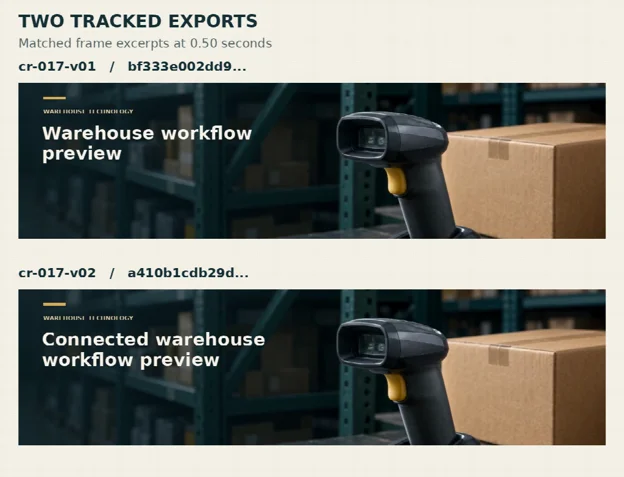
Figure 1. Matched frame excerpts at 0.50 seconds. The caption revision creates a new creative version; these are production examples, not live campaign results.
Keep released files immutable. If a new export arrives with an existing creative ID but a different checksum, investigate before replacing the stored asset. If two differently named files have the same checksum, they contain identical bytes and may be duplicate copies. A checksum identifies file contents, not the campaign purpose or visual meaning.
-
Carry the registry keys into manual tracking links
For manually tagged placements, define a consistent mapping between registry fields and UTM parameters:
| Parameter | Example value | Purpose |
| utm_id | cmp-042 | Internal campaign identifier |
| utm_campaign | warehouse_demo | Readable campaign name |
| utm_source | Traffic source | |
| utm_medium | paid_social | Channel classification |
| utm_source_platform | Sending or buying platform | |
| utm_content | cr-017-v02 | Tracked creative version |
Use the same convention wherever links are built. UTM values are case-sensitive, so warehouse_demo and Warehouse_Demo should not become accidental aliases for one initiative.
Generate tracking values from the deployment record rather than retyping them in each platform. Check that any dynamic parameters expand into the intended values. For campaigns using auto-tagging, inspect the platform-specific and manual reporting fields separately; manually adding UTMs does not mean every traffic-source field will use them.
The parameters describe the click’s campaign context. They do not attach a checksum to the video, identify a viewer who never clicks, or automatically populate a CRM record. Those connections require their own instrumentation and field mapping.
-
Check naming collisions and lost parameters
When two exports share a filename, compare their creative IDs, checksums and change-log entries. Rename the files around their registered IDs and update the deployment records. Sorting by upload date cannot establish which file a running placement uses.
Test tracking links through the complete redirect path. A valid starting address can still reach a landing page with its query string missing.
A controlled local HTTP check for this workflow exercised three paths:
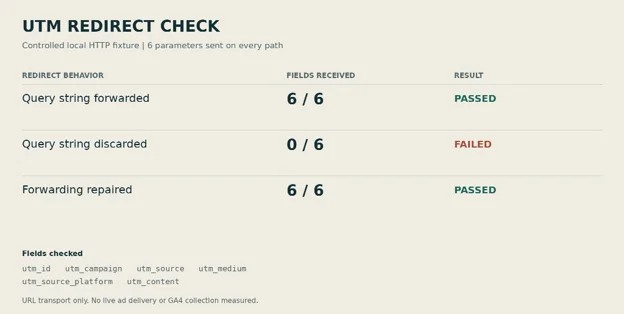
Figure 2. Actual local redirect checks. All six UTM fields arrived on the forwarding path, none on the dropping path, and all six after repair.
The check establishes URL transport in the local fixture. Production redirects and analytics collection still need to be tested in their own environment.
Compare the generated link, redirect destination and landing request to locate the first loss. If all six values arrive but the report remains empty, inspect collection, filters, reporting delay and the dimensions selected. Rebuilding the creative file will not repair a tracking failure.
-
Join reports at the level the data supports
For manually tagged sessions in GA4, inspect Session manual campaign ID and Session manual ad content. Match those values to the campaign and creative registry, together with the relevant source and medium. Check that the lookup keys resolve to one defined creative record.
Native ad-delivery data needs a separate mapping using platform, account and ad identifiers. If several ads share the same creative and tracking values, those UTMs cannot distinguish the individual ads. Preserve native identifiers when that level of analysis matters.
Keep the reporting grain explicit. Creative records describe files; deployment rows describe uses; analytics rows describe measured activity. Joining a creative to three deployment rows and summing its production cost three times inflates the total. Calculate asset-level costs before distributing them under a documented allocation rule.
Finally, separate identification from attribution. A traceable file and a surviving UTM label show which records can be connected. They do not establish that a video caused a lead or sale. Pipeline attribution needs additional data and a stated model; causal lift needs a suitable experiment.