


Multi-region campaigns fail in quiet ways. The German landing page loads in English. The UK form routes leads to the US sales team. The ad that should run in Singapore never shows at all. These are examples of launch defects worth catching before paid traffic arrives.
A useful QA routine checks the ad, the landing page and the lead handoff separately. No single preview reproduces every buyer’s experience, but each check can catch a different kind of failure.
Why Geo QA Matters for ABM and Multi-Region Campaigns
Account-based and multi-region campaigns depend on precision. You’re paying to reach specific companies in specific places, often at high cost per click. A mismatch in currency, language or form behaviour can lose a lead even when the targeting is right. For ABM, confirming that the enquiry reaches the correct account owner matters as much as confirming that the page looks right.
Some of these errors are easy to miss from your own desk. Ad platforms, websites and search engines adjust what they show by location, so the version you see in the office isn’t the version your buyers see.
Spot-Check IP-Based Regional Behaviour
A Free VPN can help spot-check IP-based regional behaviour when its available exit locations include the country you need. Check the current plan and app first: location choice varies by service and platform, and a free plan is not automatically suitable for every market. Connect to an available target region, then open the campaign’s landing-page URL directly.
Changing the public IP is only one part of the test. Browser language, cookies, account settings and device location can influence what appears. A VPN does not change GPS coordinates or turn your device into a local buyer’s phone. If a result is important or unexpected, ask a colleague in the market to reproduce it.
Two rules keep this clean:
- Avoid searching for and clicking your own live ads. Use the platform’s preview tools and open the destination URL directly, rather than creating unnecessary impressions or clicks.
- Start a fresh private browser session without signing in. This reduces carry-over from ordinary browsing, but does not remove every location or personalisation signal. Test returning-visitor behaviour separately when it matters.
Record the exit region, browser language, device and consent state alongside each result. Without those details, two testers may be comparing different conditions rather than finding an intermittent bug.
Use the Built-In Previews First
For ad eligibility, use the platform’s own tools before drawing conclusions from a live search. A missing ad in one VPN session is not proof that a campaign is broken.
- Google Ads’ Ad Preview and Diagnosis tool shows whether your search ads are eligible to appear for a keyword in a chosen location, without creating impressions.
- Google Search Console’s URL Inspection helps check indexing and Google’s access to a page. It is not a regional ad preview or a conversion test; some paid landing pages are intentionally not indexed.
- Social ad platforms offer creative and placement previews; check which formats the platform supports.
These tools answer different questions. An ad preview does not verify the full journey through redirects, forms and CRM routing. Check that journey separately, including a real mobile browser when mobile traffic is part of the plan.
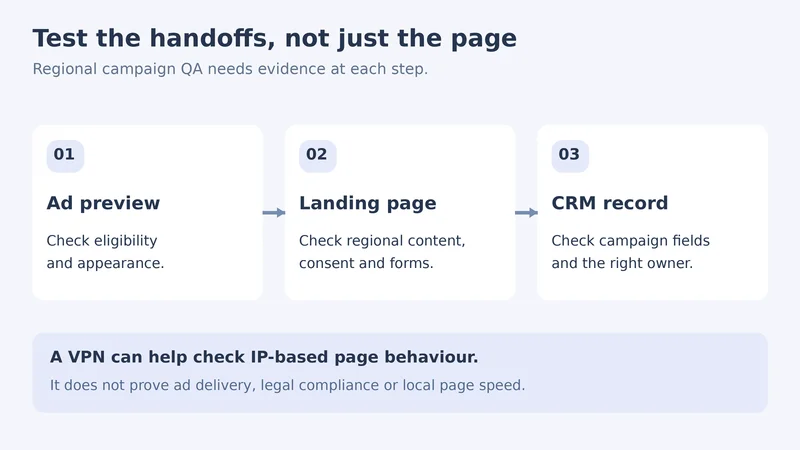
A Five-Point QA Checklist for Each Market
Before testing each country, write down the expected language, offer, destination URL and receiving sales team. Then run these checks:
- Language. The page, form labels, error messages and thank-you page match the intended audience. Test automatic redirects and any manual language selector; do not assume a buyer’s language preference from their IP location alone.
- Currency and pricing. If prices are shown, confirm the intended currency, offer and tax wording with the owner of that market’s campaign. Do not assume every regional page needs a different currency.
- Consent and privacy. Test the market’s approved consent setup: accept, reject and change preferences, then check form behaviour. Confirm expected tracking with the privacy and analytics owners; a banner appearing is not proof of legal compliance.
- Form routing. Agree on test contact details first. Submit a clearly labelled test lead and verify the confirmation page or email, campaign fields and receiving CRM owner. Exclude the test from lead scoring, sales outreach and reporting where your systems allow it.
- Page speed. Use a performance test with a probe in or near the target region and a stated device/network profile. A VPN adds its own routing and latency, so its load time is not a reliable local-speed benchmark.
Record expected versus actual results in a shared sheet, with the URL, test conditions, date, evidence and person responsible for the fix. Use synthetic test data and redact screenshots before sharing them.
Agree what blocks launch. A form that loses submissions or routes them to the wrong team needs fixing and retesting. A minor spacing issue can have a different priority. Sign off the affected journey after a fix, rather than relying on a screenshot of the corrected page alone.
Set a Simple Team Policy
Geo checks work best when everyone uses the same approved tools on company devices. Agree on which VPN and browsers the team uses, who runs checks for which markets, and where the evidence is stored. If your marketers work on MacBooks, X-VPN for Mac is one option your IT team can review and approve for these checks.
A campaign that’s right in every market looks effortless to the buyer. Behind it is usually a short check in each region, done before launch rather than after the budget is gone.


