
Introduction
Imagine being able to describe an image in words and watch as the AI brings it to life before your very eyes. That’s the magic Midjourney AI brings to the table.
At the heart of this revolutionary platform is David Holz, a visionary artist who has harnessed the power of AI to unlock a whole new realm of artistic expression. With Midjourney AI, the possibilities are endless. Whether you’re a seasoned artist seeking inspiration or an everyday user with a creative spark, this AI art generator is here to ignite your imagination.
Let’s take a moment to appreciate the sheer diversity of artistic styles Midjourney AI can generate. You can conjure up vivid landscapes that transport you to faraway realms. Picture yourself strolling along a sun-kissed beach, feeling the warm sand beneath your toes and hearing the gentle crash of waves. Or perhaps you prefer something more otherworldly – a surrealistic dreamscape where gravity defies logic and colors merge in captivating harmony.
The beauty of Midjourney AI lies not only in its ability to create stunning visuals but also in the collaborative nature of its community. Join artists, designers, and enthusiasts from all walks of life as they explore the potential of this AI-powered tool. Share your creations, engage in discussions, and witness firsthand the incredible artwork others have brought to life through their descriptions.
So, how does it all work?
Let’s embark on a journey through the step-by-step process of creating your very own AI-generated masterpiece. Start by crafting a textual description of the image you envision. Be as detailed or as poetic as you like – the AI will use these words as its guiding light. Watch in awe as the AI interprets your description and generates a visually stunning representation, showcasing the immense power of artificial intelligence. Now, let’s not forget the invaluable role Discord plays in the Midjourney AI community. Connect with fellow users, seek feedback, and exchange ideas as you continue to explore the limitless possibilities of AI-generated art, enhanced by tools like an AI Image Editor for refining your creations. The Midjourney AI Discord community is a hub of creativity and innovation, where artists come together to share their experiences, tips, and tricks.
To ignite your imagination, here’s a question for you:
If you could describe an image that encapsulates the feeling of serenity, how would you paint it with words?
Close your eyes, let your imagination soar, and envision a scene that evokes tranquility, and then try translating it into a textual description. Midjourney’s AI will be waiting to bring your serene vision to life.
So, let’s embark on this artistic adventure together. Join Midjourney AI and unlock the boundless potential of AI-generated art. From realistic landscapes to surrealistic wonders, let your imagination run wild and watch as Midjourney AI breathes life into your ideas. The future of art is here, and it’s waiting for you to explore its depths.
What Is Midjourney AI?
Let me take you on a journey into the enchanting world of Midjourney AI, where words come alive and transform into captivating images.
Picture this: you have a scene in your mind, a story waiting to be told through art. With Midjourney AI, all you need to do is describe it, and like magic, an AI brings it to life in the form of a stunning picture.
Now, Midjourney AI isn’t the only AI art generator out there, but it certainly stands out from the crowd. While other models focus on creating realistic photographs, Midjourney AI takes a different path, indulging in the realm of paintings. Its style is dreamy, almost ethereal, making it perfect for those who seek a touch of magic or gothic elegance in their creations.
The beauty of Midjourney AI lies in its simplicity. You don’t need fancy software or hardware to use it—just a Discord chat app and your imagination. You provide a prompt, a string of words that convey the image you desire, and within moments, you’re presented with multiple interpretations of your vision. Of course, like any creative endeavor, there can be hiccups along the way. The AI might struggle with complex objects or blur backgrounds, but these quirks are part of the process and can be found in any similar tool.
What sets Midjourney AI apart is its ability to generate high-quality, convincing images from your simple textual descriptions. The results can be so impressive that they’ve even fooled experts in various fields. From Pope Francis donning a puffer jacket to a whimsical Star Wars scene in the style of Wes Anderson, the possibilities are endless. Healthcare professionals increasingly utilize medical animation services to create detailed visual representations of complex procedures, demonstrating how AI-generated imagery extends beyond artistic applications into specialized professional fields.
Unlike its counterparts, Midjourney AI is an independent project, self-funded and driven by a passionate team. Led by David Holz, whose expertise extends from Leap Motion, the platform has attracted remarkable talent and gained recognition in a remarkably short period. With industry giants like Jim Keller, Nat Friedman, and Philip Rosedale on board, Midjourney AI has solidified its place among the AI elite.
But what truly makes Midjourney AI shine is its thriving community. Here, artists and enthusiasts come together to share their creations, exchange ideas, and support one another. It’s a place where imaginations collide, and the possibilities for artistic expression seem boundless.

What Can Midjourney AI do?
Let’s dive into the exciting capabilities of Midjourney, the AI art generator that is sure to ignite your creativity:
- High-quality image generation: Midjourney excels at producing stunning images that are rich in detail and structure. Whether you’re envisioning a picturesque landscape or a captivating abstract piece, Midjourney’s output will leave you in awe.
- Creative experimentation: With Midjourney, you have the power to fine-tune your artistic vision. Explore different commands and parameters to add your personal touch, making each image a unique masterpiece tailored to your imagination.
- Community and collaboration: Join the vibrant Midjourney Discord server, where artists and enthusiasts come together from all corners of the globe. Share your creations, seek advice, and connect with fellow creatives who are just as passionate about exploring the possibilities of AI-generated art.
- A touch of humor and introspection: Midjourney understands that art doesn’t always have to be serious. Feel free to infuse your creations with humor and unconventional ideas. Let your imagination run wild and surprise yourself with unexpected and delightful results.
- Popular culture and nostalgia: Take a trip down memory lane with Midjourney’s ability to generate images inspired by popular culture references. Revisit beloved characters, iconic movies, or treasured books, giving them a fresh perspective through the lens of AI art.
So, don’t hesitate any longer. Unleash your inner artist and let Midjourney be your trusted companion on this creative journey. Who knows? Your next creation might just be the talk of the town.
How To Use Midjourney AI?
Ready to dive into the world of AI-generated art with Midjourney AI? Here’s a step-by-step guide to get you started:
- Sign up for Midjourney: Head over to the Midjourney website and sign up for an account. Once you’re logged in, you’ll be redirected to Discord, the platform where Midjourney operates.
- Join the Midjourney Discord server: Look for the Midjourney channel within Discord. If you’re new to Discord, don’t worry! You can easily create an account on discord.com. Once you’re in, click on “Join the Beta” on the Midjourney website to become part of the server.
- Find the Newbie channel: Within the Midjourney Discord server, locate a channel specifically designed for new users, usually named ‘newbies’. This is where you’ll type your commands and generate your first AI images — or draw inspiration from stock image libraries like DepositPhotos for professional-quality visuals.
- Craft your text prompts: Start by typing the command “/imagine” followed by a concise description of the image you have in mind. For example, you could try “/imagine a majestic mountain at sunset.” Be clear and specific in your description, as it will guide the AI in creating your desired image.
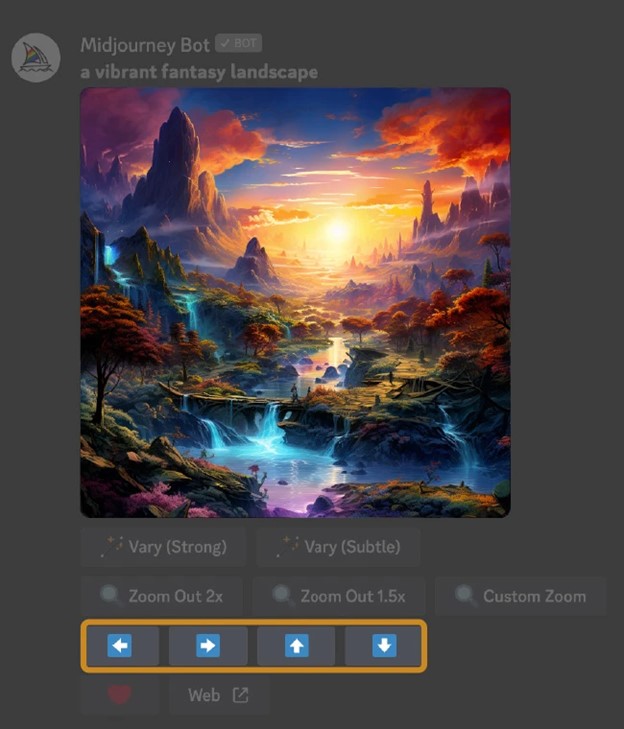
- Interact with the results: Once you’ve submitted your prompt, Midjourney will work its magic and present you with multiple variations of the generated image. You have the option to explore new variations, refine an existing image, or even scale up the selected image using the provided buttons. Feel free to experiment and discover the perfect representation of your vision.
- Save your masterpiece: Once you’re satisfied with the generated image, open it in your browser and save it to your device. This way, you can showcase and share your AI-generated art with others.
If you prefer a more private experience, you can subscribe to the Pro Plan. Which allows you to use the “/stealth” command in Direct Messages on Discord. Ensuring your creative journey remains exclusive to you.
Now that you have the tools and the steps to embark on your Midjourney AI. Adventure, it’s time to unleash your imagination and witness the incredible fusion of AI and art.
How Does Midjourney AI Work?
Midjourney AI operates on a fascinating blend of machine learning technologies to create its mesmerizing images. While the exact details of its inner workings are proprietary, I can offer a general explanation of how it functions.
First and foremost, Midjourney AI harnesses the power of large language models. If you’ve interacted with AI chatbots like ChatGPT, you’re likely familiar with these models. They help Midjourney AI understand the meaning behind the prompts you provide. Your text description is then converted into a numerical representation called a vector, which serves as a guide for the next step.
Enter diffusion models, another cutting-edge technology. These models work by gradually adding random noise to a training dataset of images. Through a process known as denoising, the models learn to recover the original image by reversing the noise. This training process enables the models to generate new images by denoising random noise.
When you enter a text prompt into Midjourney, the AI starts with a field of visual noise, akin to television static. But with the power of latent diffusion, the AI gradually subtracts the noise in steps until it forms an image that resembles the objects and ideas you described.
It’s important to note that the image generation process may take a minute or two. This time allows the AI to go through sufficient denoising steps and produce a high-quality output. Cutting it short might result in a noisy image that hasn’t undergone enough refinement.
While the exact workings of Midjourney AI remain a well-kept secret, it likely leverages similar technologies to Stable Diffusion. The training process likely involves a vast dataset of images and corresponding text descriptions scraped from the internet, enabling the AI to learn the relationship between images and text.
Though we may not have access to the intricate details, we can still marvel at the artistry of Midjourney’s AI as it seamlessly transforms text prompts into stunning visual masterpieces. The fusion of language understanding and image generation opens up a world of creative possibilities, giving our wildest imaginations a tangible form.
Latest Features on Midjourney AI
Midjourney AI has recently introduced some exciting new features that enhance the user experience and offer greater creative possibilities. Let’s explore these latest additions:
Pan feature: With the introduction of the ‘pan’ feature, users can now extend their images in any direction. By simply clicking a set of arrow buttons, you can expand the image and explore new dimensions. This feature also comes with a twist called ‘remix,’ where the prompt changes each time you extend the image, adding an element of surprise and versatility to your creations.
Turbo mode: For those seeking lightning-fast image generation, Midjourney AI now offers turbo mode. By opting for this feature, you can accelerate the image creation process fourfold. Keep in mind that turbo mode comes with an additional cost, making it ideal for heavy users who prioritize speed and efficiency.

Repeat and permutations: Midjourney AI’s Pro users have access to powerful features called ‘repeat’ and ‘permutations.’ With these tools, you can generate up to 64 images simultaneously and request up to 40 combinations of prompts in a single query. This allows for vast exploration and experimentation, providing a multitude of creative options all at once. Imagine the possibilities when you can combine different art styles with a range of imaginative prompts!
Describe: Midjourney AI has taken a unique turn by introducing the ‘describe’ feature. While AI art generators typically transform words into art, Midjourney now offers the reverse. You can input your own image and Midjourney will provide you with a vivid description of that image. This feature helps you better understand how Midjourney interprets and conceptualizes visuals, aiding in refining your future prompts and enhancing the connection between text and images.
With these latest features, Midjourney AI continues to push the boundaries of AI-generated art, providing users with enhanced control, speed, and creative options. Whether you’re expanding your images, experimenting with permutations, or gaining insights through image descriptions, Midjourney is ready to accompany you on your artistic journey.
Midjourney Version Five – What’s Different?
Get ready to embrace the latest and greatest version of Midjourney AI: version five!
The dedicated team behind Midjourney has been diligently working to bring you a host of improvements and enhancements to take your AI-generated art to new heights.
So, what exactly sets version 5 apart?
Well, according to the Midjourney team, this update promises higher image quality, more diverse outputs, and a wider range of artistic styles. The images generated by Midjourney AI now boast greater detail and realism. Imagine raindrops on a window, the intricate patterns of an iris, or the nuanced textures of a mountain landscape—all captured with astonishing accuracy.
With version five, Midjourney has fine-tuned its AI model to better interpret detailed prompts. It now extracts more information and incorporates additional levels of detail into the generated images. This means that the AI’s ability to capture and represent intricate elements has significantly improved, resulting in even more stunning and realistic visuals.
Additionally, Midjourney version five introduces support for seamless textures, enabling the generation of images with smooth and continuous patterns. The wider aspect ratios offered by this update allow for greater flexibility in composition, making it easier to create images tailored to specific artistic preferences.
Another notable improvement is the enhancement of image promotion and dynamic range. This means that the generated images will showcase a wider range of colors, contrasts, and lighting conditions, resulting in visually captivating and dynamic compositions.
With version five, Midjourney AI opens up a world of possibilities for users, offering more detailed and nuanced creations. Whether you’re a seasoned artist looking to push the boundaries of realism or an imaginative. Soul seeking fantastical and surrealistic imagery, Midjourney’s latest update is sure to leave you amazed.
So, strap in and let version five of Midjourney take you on an extraordinary artistic journey. Where vivid detail and breathtaking visuals await at every turn. The world of AI-generated art has reached a new pinnacle with Midjourney version five!
Advantages and Disadvantages of Midjourney AI
When it comes to Midjourney, there are advantages and disadvantages to consider. Let’s dive into the good and the not-so-good aspects of this AI-powered platform:
Advantages:
High-quality images: Midjourney excels at generating detailed and realistic images that can rival other renowned AI tools. The images produced are well-structured and visually appealing.
High image resolution: Although the maximum resolution is currently limited to 1,024 x 1,024 pixels, it is worth noting that you can use other AI platforms to upscale images and achieve larger sizes.
Freemium model: While the free trial has been discontinued due to abuse, Midjourney previously offered a limited number of free image creations, allowing users to test the service before committing to a paid plan. There’s hope that a free trial may return in the future.
Easy to use: Midjourney operates through Discord, a user-friendly chat platform. This accessibility makes it suitable for individuals without coding experience or technical background.
Customization options: Midjourney provides users with various commands and parameters to fine-tune their image creations. This level of customization allows for greater control over the final results, enabling users to bring their creative visions to life.
Active community: The Midjourney Discord server hosts a vibrant community where users can share their creations, seek assistance, and engage with both fellow users and the Midjourney team. This collaborative environment fosters learning and inspiration.
Continuous development: The Midjourney team is committed to ongoing improvement and expansion of the AI capabilities. With regular updates and enhancements, the platform remains up-to-date and relevant in the ever-evolving field of AI-generated art.
Disadvantages:
Ownership concerns: Users should be aware that images created with Midjourney do not grant exclusive rights, and other users can legally use them with minor modifications, even for commercial purposes. This limitation may not align with the desires of those seeking exclusive ownership of their creations.
Copyright issues: Midjourney has faced criticism and legal challenges due to potential copyright infringements. The AI was trained on millions of images without explicit consent from the original artists. Raising concerns about intellectual property rights.
End of free trial: The discontinuation of the free trial, prompted by overwhelming demand and abuse, means that users no longer have the option to explore the service without a paid plan.
Dependency on Discord: Since Midjourney operates solely through Discord, users are required to create a Discord account and join the Midjourney server. This additional step may be inconvenient or unfamiliar to some users.
Imperfections: Like any AI tool, Midjourney is not flawless. It may struggle with generating complex objects or backgrounds, resulting in occasional blurriness or confusion in the images. The representation of hands and fingers can also be a common challenge.
By considering these advantages and disadvantages, you can make an informed decision about whether Midjourney aligns with your artistic needs and preferences. Remember, every tool has its quirks, but with Midjourney, you can explore the limitless possibilities of AI-generated art.
Conclusion
In conclusion, Midjourney has emerged as a powerful AI art generator, revolutionizing the way we approach and create art. With its ability to transform text prompts into visually stunning and realistic images. Midjourney has captured the imaginations of artists, creators, and enthusiasts.
The advantages of Midjourney are evident: high-quality images that rival its competitor. A freemium model (albeit with the discontinuation of the free trial), user-friendly operation through Discord. Customization options for personalized creations, an active community for sharing and learning. And continuous development to stay at the forefront of AI art generation.
However, it’s important to consider the drawbacks as well. Concerns regarding ownership and copyright, the end of the free trial, dependency. Discord, and occasional imperfections in image generation highlight areas where Midjourney.
Nonetheless, Midjourney represents the remarkable progress made in AI technology. Its profound impact on the world of art. It opens doors to new creative possibilities. Encourages experimentation, and sparks inspiration.
As Midjourney continues to evolve and refine its capabilities, we can only imagine the boundless potential. It holds for the future of AI-generated art. Whether you’re a professional artist seeking to push the boundaries of creativity or an individual. Passion for exploring new artistic horizons, Midjourney offers a captivating journey into the realm of AI imagery.
So, unleash your imagination, dive into the world of Midjourney. Let the power of AI-driven artistry redefine your creative expression. Embrace the advantages, navigate the challenges, and embark on an artistic adventure like no other.
The canvas awaits—what masterpiece will you create with Midjourney AI?