
Lead-Gen now on Auto-Pilot withBuild My Campaign
Valasys Media — Empowering marketers with powerful insights

10 Clear Benefits of It Services Management to Simplify Day-To-Day Operations

Discover how IT services management streamlines operations with these 10 benefits. Simplify your day-to-day tasks efficiently.

Guest Author
Guest Author
Last updated on: Jun 18, 2026
10 Clear Benefits of It Services Management to Simplify Day-To-Day Operations

Most businesses today rely on IT functions as they carry out daily operations. They turn to IT service management (ITSM) best practices known as the information technology infrastructure library (ITIL) to ensure they get the most from the IT systems. What benefits come with doing so?

1. Increased Efficiency

When a company operates efficiently, it makes the most of the resources it has. ITSM helps a company achieve this goal through the use of things such as IT asset recovery management. These processes are designed to optimize the lifecycle management of these assets while finding cost-effective ways to procure new assets and dispose of existing ones. When a company works within this framework, it benefits from processes put into place to allow for continual service improvement. Doing so allows the organization to see ongoing efficiency gains, as these functions are continuously being optimized to meet changing conditions.

2. Lower Operational Costs

IT infrastructure and operations teams view solutions differently today. As a company increases in size and maturity, these teams must bring in more members so they don’t become overwhelmed. With the help of it services management, these teams can scale operations as needed without bringing in new people. They won’t have the expenses associated with recruiting and onboarding new employees only to find these employees aren’t needed during slow periods. IT service management comes with automated features that reduce the manual workload of existing employees, so they have time for critical tasks. Enterprise IT asset management complements this efficiency by centralizing device lifecycles and global provisioning to further minimize manual administrative burdens.

3. Efficient Implementation

Any changes in an IT system can lead to problems, including downtime which no company can afford. When a company uses the ITIL change management process, the odds of problems developing during implementation decrease significantly. These best practices bring together the various components of the implementation to ensure they create and support a system that works. The components include the roles, processes, and policies that will be utilized during the implementation. Doing so ensures changes are approved by the appropriate parties and any issues that might arise by these changes are identified, so there are no issues when the implementation takes place.

4. Accountability

ITSM standardizes services for increased accountability. With this standardization, IT policy compliance improves. This system implements functions and documented processes to ensure each IT service is delivered properly. IT managers can monitor operator actions and see how they are addressing tasks. The increased visibility ensures consistent delivery of services and compliance throughout the organization. It does so with the help of the Capability Maturity Model Integration (CMMI) scale.

Businesses carry out many activities daily. Some are core functions that bring in revenue while others are support functions that support the core functions. IT is a support function every business needs. ITSM puts processes in place for the company’s network and monitors IT infrastructure activity. Doing so allows any security policy breaches to be caught and handled quickly.

5. Increased Effectiveness Within the IT Department

IT managers must select key performance indicators to determine how well their teams are performing. They must track the KPIs to see if improvements are being made. With ITSM’s formalized processes, driving KPI improvements takes less effort. When structured incident responses are in place, the time needed to resolve the issues drops. Focusing on crisis management also allows the company to recover from a service interruption in less time.

6. Self-Service Options

Consumers want more self-service options, particularly if they are tech-savvy and don’t need much assistance. With these options, they can resolve incidents or fulfill service requests without relying on an IT operator. Ticket resolution costs decrease and customer satisfaction improves. However, the self-service option should be part of a larger drive for improvement.

Companies should offer a knowledge base so users can find answers without speaking to a human. With this option in place, self-service productivity will improve. AI-powered chatbots and service portals are two options every business should consider today.

However, these options should be part of a large push to provide a better customer experience. Companies should also look into aligning the IT department’s activities with the needs of the business. The IT team will focus on the services the business wants. In addition, a formalized ticketing software and incident management system must be put into place to guarantee every report or request submitted is handled.

7. Better Communication

Communication improves within a company when it adopts ITSM. The IT service desk becomes the single point of contact, so every user knows which channel to use to obtain support. This service desk handles incident and event management along with request fulfillment.

8. Task Automation

Every department within an organization needs to eliminate tedious manual tasks that contribute to human error. ITSM software makes it easy for the IT department to manage its services. Doing so improves service quality and consistency. IT operators find their workload decreases so they can focus on activities that add value to the organization.

9. Improved ROI

Adopting and implementing this system involves more than purchasing software. The company must adopt processes that reflect best practices when it comes to managing IT services and functions. Once these processes have been adopted, policies and procedures need to be put into place to ensure they are used. All parties must buy into this implementation for it to be effective.

10. Time and Money Savings

ITSM processes focus on saving the business both time and money. They do so by making daily operations more efficient. Knowledge management is one way these processes achieve this goal. Businesses won’t need to rediscover information they already have. This information can easily be shared with the help of a knowledge base software. This saves the company time. Better time management means more money for the company. Information security processes also help safeguard the company from expenses associated with a security breach, as the processes drive risk mitigation.

Learn more about IT services management today to see if it is right for your organization. Most business owners will find it is and wish they had implemented it sooner. Doing so allows the business to grow in every way while seeing better profits, happier employees, and more satisfied customers.

Related Posts

Facing Construction Delays? Experienced Lawyers Help Address Contractual Disagreements Effectively

Facing Construction Delays? Experienced Lawyers Help Address Contractual Disagreements Effectively

Guest Author

Most delay disputes are lost on paper, before any hearing. A single missed notice can sink an otherwise strong claim. When schedules slip, both sides reach for the contract. A seasoned construction attorney treats that document as a recovery map. Clauses on extensions, damages and dispute procedure each carry weight. Excusable delays, notice rules and shared fault all shape outcomes. So does choosing the right forum for resolution. Field records, written months earlier, can carry the decisive proof. Paperwork, in short, decides who absorbs the cost of lost time. Delay Claims Start With Contract Wording Each agreement allocates the risk of lost time differently. Some grant extra days without extra money; others allow both. Liquidated damages clauses set a fixed daily charge for late completion. A lawyer studies these terms before anyone files a claim. That early review can reveal leverage a site team overlooks. Which Setbacks Justify a Time Extension? Not every holdup earns extra days. Courts and arbitrators separate excusable events from contractor-caused ones. Recognized grounds for relief include: Owner-directed design changes alter the original scope of work. Unforeseen site conditions differ sharply from the bid documents. Severe weather exceeds the averages the contract anticipated. Late owner approvals halt crews waiting on decisions. Missed Notice Deadlines Destroy Valid Claims Here, timing matters more than merit. Standard forms demand written notice shortly after a delay begins. Courts enforce those windows strictly, even against legitimate claims. A construction attorney builds a notice calendar at project kickoff. Each letter then cites the clause, cause and expected impact. Such discipline turns routine correspondence into admissible evidence. What If Both Parties Caused the Slippage? Concurrent delay is where disputes turn technical. Picture an owner releasing drawings late while crews sit short-staffed. Neither side can pin the whole period elsewhere. Experts run critical path analysis against the baseline schedule. Superintendent daily logs supply the raw evidence for that analysis. Counsel then apportions responsibility one day at a time. Why Try Mediation Before Filing Suit? Litigation can outlast the project it concerns. Mediation brings a quicker, confidential route: Work continues while talks proceed. Costs stay far below trial. Business relationships survive the dispute. Parties control the final terms. If talks collapse, arbitration remains available. Many contracts mandate this stepped sequence. A neutral mediator tests each side’s numbers privately. The Superintendent’s Logbook Settles More Disputes Delay disputes look like legal battles from the outside. In practice, the superintendent’s daily log decides most of them. Critical path experts and polished briefs rest on those entries. A crew count noted at dawn can outweigh testimony. Lawyers can argue only what someone recorded at the time. Sloppy logs leave sharp advocates with little to prove. So real protection begins long before counsel enters the room. FAQs When should a contractor contact a lawyer about delays? Before signing is best, while risky clauses remain negotiable. At minimum, call once the first schedule slip surfaces. Prompt advice protects notice rights with short expiry windows, and waiting costs leverage. Can an owner recover money for late completion? Yes, through liquidated damages or proven actual losses. The contract decides which route applies. Excused delays can reduce those charges, and penalty-style amounts may face court challenge. Does a no-damages-for-delay clause bar all compensation? Such a clause does not settle every case. Courts recognize exceptions for active interference or bad faith. Enforceability shifts between jurisdictions, making legal review essential before conceding anything. How long does a delay dispute take to resolve? Mediation can conclude in a few weeks of focused sessions. Arbitration and litigation can stretch across months or years. Schedule complexity and expert involvement drive that timeline.

Cloud-Based LinkedIn Prospecting Tools_ Features and Safety Compared

Cloud-Based LinkedIn Prospecting Tools: Features and Safety Compared

Guest Author

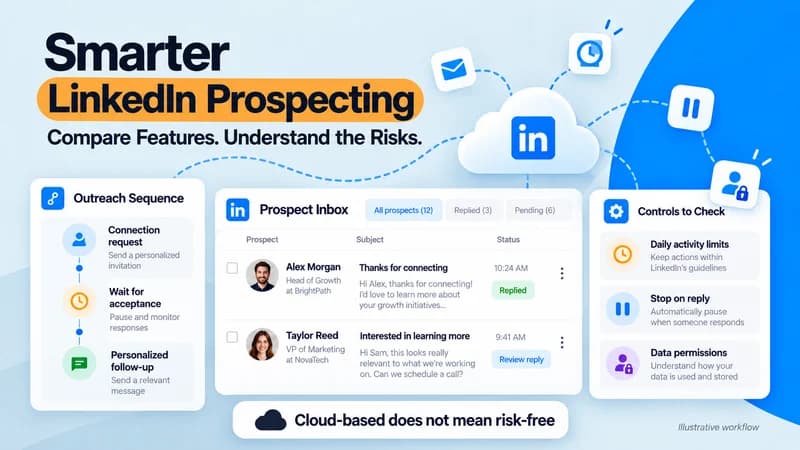
Follow-ups slip when your calendar fills up. Campaigns stop when your laptop sleeps. And every vendor page calls its tool “safe,” so no claim is easy to trust. The short answer: cloud-based tools keep sequences running without your device, but none removes account risk. Compare them on targeting, sequence logic, pacing controls, reply handling, and data practices. Below are the rules to know first, the features worth paying for, the safety settings to check, and a pilot test to run before you commit. Start with the rules, because they shape every safe setup. Know the Rules Before You Automate LinkedIn’s User Agreement prohibits bots and unauthorized automated activity, so every third-party tool carries some account risk. A vendor can reduce that risk through pacing and design, but cannot remove it. Privacy law matters too. Business contacts are still people, and these rules for business-to-business marketing explain when messaging them needs a lawful basis. Under UK data protection law, serious breaches can bring fines of up to £17.5 million or 4% of global annual turnover, whichever is higher. LinkedIn Message Automation: What It Does and What to Automate Managing connection requests, messages, and follow-ups takes time. With LinkedIn message automation, software handles these tasks based on rules you set. It does not pick your audience or write a strong offer for you. Teams use it to automate LinkedIn connection messages and set up automated LinkedIn follow-ups, helping them keep conversations moving after a request is accepted. Good candidates to automate: A short, truthful connection note, or no note A first message after acceptance One or two follow-ups with delays Stop-on-reply logic Keep these human: replies, objection handling, and anything that needs judgment. Cloud-Based vs. Desktop vs. Browser Extension Tools Where the software runs affects reliability and how your activity looks to LinkedIn. Cloud-based LinkedIn automation tools: run on vendor servers, so campaigns continue when your device is off. Ask how the vendor handles IP addresses and sessions. Desktop apps: run on your computer and usually need it on. Browser extensions: run inside your LinkedIn session and typically need the browser open. LinkedIn’s rules cover third-party software and extensions alike. Cloud deployment doesn’t make a tool safe. It only makes steady pacing easier to control. Features That Matter When You Compare Tools LinkedIn reports more than 1.3 billion members, so volume is never your constraint. Targeting is. Compare these features: Lead sourcing: LinkedIn search, Sales Navigator lists, CSV imports, or a built-in database Sequence logic: delays and if/else conditions that branch on acceptance or reply Personalization: variables you can verify, plus AI drafts you can edit Reply handling: a unified inbox, labeling, and stop-on-reply Multichannel flow: LinkedIn and email in one sequence, so the same prospect isn’t contacted twice Team controls: workspaces, permissions, and white-label options Integrations: CRM sync or API access, so replies reach your system of record Skylead, for example, runs LinkedIn messages, InMails, and email in one sequence with if/else conditions. It adds a B2B database, AI enrichment, and an AI SDR for replies. Safety Settings to Compare LinkedIn publishes no single universal message limit, so a tool’s controls matter more than any headline number. Look for: Adjustable daily limits per account A gradual ramp-up for new or inactive profiles Sending windows that match the prospect’s working hours Randomized delays between actions Automatic pause when LinkedIn shows warnings or actions fail Stop-on-reply on every follow-up Clear documentation on how sessions and IPs are handled A practical rule: the pattern to avoid is a sudden jump from no activity to full volume. Steady, gradual increases look far more like normal use. Treat any safety guarantee as a red flag. No vendor controls LinkedIn’s decisions. How Pricing Models Differ Prices change, so compare structure instead of numbers. Check whether you pay per seat, per LinkedIn account, flat for a team, or by usage credits for data and AI. Then ask what is included, such as email sending, enrichment, AI replies, extra accounts, and white-labeling. Model cost at the number of accounts you expect to run in 12 months. Which Setup Fits Your Team The right tool depends on who is sending. Solo founder or small sales team: choose simple 2 to 3 step sequences, warm segments, and strong pacing controls. Recruiting team: prioritize a shared inbox, permissions, and careful handling of candidate data. Agency: look for workspaces, per-client permissions, white-labeling, and pricing that doesn’t grow with every seat. Larger or regulated company: ask for written documentation on data handling before procurement review. The Pilot Test Most Comparisons Skip Feature lists don’t show how a tool behaves under real conditions. Before rolling out to a team, run a small pilot: Pick one warm, well-defined segment, such as people who engaged with a relevant post. Start below the vendor’s suggested limits and raise them gradually while watching acceptance and warnings. Reply to your own test campaign from a second account and confirm the sequence stops. Change one variable at a time, such as the first message or send time. Check export options, so your data can leave with you. Then score each tool from 1 to 5 on stability, control clarity, support response, and data export. Here is an illustrative example, not real results. Tool A scores 5, 4, 4, and 5, for 18 out of 20. Tool B scores 4, 3, 3, and 2, for 12. Tool A wins even if both tools had similar early replies. Data Privacy Rules for US Prospecting US teams face state privacy laws too. If you handle personal information about California residents, California privacy law requirements may apply to how you collect, store, and delete prospect data. Collect only what you need, honor deletion and opt-out requests, and confirm the details with legal counsel. Where to Start Pick one warm segment, shortlist two or three tools, and run one pilot. Confirm the safety controls work before you add volume. If running LinkedIn and email from one sequence is your gap, Skylead’s free trial is an

Exploring Montana MSB Insights and Future Potential Opportunities

Exploring Montana MSB Insights and Future Potential Opportunities

Guest Author

To maximize your experience with this innovative financial tool, familiarize yourself with its intuitive interface, which prioritizes user engagement. Its layout is designed for seamless navigation, enabling immediate access to various functionalities without unnecessary complexity. Take advantage of the real-time analytics functionalities available. These insights allow users to monitor transactions and assess performance metrics, providing a clear picture of financial standing and facilitating informed decision-making. The integration of advanced reporting tools can significantly enhance your ability to manage finances effectively. Consider utilizing the customizable features tailored to meet specific business needs. By adjusting parameters and options, users can align the system with their operational objectives, ensuring a personalized approach to transaction management and client relations. For optimal security, leverage the multi-layered protection protocols in place. This system employs cutting-edge encryption methods and regular security audits to safeguard personal and financial information, instilling confidence in users regarding data integrity. Engagement with available support channels is recommended for troubleshooting and maximizing the platform’s capabilities. Real-time assistance and extensive resource libraries can provide clarity and enhance overall functionality, ensuring users can navigate any challenges confidently. Understanding the User Interface of Montana MSB Begin with the dashboard, which acts as the central hub for navigation within the Montana MSB platform. Familiarize yourself with key sections such as transactions, reports, and user management that are easily accessible from the main menu. Utilize the search functionality for quick access to relevant data; this feature is particularly beneficial during high-traffic periods. Pay attention to customization options available in settings, allowing users to tailor notifications and preferences. Tooltips offer immediate guidance on various features, simplifying the learning curve. Regularly review updates to ensure you maximize the utility of modifications, as user feedback often leads to enhancements in layout and functionality. Integrating Payment Solutions within Montana MSB Choosing suitable payment gateways is critical for streamlined operations. Focus on integrating solutions that support multiple currencies and payment methods. Compatibility with popular options like credit cards, e-wallets, and bank transfers increases accessibility for users globally. API Integration Utilize robust APIs for seamless payment processing. This allows for real-time transaction handling, which enhances user experience and reduces waiting times. Ensure your development team is well-versed in API documentation to facilitate smooth integration. Security measures cannot be overlooked. Implement strong encryption protocols, such as SSL, to protect sensitive data during transactions. Regularly update security features to guard against potential threats and comply with industry standards. User Interface and Experience Design an intuitive user interface for payment processes. Simplifying the steps reduces cart abandonment rates. Consider features like one-click payments or saved payment methods to enhance user satisfaction. Monitoring transaction performance through analytics tools offers valuable insights into customer behavior. Analyze data to identify popular payment methods and adjust strategies accordingly. This ensures resources are allocated efficiently and user preferences are met. Collaboration with payment service providers is beneficial. Establish partnerships with reputable firms to access exclusive rates or services. This can give you an edge in competitive markets and enhance your offerings. Regular testing of payment systems is advisable to ensure compatibility and functionality. Conducting these tests post-integration will help identify any issues before they affect users. Continuous improvements keep the transaction process running smoothly. Security Protocols Implemented in Montana MSB Utilizing advanced encryption standards is critical to securing sensitive financial data. The encryption process converts information into a format that can only be read by authorized entities, thus preventing unauthorized access. Adopting AES-256, which is widely recognized for its robustness, ensures that data remains protected throughout transactions. Multi-Factor Authentication Incorporating multi-factor authentication (MFA) significantly enhances security layers. By requiring users to provide two or more verification factors, such as something they know (password) and something they have (a one-time code sent to their mobile device), the risk of unauthorized access diminishes. This method adds complexity to the login process, deterring potential breaches. Regular security audits are indispensable for identifying vulnerabilities. Conducting these assessments at predetermined intervals allows for timely updates to security protocols, ensuring alignment with current threats. The feedback from audits should inform continuous improvement in protection measures. Real-Time Monitoring Systems Implementing real-time monitoring systems allows for immediate detection of suspicious activities. These systems analyze user interactions and flag anomalies that could indicate fraud or cybersecurity threats. Quick response capabilities to detected issues minimize potential damage and ensure a prompt reaction to incidents. Analyzing Customer Support Options on Montana MSB To enhance user experience, consider utilizing live chat features for immediate assistance. This instant communication facilitates real-time problem resolution and can significantly boost user satisfaction. Support Channels Email Support: Allows for detailed inquiries and documentation. Response times can vary, so users should be prepared for potential delays. Phone Support: Ideal for urgent matters, offering direct contact with support agents. Check operating hours to maximize availability. FAQs: A well-structured FAQ section can address common concerns efficiently. Regular updates are key for accuracy. Evaluating response times is paramount. Generally, live chat offers the quickest turnaround, while email may require a longer wait, typically ranging from a few hours to a couple of days. Additional Resources Knowledge Base: Access to articles and guides can empower users to solve issues independently. Community Forums: Engaging with fellow users fosters knowledge sharing and may lead to quicker solutions. Feedback mechanisms play a vital role in service improvement. Encourage users to rate their support experiences and provide comments to refine offerings over time. Finally, comprehensive training for support staff is essential. Ensuring representatives are knowledgeable about the services and common issues can enhance the efficiency of assistance provided.