


Auto-Applying to Jobs: How the Tools Work and How to Check What Actually Went Out
Learn how automatic job application tools work and how to verify which applications were submitted, track progress, and spot errors.


Job hunting has turned into a numbers game on both sides of the desk. Recruiters now sift through about 3.5 times more applications than they did a few years ago, according to Greenhouse data reported by the Associated Press, and Greenhouse’s 2026 AI in Hiring Report says nearly three-quarters of candidates already use AI somewhere in their search. Auto-apply software sits right in the middle of that shift. It promises to find openings, fill in forms and submit applications while you do something else.
Some of these tools do exactly that. Others only fill in fields and wait for you to click. A few push volume so hard that they put your accounts at risk. This guide explains how auto-applying works, where it tends to go wrong, and how to check whether your applications are reaching employers at all.
What auto-apply tools actually do
The label “auto-apply” covers three quite different kinds of software. Knowing which kind you are looking at tells you most of what to expect.
Cloud agents. These run on the vendor’s servers. You upload a résumé, set filters for role, location, salary or company, and the agent searches job boards and career pages, fills in the forms and submits them. Your browser does not need to be open. Most cloud agents keep a log of what they sent.
Browser extensions that submit. These live in Chrome and click through application forms on sites such as LinkedIn or Indeed at machine speed. They are cheap and fast, but they depend on your browser session. A captcha, a one-time code or a session timeout can stop a run partway through, sometimes without telling you.
Autofill assistants. These detect form fields on job boards and applicant tracking system (ATS) portals such as Workday, Greenhouse and Lever, then paste in your details and saved answers. You review the form and press Submit yourself. Nothing goes out unseen, but nothing goes out overnight either.
Many products mix these approaches. A service may run most applications from the cloud and use a small browser helper for LinkedIn Easy Apply, for example. When you look at any tool, ask where the submission happens and who presses the final button.
Why sending more applications stopped working
The basic appeal of auto-applying is volume. If a job search is a numbers game, more applications should mean more interviews. The data suggests that logic has run into a wall.
Greenhouse’s 2026 benchmark report, The Hire Standard, found that the average recruiter handled 746 applications a year in 2025, compared with 146 in 2022, a rise of 412 percent. Much of that growth comes from candidates using the same automation you are considering. When every applicant can send hundreds of applications a week, a generic résumé is easier to ignore than ever.
Automation still has a place. Searching listings, copying the same details into form after form and answering the same screening questions again and again is grunt work, and handing it off saves real hours. The gains come from spending those hours on tailored applications and real conversations, not from multiplying low-quality submissions.
The three moments behind “applications sent”
Most dashboards show a single number for applications sent. In practice that number can blend three different events:
- Form started: the tool loaded the job page and began filling in fields.
- Form marked submitted: the site showed a success screen or a submission ID.
- Employer receipt: the employer’s ATS sent you a timestamped confirmation email.
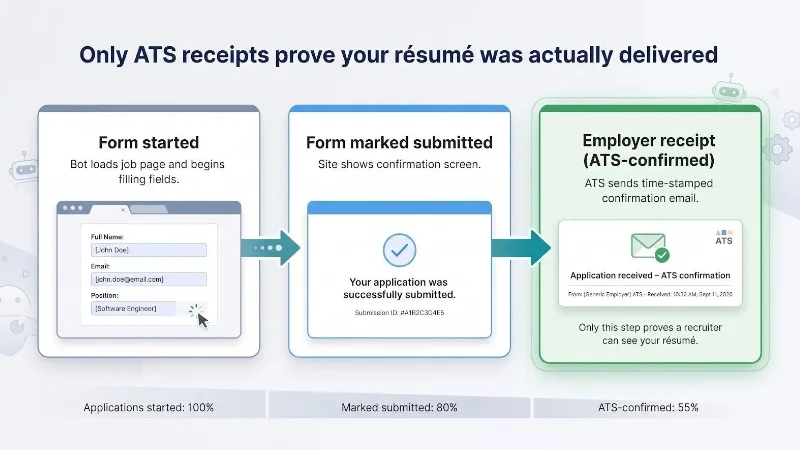
Only the third moment proves that your résumé reached a system a recruiter can see. The gap between the first and the third can be large. Forms fail on required fields the tool could not answer. Sessions expire. Some sites show a confirmation screen even when an upload did not attach properly.
When a tool reports 200 applications, it is worth asking which of these three it is counting.
How much proof should you expect?
Tools differ widely in what they let you check after the fact. Roughly, they fall into four levels:
| Proof level | What you see | What it tells you |
| Full record | The complete application, résumé and cover letter, previewed before it goes out, with employer confirmations in your inbox | Exactly what each employer received |
| Log with résumé version | Where you applied, when, and which résumé version was used | What the tool sent; employer emails arrive separately |
| Log only | Job ID and timestamp | That the tool attempted something |
| Counter only | A running total | Very little |
Higher levels are not better for everyone. A full preview of every application slows things down. But if a tool sits at the bottom of this table, you have no way to tell a working search from a broken one until the interviews fail to arrive.
Employer confirmation emails go to whatever address is on the application, so make sure the tool uses an inbox you check. Those emails are your independent record, whatever the dashboard says.
Control: full automation, review mode, or something in between
The second big difference between tools is how much they let you supervise. Most offer some version of three settings:
- Full automation: the tool finds matches and submits without asking.
- Review mode: the tool prepares each application and holds it until you approve it.
- Hybrid: the tool sends strong matches on its own and holds borderline ones for you.
Review mode is the safest way to start with any new tool. It lets you see how the software reads your filters, how it answers screening questions and how it rewrites your documents, before any of that reaches an employer. Once you trust the output for a certain kind of role, you can loosen the controls for that category and keep review mode for the jobs you care about most.
Some services build this choice into the setup itself. The AIApply platform, for example, lets you set the roles, locations and companies to target or avoid, then choose whether to approve each tailored draft or let Auto Apply run on its own, and it records the date and résumé version of every submission in a dashboard. Whatever tool you use, look for that combination: clear targeting rules, a review option you can switch on and off, and a record of what was actually sent.
Personalization and the risk of invented details
Tailoring used to mean an evening spent rewriting a cover letter. Now many tools generate a job-specific résumé and cover letter for each application, adjusted to the keywords in the posting so it gets through ATS screening.
That helps, but it brings a specific risk. Language models can invent details. A rewritten résumé might inflate a job title, stretch dates or claim a skill you only listed as an interest. Screening answers can be wrong in ways that look careless or dishonest to a recruiter. Duplicate applications to the same employer through different boards can create a similar impression.
Some practical safeguards:
- Read the first batch of tailored documents line by line before you allow automatic sending.
- Keep a saved-answers library for common screening questions (work authorization, notice period, salary expectations) so the tool uses your words, not its guesses.
- Check whether the tool detects duplicate applications across job boards.
- Note which résumé version went to which employer, so nothing in an interview catches you off guard.
Template-based tools avoid some of these risks because they change less, but they also tailor less. For a competitive role, a template résumé may not be strong enough.
Platform rules: the LinkedIn question
LinkedIn is where many job seekers spend the most time, and it is also where automation causes the most trouble. LinkedIn’s help center says it does not permit “any third party software, including ‘crawlers’, bots, browser plug-ins, or browser extensions that scrape, modify the appearance of, or automate activity on LinkedIn’s website,” and that members who use them risk having their accounts restricted or shut down.
The risk is highest with browser extensions that fire hundreds of clicks a minute from your own logged-in session. Autofill assistants that wait for you to press Submit carry less risk, because a person still takes the final action. Cloud agents differ in how they reach LinkedIn, so ask the vendor directly and read their terms.
For most people, losing a LinkedIn account costs far more than any number of extra applications is worth. If a tool’s approach to LinkedIn is unclear, keep it away from your profile.
Privacy: what you are handing over
An auto-apply tool needs a lot of personal information to do its job: your work history, education and contact details, and sometimes demographic answers or government ID numbers when an application form asks for them. That data passes through the vendor and, often, through the AI providers the vendor uses.
Before you upload anything, check the privacy policy for a few specific points:
- Where your data is stored and which model providers process it.
- How long it is kept, and whether backups are deleted within a stated period after you delete your account.
- Whether your documents or prompts are used to train models.
- What happens to stored credentials, such as a connected email account, when you disconnect them.
Some vendors publish clear answers, such as a fixed window for purging backups. Others say little. A vague policy does not prove bad practice, but it is a good reason to share less.
Pricing models and what they mean in practice
Auto-apply pricing comes in several shapes, and the headline number rarely tells the whole story.
Per-application credits. You buy a pack of credits, and one credit usually equals one application. This makes cost easy to predict and suits people who want to control volume. Check whether unused credits expire.
Daily or weekly subscriptions. Some tools bill by the day or week, with a daily cap on applications. A low daily price adds up over a long search, so work out the monthly figure.
Annual plans with tiered caps. Browser extensions often sell yearly plans in which the cheapest tier allows only a handful of applications a day, while the large daily numbers sit on the most expensive tier.
Free tiers. Many tools let you try a few applications free or send a small daily batch at no cost. That is the best way to judge output quality before you pay.
Also check whether features such as tailored documents are included or sold as add-ons, and read the refund terms before you commit. Prices in this market change often, so confirm current figures on the vendor’s site. If you want to compare specific products side by side, see this tested ranking of automated job application tools.
Run a small test before you scale
The simplest way to judge any auto-apply tool is a short, measured trial.
- Start on a free tier or the smallest paid option, in review mode.
- Run it for a week against a narrow set of roles you understand well.
- Track three numbers: applications attempted, applications marked submitted, and applications confirmed by an employer email.
- Calculate your verified submission rate: confirmed divided by attempted.
If fewer than half of attempted applications end in an employer confirmation, tighten your filters or fix your profile before you raise the volume. Also read a sample of what went out. A high confirmation rate with weak documents is not a win.
Keep watching after the trial. Captchas and multi-factor logins break automated runs, and some tools skip the job while others fail silently. Early logs tell you which kind you are dealing with.
When auto-applying makes sense, and when it does not
Automation suits some searches better than others.
It tends to work well when you are applying for many similar roles with standard requirements: entry-level positions, high-volume fields such as customer support or sales, or contract work where speed matters. It also helps when you are searching across many locations or job boards and the main obstacle is the time it takes to find listings and fill in forms.
It tends to work poorly for senior roles, career changes and jobs at a short list of target companies. In those cases a recruiter wants evidence that you understand the specific team and its problems, and a referral or a carefully written application usually does more than ten automated ones. Niche fields with few openings gain little from volume, because there is not much volume to capture.
Many job seekers end up with a split approach: automation for the broad, routine part of the search, and hands-on applications for the few roles that matter most. If you take that route, keep the two lists separate, and add your priority companies to the tool’s exclusion list so it never applies to an employer you planned to approach in person.
Questions to ask before you choose a tool
Before you commit to any auto-apply service, you should be able to answer these:
- Where does the submission happen: the vendor’s cloud, your browser, or your own click?
- Can you review applications before they go out, and switch that on or off by job type?
- What record do you get afterward, and does it show which résumé version was used?
- Does it tailor documents for each job, and can you edit them?
- How does it handle LinkedIn, and does that fit LinkedIn’s rules?
- What does the privacy policy say about storage, retention and model training?
- What will a month of realistic use cost, including add-ons?
A tool that answers these clearly is easier to trust, whatever its price.
Conclusion
Auto-applying can take hours of repetitive work off your plate, but it does not replace judgment. Choose a level of automation that matches how much each application matters, insist on a record of what was sent, and count employer confirmations rather than dashboard totals. Spend the time you save on the applications that deserve a personal touch and on the people who can refer you. Automation works best when it handles the routine work and leaves the decisions to you.

