How to Build a High-Intent ABM List Using VAIS
Build high-intent ABM lists with VAIS. Learn how 4 simple steps combine product data, Bombora intent, and AI scoring to identify in-market accounts. Drive targeted campaigns.


A step-by-step guide to the Build VAIS with Intent feature, with a real-world example.
You already know your ICP. You have a target account list. But most ABM lists are built on firmographics, not desire, targeting who might buy, not who is actively trying to buy right now.
That’s the gap VAIS (Valasys AI Score) closes.
This guide walks you through the Build VAIS with Intent feature, with an example throughout so you can see exactly what happens at each step.
Meet Jane, Demand Gen Manager at NurtureIQ, a B2B SaaS company selling marketing automation to mid-market tech companies. She has 2,000 target accounts and no idea which ones are actually in-market.
She’s about to find out. With VAIS.
What Is a High-Intent ABM List?
A traditional ABM list tells you which companies fit your ICP. A high-intent list tells you which of those are actively researching solutions like yours in real time.
Signals include consuming competitor content, spiking search behavior on key topics, and engaging with category publications.
The result: you reach buyers in their consideration window, not after they’ve already signed with someone else.
How Does VAIS Generate a High-Intent ABM List?
VAIS layers three inputs, your product definition, live Bombora intent data, and AI scoring, to produce a ranked list of in-market accounts. But it doesn’t just give you names and scores. Every account in your download comes with five actionable data points:
- VAIS Score + Alignment Level: A numerical score (55–95) translated into a label Elite Fit (90–95), High Potential Fit (80–89), Moderate Fit (70–79), Limited Fit (60–69), Low Fit (55–59).
- Market Trend Activity: How many of your 12 intent topics an account is engaging with, from High Market Demand (4+) to No Market Activity (0).
- Funnel Stage: Where they are in the buying journey, Ready to Buy (4+ topics), Final Decision Stage (3), Evaluating Options (2), Exploring Solutions (1), Early Awareness (0).
- Suggested Campaign Type + Recommended Action: VAIS tells you what to run. Ready to Buy → BANT sales outreach. Evaluating Options → MQL lead nurture with case studies. Exploring Solutions → brand awareness campaign.
When Jane downloads her list, ‘Cloudify Inc.’ has a VAIS score of 92 (Elite Fit), is engaging with 5 of her topics (High Market Demand), is flagged Ready to Buy, and VAIS recommends: Personalized Sales Outreach / Exclusive Discount Offer. That’s not a lead — that’s a conversation waiting to happen.
Why Is This ABM Better Than Your Regular ABM?
| Traditional ABM | VAIS High-Intent ABM |
| Firmographics only | Firmographics + live Bombora intent signals |
| Static list, goes stale | Dynamic — reflects current buyer behavior |
| Equal priority, no guidance | AI-ranked with funnel stage + campaign type built in |
Step-by-Step: Building Your VAIS List
1. Product Configuration
This is where you define the shape of your ideal customer. Almost like drawing the boundaries on your fishing map before you cast a line.
You’ll need to fill in two fields:
- My Product Subcategory: Select the specific subcategory that best describes your product (e.g., Marketing Automation, CRM, Sales Intelligence). This determines which intent topic clusters VAIS maps to your list.
- My Product Category: The broader category your product falls under. This pairs with the subcategory to ensure VAIS scores accounts with the right behavioral context.
- Geolocation: Select the target geographies you want your ABM list limited to. You can choose countries, regions, or specific states/cities depending on your GTM motion.
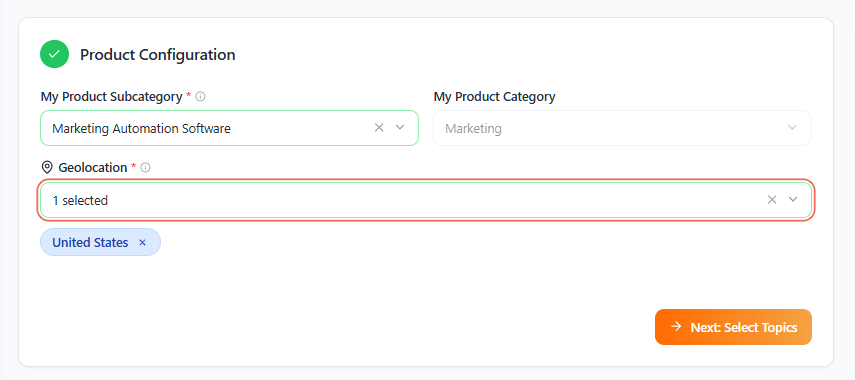
Jane selects: Subcategory → Marketing Automation. Category → Marketing Technology. Geolocation → United States. VAIS now knows exactly which intent signals to surface and where.
The key is to be as specific as possible with subcategory. A more precise product definition = more relevant intent topics = a sharper ABM list.
Once complete, click Next: Select Topics to proceed.
2. Select Intent Topics
This is the engine room of VAIS. Intent topics are the research behaviors and content consumption patterns that signal a company is in the market for a solution like yours.
Powered by Bombora, the industry standard for B2B intent data, VAIS surfaces topics that map directly to buying behavior in your category.
How to Select Topics:
- Generate Topics: Paste your website URL (e.g., https://www.bombora.com) into the Generate Topics field and hit search. VAIS will suggest topics relevant to your site’s content.
- Search Manually: Use the Search intent topics search bar to browse and find specific topics by keyword.
- Filter by Theme: Use the Filter Topic by Theme dropdown to narrow topics into thematic clusters (e.g., Security, Cloud, Analytics).
- Filter by Category: Once a theme is selected, Filter Topic by Category refines further, giving you surgical precision over which behavioral signals define your in-market accounts.
You can select up to 12 intent topics. Each topic you add is like adding another filter on the fishing map, you’re not just finding companies near the water, you’re finding the ones actively biting.
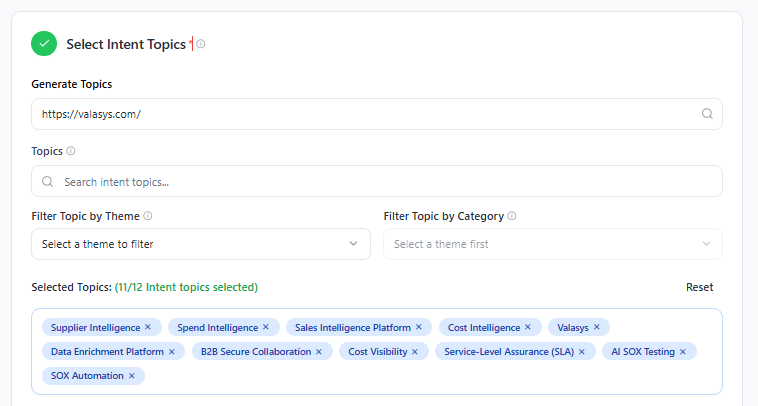
Jane selects 8 topics: ‘Supplier Intelligence’, ‘Spend IntelligenceSales’, ‘Intelligence PlatformCost’, ‘IntelligenceValasysData’, ‘Enrichment Platform’, ‘B2B Secure Collaboration’, ‘Cost Visibility’, ‘Service-Level Assurance (SLA)’.
Accounts hitting 4+ topics → Ready to Buy. At 2–3 → Evaluating Options. Even 1 topic gets an Exploring Solutions tag. No signal goes to waste.
Pro Tip: Mix broad topics (e.g., B2B Marketing) with specific ones (e.g., Marketing Automation Software) to catch both early-stage researchers and late-stage evaluators in the same build.
Also make sure your intent topics align closely with the Product Subcategory you selected. This alignment is critical for accurate scoring. The closer the topic reflects the actual product category, the stronger the intent signal becomes.

For example, if your product is 5G Home Internet, selecting “5G” as a topic will produce far more relevant intent signals than a broad topic like “Internet.” Precision here leads to sharper intent detection and a more reliable high-intent ABM list.
3. Upload Suppression File (Optional)
Before you build your list, you have the option to upload a suppression file, a list of contacts or accounts you want excluded from your output.
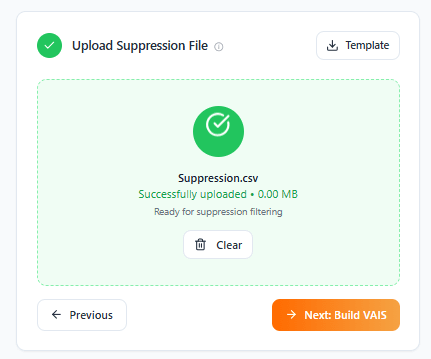
This is valuable for:
- Excluding existing customers (avoid spending budget on accounts you’ve already won)
- Removing accounts currently in active sales cycles (prevent overlap with your SDR team)
- Filtering out companies that have churned or been disqualified
Upload a .csv, .xlsx, or .txt file (max 5MB) of accounts to exclude, existing customers, active deals, or churned accounts. This keeps your list clean and your team focused on the net-new pipeline.
Jane exports 387 current customers from Salesforce and uploads them. Every account in her final list is genuinely a new opportunity.
4. Build Your VAIS
Click Build Your VAIS. The engine cross-references your configuration and topics against Bombora’s co-op, scores and ranks every matching account, and returns a download file annotated with VAIS score, alignment level, market trend activity, funnel stage, suggested campaign type, and recommended next action.
Use Save Search to preserve your setup for monthly refreshes.
Note: each build deducts one search credit (up to 38,000 downloads/day).
Jane’s list is ready in minutes. #1 is Cloudify Inc. (score 92, Ready to Buy: AE outreach). #2 scores 84, Evaluating Options: lead nurture with case studies. Different score, different play. All automated.
How to Use Your VAIS List
- Work Elite Fit + Ready to Buy first. Highest score + most active intent = call now.
- Let the funnel stage drive your campaign. VAIS maps every account to a campaign type, use it.
- Personalize using intent topics. Use the intent topics that triggered each account’s score to inform your messaging. If they’re researching ‘marketing attribution’, lead with that pain point.
- Refresh every 2–4 weeks. Buying windows close fast. Re-run VAIS before they choose a competitor.
- Sync with your CRM: Import the list into your CRM or MAP and create intent-based sequences. Trigger workflows when accounts hit a score threshold.
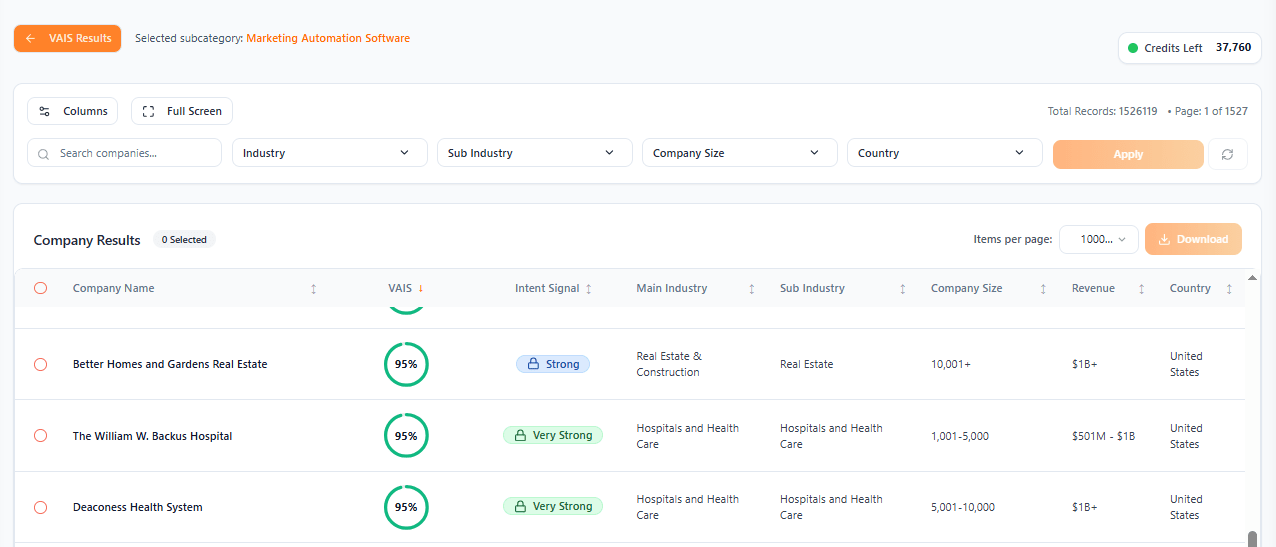
Jane runs three plays from the same list: AEs work Ready to Buy accounts. Nurture sequences go to Evaluating Options. LinkedIn matched audiences serve the Exploring Solutions tier. One VAIS build. Three targeted plays. Zero budget wasted.
Want to see which accounts in your market are actively researching solutions like yours? Run your own high-intent build with VAIS and see the results in minutes. Start your 7-day free trial and generate your first high-intent ABM list.
When you combine your ICP with live Bombora intent signals and AI scoring, the guesswork disappears. Instead of chasing accounts that merely look right on paper, you focus on the ones actively researching solutions like yours right now.
The payoff is simple. Sales talks to warmer accounts. Marketing runs campaigns that actually match buyer behavior. And your pipeline grows because you’re showing up while the buying decision is still in motion, not after it’s already been made.
Frequently Asked Questions (FAQs):
Q: How is VAIS different from a regular lead list?
A: A lead list tells you who fits. VAIS tells you who fits and is actively buying right now, and what campaign to run for each account.
Q: Where does the intent data come from?
A: Bombora’s B2B intent data co-op, 5,000+ topics across millions of web properties, representing real research behavior, not modeled assumptions.
Q: How many intent topics should I select?
A: Start with 4–8. Mix broad and specific. Too few = wide net; too many = over-filtered list. You can always adjust and rebuild.
Q: How often should I rebuild my list?
A: Every 2–4 weeks. Intent windows are short. An account in-market today may have decided in 30 days.
Stop Fishing in the Dark
VAIS doesn’t just tell you who to target, it tells you who to call first, what campaign to run, and what to say when you get there. Your buyers are already out there, raising their hands, you just have to reach them.
If you want to take this a step further, explore how look-alike modelling in VAIS helps you expand your ABM strategy by identifying companies that behave like your best-fit accounts. Read next: https://valasys.com/look-alike-modelling-in-vais/