WordPress AI Connectors: How WordPress 7 Is Building the Future of AI Websites
Discover how WordPress AI Connectors in WordPress 7 are shaping the future of AI-powered websites and smarter digital experiences.

Artificial Intelligence is slowly becoming part of everyday website development. From content generation to SEO suggestions, AI is changing how websites are built and managed.
With WordPress 7, we are seeing the first real step toward native AI integration inside WordPress core. One of the most important additions in WordPress 7 Beta 2 is something called WordPress AI Connectors.
If you noticed a new Settings → Connectors section in your dashboard and wondered what it does, this guide explains everything in simple language.
What Are WordPress AI Connectors?
WordPress AI Connectors are a new system introduced in WordPress 7 that allows you to connect AI providers like:
- OpenAI
- Claude
- Gemini
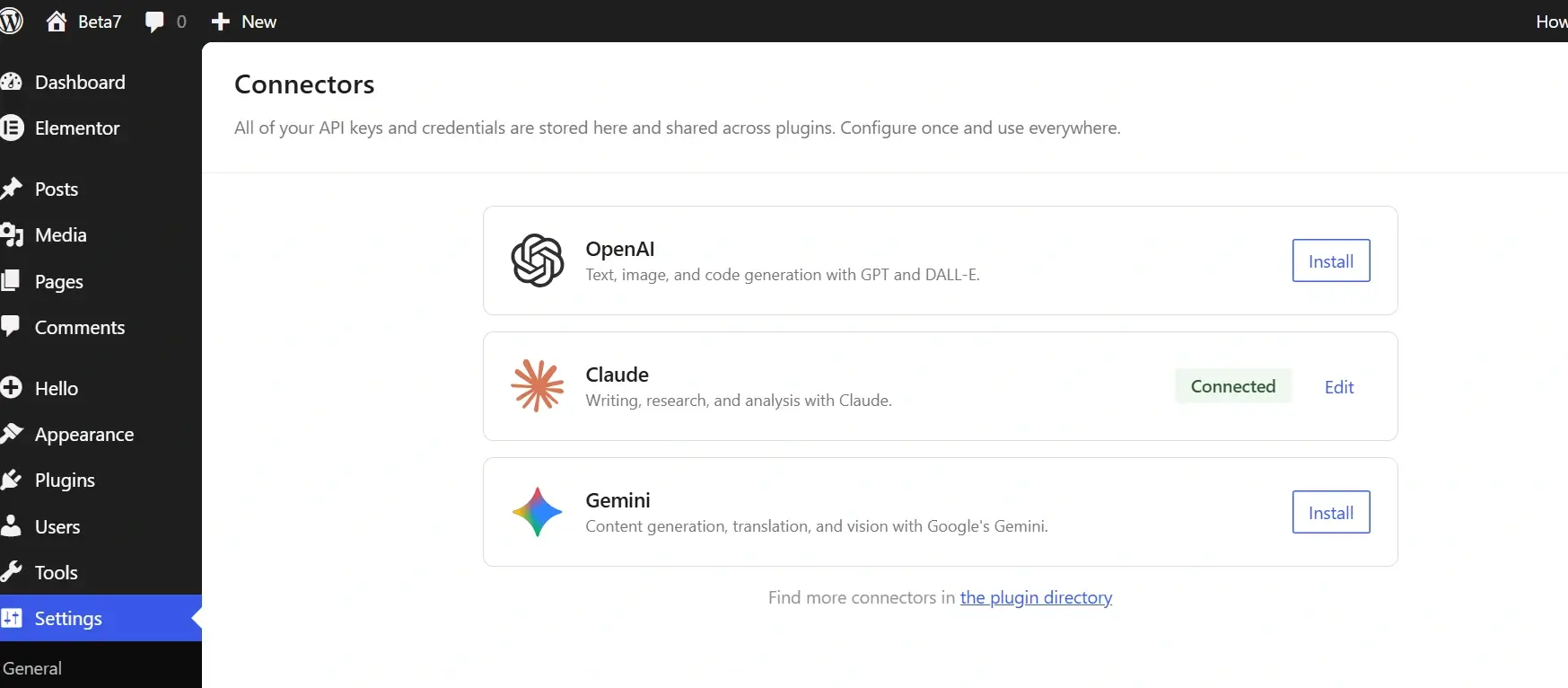
You can add your API keys once, and WordPress stores them securely.
It does not generate content automatically or create chatbots by default. Instead, it manages the connection between your website and external AI services.
Think of it as a central control panel for AI services inside WordPress.
Why WordPress Introduced AI Connectors
Before WordPress 7, every AI plugin worked separately.
If you installed multiple AI plugins, you had to:
- Enter the same API key multiple times
- Manage settings in different locations
- Use different integration methods
There was no standard system.
WordPress solved this by introducing a centralized structure. Now developers can use one unified AI Client system instead of building custom integrations every time.
How WordPress AI Connectors Work
Step 1: Add Your API Key
Go to Dashboard → Settings → Connectors.
Select a provider, install it, and paste your API key.
Step 2: WordPress AI Client Handles Communication
WordPress 7 includes an AI Client system that manages communication with AI providers using the credentials you stored.
This makes development easier and more secure.
Step 3: Plugins Use the System
Here is the important part:
AI Connectors alone do nothing.

Plugins must support the WordPress AI Client system to use these connections.
Once supported, plugins can:
- Generate blog content
- Create product descriptions
- Suggest SEO improvements
- Provide AI chat support
- Analyze user behavior
For example, developers could build niche AI tools such as predictive analytics dashboards, personalized recommendation engines, or even specialized applications like a destiny matrix calculator that generates insights directly inside a WordPress website.
What WordPress AI Connectors Do Not Do
- They do not automatically generate content.
- They do not replace AI plugins.
- They do not create built-in AI tools by default.
They are infrastructure. Like wiring in a building, they prepare the system for future use.
The Future of AI in WordPress
WordPress powers over 40% of the web. Adding AI infrastructure into core is a major signal for the future.
We can expect:
- AI-assisted content editing inside the block editor
- Smart layout suggestions in page builders
- Automated WooCommerce product content
- AI-driven SEO analysis
- Better personalization features
This is not just a feature update. It is a foundation update.
At Valasys Media, we see this as the beginning of a more intelligent WordPress ecosystem where AI becomes part of everyday workflows.
Frequently Asked Questions
What are WordPress AI Connectors?
They are a new feature in WordPress 7 that allows you to store and manage API keys for AI providers in one central location.
Do WordPress AI Connectors generate content automatically?
No. You still need plugins that use the AI Client system to generate content.
Is this available in the stable WordPress version?
Currently, it is available in WordPress 7 Beta 2. Full release is expected in the stable version.
Will page builders use WordPress AI Connectors?
Most page builders have not yet integrated this system, but adoption is likely after the official release.
Final Thoughts
WordPress AI Connectors may not look exciting today. There is no flashy interface or automatic AI assistant.
But this is how big changes begin.
By building AI infrastructure directly into the core, WordPress is preparing for a future where AI is not optional — it is integrated into how websites operate.
The real transformation will happen when developers and plugin creators start building on top of this system.
And that transformation has already started.