

The Best AI Image Editors in 2026: Tools That Redefine Visual Creation
Discover the best AI image editors in 2026 that redefine visual creation with smart editing, automation, and creative control.

Remember when editing a photo meant hours hunched over Photoshop?
A designer friend of mine spent three days last month manually removing backgrounds from 200 product images. By hand. In 2026. When I showed her what AI image editors could do, she nearly threw her tablet across the room. Not out of frustration. Out of disbelief that she’d been doing things the hard way for so long.
Here’s the thing about visual content today. Speed matters. Quality matters more. And nobody has time to master complex software just to swap a background or enhance a blurry shot.
That’s where AI image editors come in. They’ve transformed from novelty tools into essential creative companions. The best ones don’t just automate tedious tasks. They unlock possibilities that weren’t even imaginable a few years ago.
Why AI Image Editing Changes Everything
Traditional photo editing requires a specific skill set. You learn masking. You understand layers. You spend years developing an eye for color correction and exposure balance.
AI flips this equation entirely.
Now the barrier to professional-quality results isn’t technical expertise. It’s knowing what you want. Describe it in words. Click a button. Watch the AI handle the heavy lifting.
This shift matters for everyone. Marketers can create campaign visuals without waiting on design teams. Small business owners can produce product photos that compete with major brands. Content creators can maintain consistent quality across thousands of images.
The question isn’t whether to use AI image editors anymore. It’s which ones deserve your attention.
What Separates the Best from the Rest
Not all AI image editors deliver on their promises. Some generate muddy results. Others struggle with complex edits. Many lock essential features behind expensive paywalls.
The tools that stand out share common traits. They process requests quickly without sacrificing quality. They handle nuanced prompts intelligently. They offer intuitive interfaces that don’t require a manual to navigate.
Price matters too. But value matters more. A free tool that wastes your time costs more than a paid one that saves hours every week.
With dozens of options flooding the market, identifying the genuine performers takes real testing. These rankings reflect actual usage, not marketing claims.
The Top AI Image Editors Worth Your Time
1. Adobe Firefly
Adobe didn’t just add AI to Photoshop. They rebuilt their entire approach around it.
Firefly Image 5, their latest model, introduces layered editing that treats individual objects as separate manipulable elements. You can rotate objects, change perspectives, and blend new elements seamlessly. The integration with Creative Cloud means everything works within tools professionals already use.
The downside? Cost. Firefly Standard runs $9.99 monthly while the Photography plan sits at $20.99. Full Creative Cloud Pro access costs significantly more. For professionals already embedded in Adobe’s ecosystem, it’s a natural fit. For casual users, it might be overkill.
Best for: Professional designers, creative agencies, and anyone already using Adobe Creative Cloud who needs seamless integration with existing workflows.
2. getimg.ai
Here’s a tool that punches well above its weight.
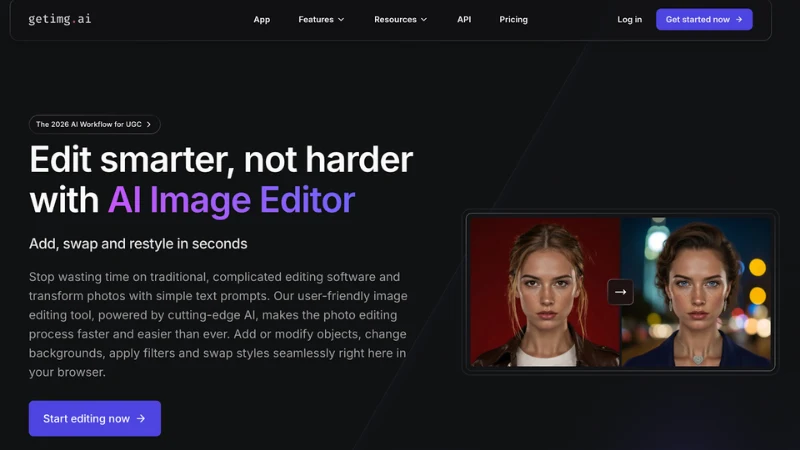
getimg.ai combines image generation and editing in a single browser-based platform. No downloads. No complex installations. Just open it and start creating.
The AI Image Editor stands out for its versatility. Inpainting lets you modify specific areas with text prompts. Background replacement happens automatically with clean edges. The sketch-to-image feature transforms rough drawings into polished visuals. You can even restyle entire photos while maintaining the original composition.
What makes it particularly valuable is the learning curve, or rather, the lack of one. New users can produce professional results within minutes. The interface guides you naturally through each feature without overwhelming you with options.
The free plan offers 100 images monthly. Paid tiers unlock advanced capabilities like custom model training through DreamBooth, allowing you to generate images matching your specific style. For creators who need both generation and editing capabilities without juggling multiple tools, it’s hard to beat.
Best for: Content creators, marketers, e-commerce sellers, and anyone who needs a versatile all-in-one platform for both image generation and editing without a steep learning curve.
3. Luminar Neo
Photographers have specific needs that general AI tools often miss.
Luminar Neo addresses them directly. Sky AI replaces dull skies with 35+ presets. Light Depth lets you place virtual light sources inside images and move them three-dimensionally for precise relighting. Face AI and Skin AI handle portrait retouching that looks natural rather than plastic.
The Fall 2025 update introduced an AI Assistant that analyzes photos in real time and suggests targeted edits. A Restoration tool brings damaged or old photos back to life. These additions push Luminar Neo firmly into professional territory while remaining accessible to enthusiasts.
Performance stays snappy even on older hardware. The mobile version matches the desktop experience closely. One-time purchase options exist alongside subscriptions, which photographers particularly appreciate.
Best for: Professional and hobbyist photographers who work with RAW files and need specialized tools for landscapes, portraits, and detailed photo enhancement.
4. Canva Magic Studio
Canva transformed from a simple design tool into an AI-powered creative platform.
Magic Edit, powered by Leonardo AI, handles common editing tasks with simple brushstrokes and text prompts. Magic Grab lets you select and manipulate subjects. It extends images beyond their original borders. The late 2025 Dream Lab integration brought dramatically improved image generation with the Leonardo Phoenix model, making AI-generated faces and complex compositions far more realistic than before.
The real strength is integration. Everything connects to Canva’s massive template library. Edit an image, drop it into a social post template, and publish. The workflow stays seamless from start to finish.
Free users get limited AI uses. Pro accounts unlock unlimited Magic Studio access for about $15 monthly. For social media managers and marketing teams, the combination of editing and design capabilities makes it incredibly efficient.
Best for: Social media managers, small business owners, and marketing teams who need quick edits combined with ready-to-use design templates.
5. Pixlr
Sometimes you just need something quick, free, and browser-based.
Pixlr delivers professional-grade AI photo editing without downloads or account requirements. Object removal works cleanly. Background replacement handles complex edges well. Enhancement tools improve lighting and color with single clicks.
It won’t match the depth of dedicated applications. Advanced users might find themselves wanting more control. But for fast edits and casual use, Pixlr removes every barrier to getting started.
Best for: Beginners, casual users, and anyone who needs quick browser-based edits without signing up or paying for software.
Making the Right Choice
Your ideal AI image editor depends entirely on how you work.
Professional photographers editing raw files need Luminar Neo’s specialized tools. Design teams already using Adobe products benefit from Firefly’s seamless integration. Social media managers handling diverse content types get maximum value from Canva’s all-in-one approach.
For versatility without complexity, getimg.ai offers the best balance. Generation and editing in one place. Browser-based access from any device. A generous free tier for testing. Paid plans that scale with actual needs.
The tools exist. The capabilities keep expanding. The only question is whether you’ll keep doing things the hard way while everyone else moves forward.
Getting Started This Week
Pick one tool from this list. Just one.
Don’t try to evaluate everything simultaneously. You’ll get analysis paralysis and end up sticking with your current workflow out of frustration.
Sign up for a free account. Upload an image you’ve been meaning to edit. Try the background removal. Test the enhancement features. See how it handles a complex request.
Give it an honest hour of exploration. That’s enough time to know whether it fits your workflow. If it doesn’t, try another one next week.
The photographers and designers thriving right now aren’t necessarily more talented than everyone else. They’re simply using better tools. And in 2026, the best tools happen to be powered by AI.
Start this week. Your creative output will thank you.

