


AI Home Design Made Simple with the AI Remodel App
Visualize your dream room before renovating. AI Remodel App brings ai home design to your phone fast, realistic, and incredibly easy to use.

Picture this. You have spent three weekends painting your living room a deep sage green. You were confident about it. Every swatch you looked at pointed toward the same decision. But once the furniture is back in place and the lighting hits the walls, something feels completely wrong. The colour is heavier than expected. The room feels smaller. And now you are stuck with it.
If that story sounds familiar, you are not alone.
Millions of homeowners go through the exact same situation every year. The problem is never really about taste, it is about not being able to truly see an idea before committing to it.
This is the exact problem that ai home design tools are built to solve. The AI Remodel app, in particular, is changing how people approach renovation by letting them visualise realistic room redesigns from their own phone — before touching a wall, buying a tile, or calling a contractor.
Renovation Without Visualization Is a Gamble
Here is something the home improvement industry rarely tells you. Most renovation regrets happen because of decisions made during planning, not during execution. The contractor did exactly what you asked. The problem is what you asked for did not look the way you thought it would in your actual space.
Small paint chips look nothing like full walls. Furniture dimensions on a website tell you very little about how a piece will feel in a room with specific proportions. Flooring samples under a store’s fluorescent lighting behave completely differently under your home’s natural light.
For years, the only real solution was hiring a professional interior designer. Someone who could translate your ideas into rendered visuals before any physical work began. That process is genuinely valuable. But it is also time-consuming and expensive — often running into thousands of dollars even for a single room project. Most people simply skip it and hope for the best.
The AI Remodel app makes that level of visual planning accessible to anyone.
What AI Remodel Does Differently
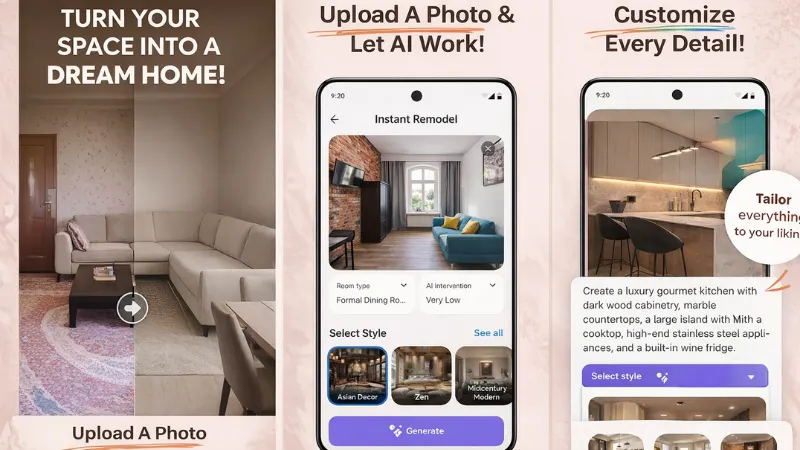
The AI Remodel app works from a single photograph of your room. You open the app, take or upload a photo of the space you want to change, and choose from a range of interior design styles. Within seconds, the app produces a realistic redesign of that room, one that respects your actual layout, dimensions, and existing structural elements.
This is a meaningful distinction. The app is not applying a template or dropping generic furniture into a blank floor plan. It is reading the real visual data in your photo and rebuilding the scene around it. Light, proportion, depth all of it is factored into the output.
What You Get Inside the App
The AI Remodel app is packed with features that serve real, practical needs:
- Photo-based redesign: Take a photo of any room and receive AI-generated redesign concepts in seconds.
- Multiple design styles: From clean Scandinavian and sleek modern to rustic, industrial, and classic aesthetics.
- All major room types covered: Works seamlessly for living rooms, kitchens, bedrooms, bathrooms, and outdoor spaces.
- Before and after toggle: Instantly compare your current room with the redesigned version on the same screen.
- Easy sharing: Save and send your chosen designs directly to builders, family members, or anyone involved in your renovation.
What makes this list more than just a features rundown is how these things work together in practice. When you can share an actual image of the finished look you are aiming for, the entire renovation process becomes smoother. Conversations with contractors become clearer. Decisions about materials become easier. Disagreements with partners about direction get resolved faster.
The Technology That Powers the Results
Behind the AI Remodel app is a generative AI system trained on extensive interior design data. It does not just know that a Japandi-style room uses neutral tones. It understands why those rooms feel calm, the low furniture, the natural textures, the deliberate use of negative space. That contextual knowledge shapes every redesign it produces.
The results are not perfect for renders, but they are realistic enough to be genuinely useful. And for most homeowners, that is all they need, a clear enough picture to feel confident about the direction.
The People Who Benefit Most
Homeowners planning significant renovations will find the most immediate value here. Being able to test a kitchen layout, a bathroom colour scheme, or a complete bedroom overhaul before committing any budget to it is enormously useful. It turns what is normally a stressful guessing game into a much more grounded decision-making process.
Renters benefit in a different but equally real way. When you cannot make structural changes to a space, your options are limited to furniture, textiles, lighting, and accessories. The AI Remodel app helps you experiment with those elements digitally first, so you spend money only on things you are actually confident about.
There is also a growing group of homeowners who use it specifically for property preparation before selling. Small changes better lighting, a fresh colour palette, decluttered arrangements — can make a significant difference to how a home photographs. The app helps identify which changes are worth making and how to execute them effectively.
How to Use It: Start to Finish
Getting your first redesign takes less than two minutes. Here is the full process:
- Download the AI Remodel app from the Google Play Store onto your Android device.
- Open the app and select the room category that matches the space you want to redesign.
- Take a fresh photo of the room or upload one from your gallery.
- Select a design style that reflects what you are going for.
- Allow the AI to process your image — results appear within a few seconds.
- Review and compare the redesigned version alongside your original photo.
- Save the design or share it directly with anyone involved in your renovation plans.
Each step is intuitive and requires no prior experience with design tools. The app is built for real people with real homes, not design professionals working in studios.
Wrapping Up
There is something genuinely freeing about being able to see a bold idea clearly before you act on it. Renovating your home should be exciting, not anxiety-inducing. The AI Remodel app takes away a significant chunk of that anxiety by replacing guesswork with actual visual evidence.
It will not make every design decision for you. But it will make sure that when you do decide, you are deciding with full clarity about what you are choosing. For anyone standing in a room and wondering what it could become — that kind of confidence is worth more than most people realise until they have it.

