

AiPPT: The Ultimate Guide To Using Our PPT to PDF Converter
Convert PPT to PDF easily with AiPPT. Learn how our fast, secure PPT to PDF converter works and create high-quality PDFs in seconds.

In the world of digital communication, the moment arrives for every presentation to transition from a work-in-progress to a final, shareable document. This is where the crucial step of PPT to PDF converter into play. It’s more than a simple file format change. It’s about preserving your intent, securing your content, and ensuring universal accessibility. Navigating this process shouldn’t require technical expertise or complex software. AiPPT is built on a singular philosophy: to strip away all complexity and deliver a tool that is purely focused on flawless, fast, and secure PPT to PDF conversion. This guide will walk you through everything you need to master our converter, transforming this final step from a potential hurdle into a seamless part of your workflow.
Part 1: Why Professional Conversion Matters — The Core Advantages of PDF
Understanding the “why” behind PPT to PDF conversion is key to appreciating its value. A PDF is not just another file but a digital snapshot of your work.
Visual Fidelity is Non-Negotiable: A PPT file might look perfect on your machine, but on another computer with different fonts or an older software version, your careful layout can disintegrate. Converting PPT to PDF effectively “freezes” your design. Every element—from custom fonts and precise image placements to specific color schemes—is locked in place. This guarantees that every recipient sees exactly what you designed, regardless of their device or platform.
The Ultimate Barrier for Security and Integrity: Once a presentation is finalized, the last thing you want is accidental edits, misplaced data, or unauthorized modifications. A PDF acts as a protective barrier. By converting your PPT to PDF, you create a read-only document ideal for formal submissions, legal documentation, client deliverables, or archival purposes. It ensures the message you send is the message received, unchanged and complete.
The Universal Language of Collaboration: Not everyone has, or needs, presentation software. Sending a PPT file can create unnecessary friction. A PDF, however, is a universal standard. Virtually every computer, tablet, and smartphone has a built-in way to open it. Using AiPPT for PPT to PDF conversion removes all technical barriers for your audience, making collaboration and distribution effortless and professional.
Part 2: First Impressions: The Minimalist Design of the AiPPT Converter
When you visit the AiPPT PPT to PDF tool page, you are met with an interface that embodies clarity and purpose. There are no distracting menus, overwhelming options, or cluttered layouts. Our design philosophy is intentional: to reduce cognitive load and let you complete your task without a single moment of confusion.
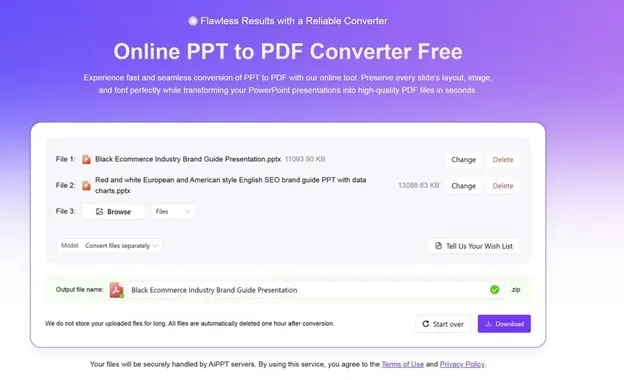
The workspace is intuitively one primary zone. You can upload your files, select the conversion options, and download the PDF there.
We believe a tool should be understood at a glance. By focusing exclusively on the core function—transforming your presentation into a high-quality PDF—we eliminate the learning curve. This minimalist approach allows us to channel all our resources into ensuring the conversion process itself is exceptionally reliable and swift.
Part 3: The Core Three-Step Flow: From Upload to Download
The power of AiPPT lies in its streamlined process. Achieving a perfect PPT to PDF conversion requires only three intuitive actions.
Step 1: Flexible and Simple Upload
We offer two equally straightforward methods to bring your files into the tool:
- Drag-and-Drop: Simply drag your PPT file(s) from your desktop folder and drop them directly into the designated zone on the webpage. It’s a fast, visual, and efficient method.
- Click-to-Select: Click the upload area to open your system’s file browser, then navigate to and select the presentation you wish to convert. This method is perfect when you have a specific file path in mind.
AiPPT supports standard presentation formats, ensuring your work is ready for conversion. The upload is quick, putting you in control within seconds.
Step 2: The One Essential Pre-Conversion Choice
After upload, before initiating the PPT to PDF process, you are presented with a single, meaningful decision: how to handle your file(s). This choice tailors the output to your specific needs.
- Merge files: Select this option if you have uploaded multiple PPT files that belong together. AiPPT will combine them, in upload order, into a single, continuous PDF document. This is ideal for creating comprehensive reports, multi-chapter documents, or a complete project portfolio for unified distribution.
- Convert files separately: Choose this if you want each uploaded PPT file to become its own independent PDF. This is the best choice for processing a batch of unrelated presentations, maintaining their individual identities for separate sharing, filing, or naming.
This elegant single-choice system removes guesswork. You decide the structure of your output with one click, and we handle the rest.
Step 3: Retrieving Your High-Quality PDF
Once you make your selection, the conversion begins immediately. Our systems work in the background to render your slides with precision. Within a short time, your file is ready.
A clear download button will appear. A single click saves the resulting PDF directly to your device.
For multiple files converted separately, you will typically receive them in a convenient zip folder for easy management.
From there, the file is yours. You can rename it, attach it to an email, store it in your cloud drive, or print it—confident that the document is a perfect digital replica of your original presentation.
Part 4: Mastering the Conversion: Pro Tips and Best Practices
To leverage the AiPPT PPT to PDF converter like a pro, a small amount of preparation can ensure optimal results.
Pre-Conversion Preparation for Your PPT File: Since our tool is designed for maximum fidelity, what you give is what you get. For the best outcome:
- If you used special fonts, consider embedding them in your PPT file before upload (check the “Save” options in your presentation software). This guarantees the PDF preserves your exact typography.
- Complex animations and transitions are typically rendered as their final static state in a PDF. For critical animated sequences, consider creating additional slides that depict the key states.
- Ensure images are of sufficient resolution for their intended use (e.g., print vs. screen viewing).
Strategic Batch Processing: The simplicity of our interface does not limit batch capabilities. You can select and upload several files at once using your system’s file dialog. Then, use the “Merge” or “Separate” function to define the output for the entire batch in one operation, saving significant time.
Managing Special Content: Elements like speaker notes, comments, and intricate vector graphics are processed faithfully. Understanding that a PDF is a static format helps set the right expectations—interactive elements like embedded video will become static images or links.
Part 5: Integrating AiPPT into Your Real-World Workflows
The true test of a tool is how it fits into your daily life. The AiPPT PPT to PDF converter seamlessly integrates into numerous professional and personal scenarios.
- For Educators and Students: Submit thesis defenses or project reports as unalterable PDFs. Distribute lecture notes and reading materials in a format every student can open instantly, without compatibility concerns.
- In the Business World: Sales teams can send finalized, brand-perfect proposals to clients. Project managers can archive milestone reviews. HR departments can circulate official company policies. Converting PPT to PDF adds a layer of professionalism and finality to all corporate communications.
- For Creatives and Consultants: Designers can deliver visual concepts and final layouts. Independent consultants can provide analysis reports with fixed data charts. It’s the perfect format for portfolio pieces or client deliverables that must look exactly as intended.

