

Micro SD vs SD Card: What’s the Difference and Which Should You Buy
Understand the key differences between SD and microSD cards, including physical size, capacity, speed classes, and ideal use cases to choose the right storage for your devices.

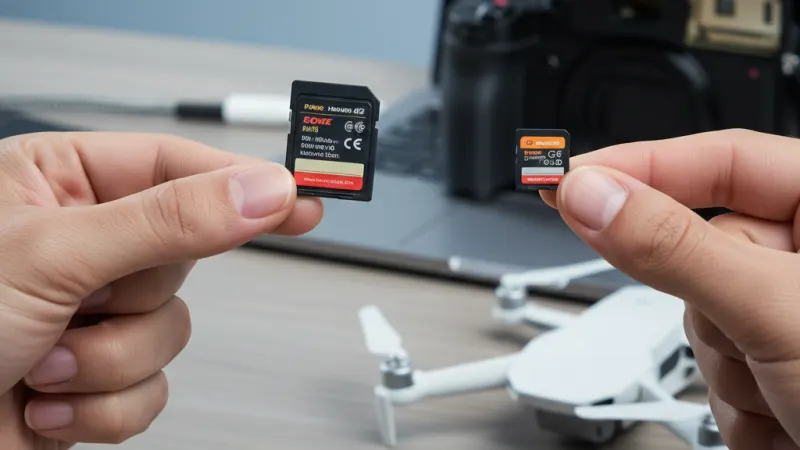
If you’ve shopped for removable storage lately, you’ve probably run into two near-identical acronyms: SD and microSD. They share logos, speed ratings and even many of the same brand names, so it’s fair to wonder if there’s any practical difference. In short: there is.
The right pick depends on what you’re putting it in, how you plan to use it, and the performance your device can actually take advantage of. Here’s a clear guide to help you buy confidently.
The physical difference (and why it matters)
SD (full-size) cards measure 32 × 24 × 2.1 mm and are the standard for most cameras—DSLRs, mirrorless bodies and many camcorders. They feel sturdy, include a tiny write-protect switch on the side, and are easier to handle with cold or clumsy fingers.
A micro sd card is much smaller at 15 × 11 × ~1 mm. You’ll find them in drones, action cams, dash cams, handheld consoles (like the Switch), Raspberry Pi projects and some Android phones and tablets. A microSD card can be used in an SD slot with a cheap passive adapter; the reverse is impossible.
That adapter detail is important: while adapters work fine for moving files, most are UHS-I only. If your camera and card both support UHS-II (faster, thanks to a second row of contacts), popping a microSD into an adapter can quietly cap your speeds. For critical work, prefer a native full-size SD card if your device is built for one.
Capacity: SDHC, SDXC and friends
Both SD and microSD share the same capacity families:
- SDHC: 4–32 GB
- SDXC: 64 GB–2 TB
- SDUC: up to 128 TB (rare in the wild)
Your device must support the family you buy. Older cameras may top out at SDHC; many modern devices handle SDXC without issue. Always check the manual before spending up on a massive card you can’t fully use.
Speed classes decoded (without the marketing fog)
Speed logos are messy, but they boil down to minimum sustained write speed—the thing that stops your 4K video from stuttering or your burst photos from stalling.
- Speed Class (C2–C10): legacy; C10 = 10 MB/s minimum.
- UHS Speed Class (U1, U3): U1 = 10 MB/s, U3 = 30 MB/s minimum.
- Video Speed Class (V10, V30, V60, V90): designed for high-bitrate video; V30 = 30 MB/s, V60 = 60 MB/s, V90 = 90 MB/s minimum.
You’ll also see UHS bus versions:
- UHS-I (up to 104 MB/s bus) is most common.
- UHS-II (up to 312 MB/s bus) uses an extra row of pins and dramatically speeds up bursts and offloads—if your device and reader support it.
- SD Express exists on paper for extreme speeds, but consumer adoption is still limited.
For phones and tablets, there’s an extra label: A1 and A2 (Application Performance). These indicate random read/write performance and IOPS. A2 is better for running apps from the card, provided your device and OS can take advantage.
Use-case recommendations
Here’s the practical bit—match the card to the job.
- Mirrorless/DSLR photography: If your camera has a full-size SD slot, buy a full-size SD. For casual shooting and 1080p video, a UHS-I V30/U3 card is fine. For high-speed bursts or long 4K/6K clips, step up to UHS-II V60 (sports, wildlife) or V90 (high-bitrate or 8K on supported bodies).
- Action cams & drones: Most use microSD. Choose V30 as a baseline for reliable 4K. Some newer, higher-bitrate modes appreciate V60. Stick to reputable brands and avoid suspiciously cheap, super-high capacities—they’re often counterfeit.
- Dash cams & security cams: Look for “high endurance” microSD models designed for constant overwriting. A V30 or C10 is usually adequate; endurance matters more than peak speed.
- Android phones & tablets (if they support microSD): Prioritise A2 for smoother app and game performance. For photos and video, V30 is a safe bet.
- Nintendo Switch and handheld consoles: microSD A1/A2 cards work well; capacity and reliability are the priorities. V30 helps with faster game installs and updates.
- Raspberry Pi & maker projects: A2 microSD can noticeably reduce boot and load times. Consider making backups—cards lead hard lives in these devices.
Reliability, durability and avoiding fakes
Not all cards are equal. Look for water, shock, X-ray and temperature ratings if you travel or shoot outdoors, and consider brands that offer clear endurance lines and multi-year warranties. To dodge counterfeits, buy from authorised retailers, keep the packaging, and test the card on arrival (using tools like H2testw/F3). If a 1 TB card is suspiciously cheap compared to the rest of the market, it’s almost certainly not legit.
Readers, cables and workflow
Your card is only as fast as the slowest link. If you buy a UHS-II card for speedy offloads but use a bargain-bin UHS-I reader (or pop a microSD into a basic adapter), you’ll be scratching your head at the transfer times. Pair UHS-II cards with UHS-II readers and use reliable USB-C cables. For UHS-I cards, a decent modern reader still helps.
What should you actually buy?
Use the slot your device offers—that’s the simplest rule.
- If your camera has a full-size SD slot, buy a full-size SD card. Handling is better, UHS-II options are plentiful, and you’ll avoid adapter bottlenecks. Pick V30/U3 for everyday 4K, V60 or V90 for high-speed bursts and demanding codecs.
- If your device takes microSD (drone, action cam, dash cam, handheld console, some tablets/phones), buy a microSD that meets the speed class your workload needs: V30 minimum for 4K, A2 if app performance matters, and high-endurance for continuous recording.
- If you need one card to move between devices, a quality microSD with a good adapter can be versatile—but be mindful you may sacrifice UHS-II performance in SD-only gear. For mission-critical shoots, stick with native form factors.
Bottom line
There’s no universal best card, only the best card for your device and workload. Full-size SD remains the right tool for most cameras, especially when you want top-tier UHS-II performance and fuss-free handling. microSD shines in compact gear and everyday versatility, and with the right speed class it’ll handle 4K and beyond just fine. Choose the form factor your device expects, match the speed rating to your recording needs, and buy from a trustworthy retailer. Do that and you’ll save yourself headaches, corrupted clips and slow transfers, too right.

