


The 60-Second Trust Test: How B2B Brands Can Use AI Video Without Sounding Like AI
: Learn to make trustworthy B2B AI video with a practical 60-second review framework, verified product evidence, clear scripts, permissions, and human checks.


A B2B video can look expensive and still leave the buyer unsure.
The lighting is polished. The transitions are smooth. The narrator sounds confident. Yet the viewer cannot tell what the product actually does, whether the results are real, or why the company deserves another minute of attention.
AI video makes this problem easier to produce at scale. It also gives smaller teams a practical way to improve how they explain their work. The difference comes from the decisions made before generation and during review.
For teams exploring a Seedance 3 AI video generator, the useful starting point is a clear boundary: which parts of the video explain an idea, and which parts must demonstrate a verified fact?
This article introduces a 60-second trust test that B2B marketers can apply to scripts, generated footage, and finished videos. The framework focuses on three things a buyer should be able to identify: the problem, the evidence, and the next step.
Start With a Trust Brief
Most video briefs specify the audience, duration, format, and campaign goal. Add four more fields before anyone writes a prompt.
The claim: What exactly should the viewer believe after watching?
The evidence: What approved material supports that claim?
The boundary: What could the video accidentally imply that the company cannot support?
The next step: Where can the viewer examine the claim in more detail?
Consider a company selling an approval-management platform.
A weak claim would be: “Our software eliminates approval delays.”
A more useful claim would be: “Our software helps teams see which requests are waiting, who owns the next action, and when a decision is due.”
The second statement gives the production team something specific to show. Its evidence might be an approved product recording of the pending-request view. Its boundary might be that the platform does not make approval decisions automatically. Its next step could be a guided demonstration.
This brief connects creative choices to product reality. It also makes review easier because reviewers know what the video is trying to establish.
Separate Visual Explanation From Product Evidence
AI-generated scenes are useful for showing situations that would be inconvenient to film: a busy office, a fragmented process, a conceptual flow of information, or a transition between business states.
Accuracy becomes more demanding when the scene represents a product interface, customer result, employee, or real-world event.
Before production, assign each planned shot one of three roles:
| Shot role | Suitable material | What to verify |
| Business context | Generated or licensed illustrative footage | The scene does not imply an undocumented customer event |
| Product evidence | Current screenshots, recordings, or approved diagrams | Features, labels, and behavior match the product |
| Customer proof | Authorized quotes, approved case-study figures, or licensed customer footage | Permission, wording, measurement period, and scope |
For example, a generated scene of a manager searching through scattered documents can establish a familiar problem. The next shot showing a software dashboard should use actual product material if it is presented as a demonstration.
During editing, place the verified screen recording inside a simple frame or use it full-screen. Generated footage can provide the surrounding context without being responsible for reproducing every interface detail.
This distinction is particularly useful for SaaS, cybersecurity, analytics, and financial-service brands, where a small visual error can suggest a capability the product does not offer.
Run the Test Before Generating Footage
The 60-second trust test is a review exercise. It can be applied to a storyboard before the team spends time generating scenes.
Use the following four checkpoints:
At 10 Seconds: Can the Buyer Recognize the Problem?
Write an opening around a moment your audience experiences.
“Unlock the future of business productivity” gives the viewer little to recognize.
“Three teams are waiting for the same approval, and nobody knows who needs to act next” establishes a concrete situation.
Look for language in sales-call notes, support questions, and approved customer interviews. Remove identifying or confidential details before using that material in a creative workflow.
Then choose a visual that reinforces the situation. One waiting request and a clearly visible owner can communicate more than a montage of people looking frustrated at laptops.
At 25 Seconds: Does the Promise Match the Evidence?
Underline every sentence that makes a factual or performance claim.
For each sentence, identify its source. A product claim should map to current product documentation or a verified demonstration. A numerical result should map to an approved case study or measurement record.
If there is no source, revise the sentence.
For example:
- “Save hours every week” requires a basis for the time-saving claim.
- “See pending approvals in one place” can be supported by a demonstration of that view.
- “A customer reduced review time by 30%” requires an approved figure, a defined measurement period, and context about that customer’s situation.
Do the same review for visuals. A dashboard that shows every task completed instantly makes a promise even if the narrator never says “instant.”
At 45 Seconds: Does the Explanation Sound Like Your Team?
Ask a colleague who regularly speaks with customers to read the script aloud.
Have them flag phrases they would never use in a real conversation. Common examples include “seamless transformation,” “unparalleled efficiency,” and “the ultimate solution.”
Replace those phrases with observable actions.
“Streamline collaboration” might become “assign the next reviewer and show when their response is due.”
“Unlock actionable insights” might become “identify which campaign produced the qualified inquiries.”
A useful editing method is to mark each sentence as one of three things: a problem, an explanation, or evidence. Sentences that fit none of those categories may be taking time without helping the buyer.
The aim is a script that a knowledgeable employee could comfortably say.
At 60 Seconds: Is the Next Step Worth Taking?
The ending should match the level of understanding the video has created.
If the video introduces a problem, offer a relevant guide or a deeper explanation. If it demonstrates a feature, offer a full walkthrough. If it presents a customer result, link to the complete case study.
Avoid asking for a sales meeting immediately after a video that has explained very little.
A focused ending might say: “Watch the two-minute walkthrough to see how requests move between reviewers.”
That invitation tells the buyer what they will get and why it relates to the video they just watched.
A Worked Example: Revising a Weak AI Video Concept
Imagine a hypothetical approval-software company preparing a LinkedIn video.
Its first script reads:
“Our revolutionary platform eliminates bottlenecks, transforms team productivity, and delivers effortless collaboration. Join the future of work today.”
The planned footage shows a generated dashboard, employees celebrating, and a graph rising sharply.
Three problems appear immediately. The claims are broad, the interface is invented, and the graph implies a measured improvement without a source.
A revised 60-second plan could look like this:
| Time | Message | Visual |
| 0–10 seconds | “A request is waiting. Three teams assume someone else owns the next step.” | Illustrative office scene followed by a simple editor-built request graphic |
| 10–25 seconds | “When ownership is unclear, the team spends time chasing updates.” | A short sequence of follow-up messages, using fictional details |
| 25–45 seconds | “This view shows the pending request, its assigned reviewer, and its due date.” | Verified recording of the current product |
| 45–60 seconds | “See how a request moves through a complete review cycle.” | A readable end card linking to the full walkthrough |
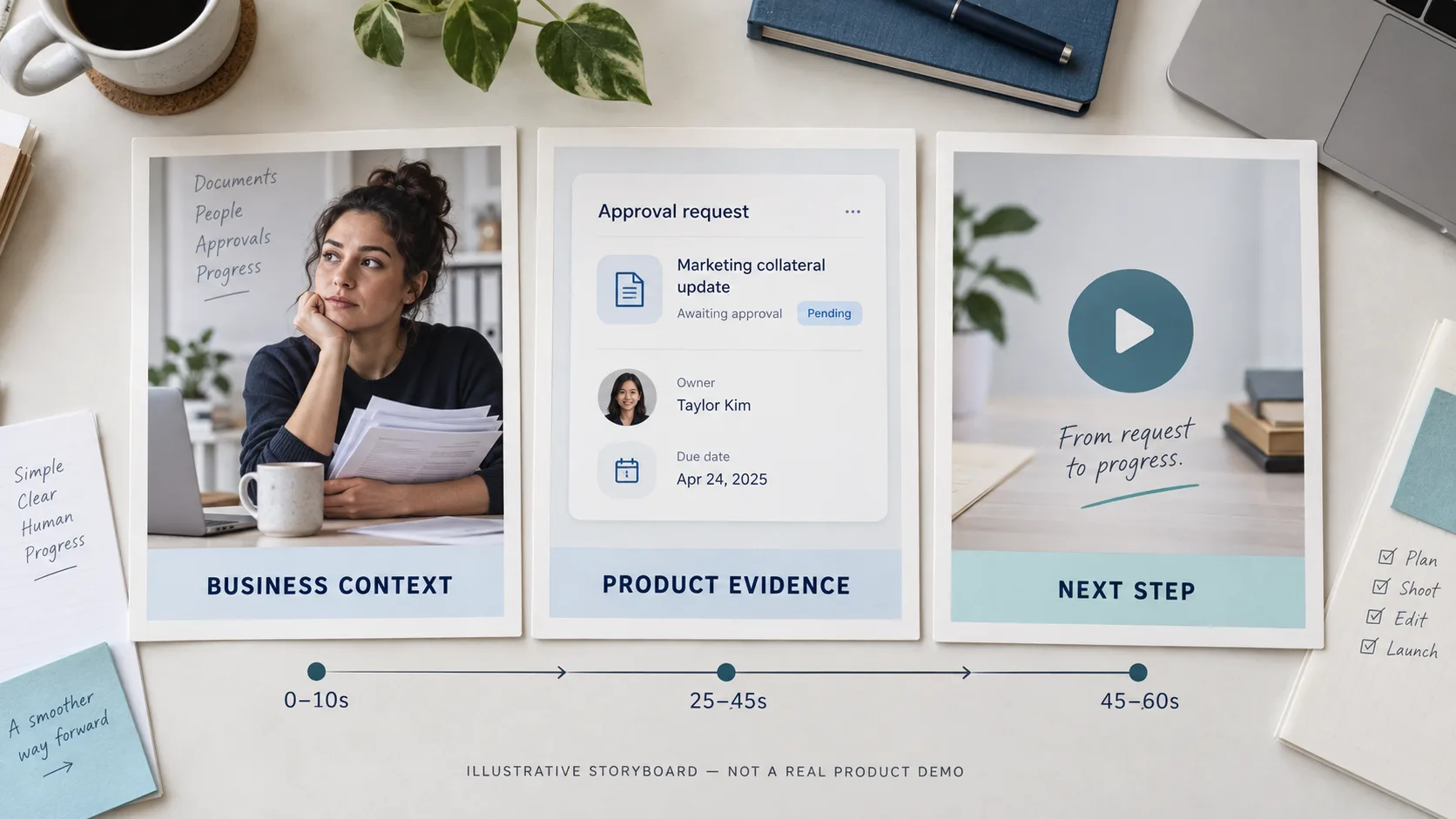
This is an illustrative production plan, not a claim about measured campaign performance.
Its strength is that every scene has a defined job. The generated material establishes context. The product recording supplies evidence. The ending offers a way to investigate further.
Write Prompts That Preserve the Boundary
A useful prompt describes the shot’s purpose and limits, as well as its appearance.
For the opening scene above, a production prompt might be:
A realistic office scene showing a project coordinator checking a small stack of documents while waiting for an update. Medium shot, restrained expression, natural daylight, slow camera movement. Leave clear space on the right for a caption added during editing. No visible company logos, no readable customer documents, no software screens, and no exaggerated celebration.
This prompt keeps the generated scene focused on the business situation.
Add precise product wording, captions, charts, and interface recordings during editing, where the team can control them. If a scene repeatedly introduces distracting details, simplify the composition or replace it with a graphic.
A short, clear shot that supports the script is usually more useful than a visually ambitious shot that requires an explanation of its mistakes.
Handle Faces and Voices With Specific Permission
A recognizable person can add credibility, but synthetic representations need clear authorization.
Before using a real person’s likeness or cloned voice, establish permission for the intended use. That should cover the script or message, distribution channels, campaign duration, and whether the material may be adapted later.
Approval for an ordinary interview should not automatically be treated as approval to generate new statements in that person’s voice.
Keep the permission record with the production assets. Give the person an opportunity to review the version that represents them.
If the team cannot establish that permission, use an authorized narrator, abstract visuals, or product footage.
For disclosure, review the requirements of the distribution platform and relevant market. Even where a specific disclosure is not required, label realistic synthetic material when viewers could reasonably mistake it for a real customer statement, person, or event.
Review the Finished Video in Three Passes
One general viewing often misses problems. Give each review pass a specific purpose.
First, listen without watching. Check whether the spoken explanation makes sense by itself. Flag unsupported promises, unfamiliar jargon, awkward emphasis, and wording that differs from the brand’s normal language.
Next, watch with the sound off. Check captions, product details, visual implications, and the ending. Confirm that the message is understandable for someone watching silently.
Finally, watch frame by frame around important moments. Inspect faces, hands, logos, product screens, transitions, and figures. Check that captions remain readable long enough to understand.
Ask a reviewer who did not help create the video to answer three questions afterward:
- What problem does this company address?
- What did the video actually demonstrate?
- What would you expect to find after clicking the next-step link?
If their answers differ substantially from the brief, revise the relevant section before publishing.
Measure Understanding Alongside Attention
Views and completion rates show whether a video held attention. They do not establish that the buyer understood it correctly.
For an initial pilot, combine viewing data with a small number of direct responses. Ask sales teams whether prospects repeat the intended message. Check whether the video generates questions about the demonstrated feature or confusion about capabilities it never meant to promise.
Track corrections as well. A video that repeatedly creates the same misunderstanding needs a script or visual change, even if its engagement figures look strong.
Useful review signals include:
- Whether viewers can describe the demonstrated capability accurately.
- Whether follow-up questions relate to the intended use case.
- Whether the destination page fulfils the video’s invitation.
- Whether sales or support teams need to correct a recurring misconception.
These observations give the next production cycle a concrete improvement target.
Make Every Minute Defensible
A trustworthy B2B AI video gives the buyer a clear problem, a supported explanation, and a sensible next step.
That standard is achievable for a small team. Start with a trust brief. Decide which shots illustrate context and which supply evidence. Check the script at 10, 25, 45, and 60 seconds. Review permissions and inspect the finished edit with distinct questions.
The result should be a video your team can explain confidently—both to the people watching it and to the colleagues responsible for the promises it makes.

