


AI Automation for Business
AI automation helps businesses streamline workflows, reduce manual tasks, improve efficiency, scale operations with smarter, faster processes


Running a business means dealing with endless tasks. Emails need replies, customer questions need answers, reports need updates, and employees spend hours moving information from one system to another. What if many of these jobs could happen automatically?
That is where AI automation for business comes in. Instead of relying only on fixed rules, businesses can use artificial intelligence to understand information, make basic decisions, and complete tasks with less human involvement. It is like giving your business an extra digital team member that works around the clock.
What Is AI Automation for Business?
AI automation combines artificial intelligence with automated business processes. Traditional automation usually follows a fixed set of instructions. AI-powered systems can go further by understanding text, recognizing patterns, processing data, and adapting to different situations.
For example, a basic system may forward every email to the same person. An AI system can read the message, identify its purpose, prioritize it, and route it to the right department.
How AI Automation Works
AI automation connects business tools, data, and processes into a smarter operating system. It can collect information from emails, forms, documents, websites, and customer conversations.
From Repetitive Tasks to Smart Workflows
Imagine an employee checking hundreds of emails every morning. An automated workflow could sort those emails, identify urgent requests, extract useful details, and send routine replies.
Businesses can build these processes through an AI automation platform, helping different tools and AI capabilities work together instead of operating in separate silos.
Why Businesses Are Adopting AI Automation
Companies are under constant pressure to do more with fewer resources. Manual processes are not only slow; they can also create errors and make it harder for teams to focus on meaningful work.
Save Time and Reduce Costs
AI can handle repetitive work quickly and consistently. Automating data entry, document processing, scheduling, and routine communications can free employees to spend more time on strategy, creativity, and customer relationships.
Improve Customer Experiences
Customers expect fast responses. AI automation can help businesses answer common questions, classify support requests, recommend relevant information, and provide assistance outside normal office hours. AI customer support automation can take this further by streamlining routine support workflows.
Common Uses of AI Automation
AI automation can be applied across almost every department. The best use cases are usually tasks that are repetitive, time-consuming, or dependent on large amounts of information.
Sales and Marketing
Sales teams can use AI to qualify leads, organize customer data, personalize messages, and identify prospects that need attention. Marketing teams can automate reporting, content workflows, audience segmentation, and campaign analysis.
Customer Support
AI can classify incoming tickets, identify common problems, suggest responses, and route complex issues to human agents. This creates a faster support process without removing human involvement where it matters.
Finance and Administration
Finance departments can automate invoice processing, expense reviews, document extraction, and routine reporting. Administrative teams can also use automation for approvals, scheduling, and internal requests.
Choosing the Right AI Automation Platform
Not every business needs the same solution. Before choosing a platform, consider your existing tools, business goals, security requirements, scalability, and the processes you want to automate.
A useful platform should make integrations easier and allow your team to manage multiple workflows without creating unnecessary complexity.
The Role of AI Workflow Automation
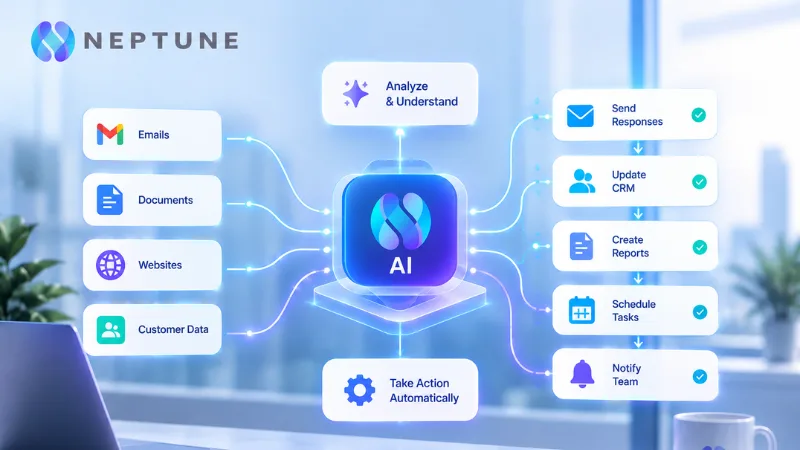
One of the biggest advantages of modern automation is the ability to connect multiple steps into one process. AI workflow automation can allow information to move between systems, trigger actions, and coordinate tasks based on changing inputs.
For example, a new customer inquiry could trigger lead classification, CRM updates, an internal notification, and a personalized response. Instead of four separate manual tasks, the entire process can become one connected workflow.
Challenges Businesses Should Consider
AI automation is powerful, but it is not magic. Poor data, unclear processes, weak integrations, and a lack of human oversight can reduce its value.
Businesses should start with clear goals and measurable processes. Human review should also remain available for sensitive decisions or situations where context is important.
How to Get Started With AI Automation
Start small. Pick one repetitive process that takes significant time and has clear rules. Measure how long it currently takes, identify unnecessary steps, and then introduce automation gradually.
Once the first workflow performs well, the same approach can be expanded to sales, support, finance, operations, and other departments.
The Future of AI Automation for Business
AI automation is moving toward more connected and intelligent business operations. As AI systems become better at understanding context and working across multiple applications, businesses will have more opportunities to automate complex processes.
The goal is not to replace every human task. It is to remove unnecessary manual work so people can focus on decisions, relationships, creativity, and growth.
Conclusion
For modern businesses, AI automation is becoming less of a luxury and more of a practical way to improve efficiency. From customer support and marketing to finance and internal operations, the right automation strategy can save time, reduce errors, and create smoother workflows. The smartest approach is to start with one useful process, measure the results, and expand from there.
Frequently Asked Questions
1. Is AI automation only for large businesses?
No. Small and mid-sized businesses can also automate repetitive tasks and improve efficiency without building a huge technical infrastructure.
2. What business tasks are best for AI automation?
Repetitive tasks such as data entry, email sorting, customer support, reporting, scheduling, and document processing are often good starting points.
3. Does AI automation remove the need for employees?
Not necessarily. In many cases, automation handles repetitive work while employees focus on tasks that require judgment, creativity, communication, and problem-solving.
4. How long does it take to implement AI automation?
It depends on the process, tools, and integrations involved. A simple workflow may be implemented quickly, while complex business processes require more planning and testing.
5. How should a business start with AI automation?
Choose one repetitive process, define the desired result, select suitable tools, test the workflow, and measure the improvement before expanding automation to other areas.

