


AI storyboard workflow for B2B explainer videos
Learn how to use an AI storyboard workflow for B2B explainer videos, from scriptwriting and scene planning to visuals and production.


Photographic storyboard references prepared for a video production brief. AI-generated editorial illustration.
An AI storyboard workflow for a B2B explainer should turn the business message into a sequence of approved visual decisions before video production begins. Give each shot a communication purpose, a clear composition and a defined handoff to the next shot.
Sponsored content from Virse. Prepared with AI assistance and editorial review.
Once the reference frames are ready, MiniMax H3 on Virse provides frame-driven and reference-driven video entries within a visual workspace. Treat those inputs as part of the production brief, and review the generated clips against the approved board.
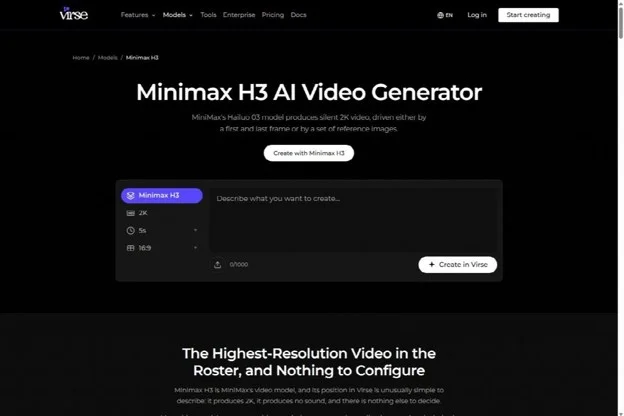
Virse’s public MiniMax H3 page, captured October 8, 2026. Public-page screenshot; no account generation was run.
This guide is for B2B marketing teams briefing a product explainer for prospects and internal buying committees. It uses a fictional file-review service as an example. The example’s product behavior is invented for planning purposes and must be replaced with verified behavior for a real client.
On this page: Define the message · Build the shots · Specify each panel · Get approval
What should an AI storyboard workflow resolve first?
An AI storyboard workflow should first resolve what the buyer needs to understand and which evidence the film will use to explain it. Establish the message before generating polished frames.
For a B2B explainer, begin with the audience’s situation. A buyer may be trying to understand a workflow, compare an approach or explain a proposal to colleagues. A visually impressive sequence will not help if it leaves the product’s role unclear.
Write a message the viewer should be able to repeat after watching. In the fictional example, the message is: a team can review a file in one agreed place and identify the approved version. That sentence gives the storyboard a specific problem to solve.
Decide which parts need literal evidence and which can use visual metaphor. A simplified animation may explain the frustration of scattered feedback. Any depiction of the actual product interface should come from accurate product assets or recordings supplied for the project.
How do you turn a business message into shots?
Break the message into changes the viewer can follow, then assign each change a shot. Describe the purpose of the shot before deciding how it should look.
Runway’s storyboarding guide describes moving from a script into beats, panels and annotations. For an explainer, use those beats to test the buyer’s understanding as well as the visual flow.
Here is a hypothetical sequence for the file-review service:
| Beat | Viewer question | Visual purpose | Evidence requirement |
| Scattered feedback | What problem is being addressed? | Show comments separated from the file | Clearly illustrative scene |
| Shared review | What changes in the proposed workflow? | Bring the file and feedback into one context | Verified product behavior |
| Resolved comment | How does work move forward? | Show a person responding to a specific issue | Accurate example of the workflow |
| Approved version | How does the team know what to use? | Make approval status understandable | Verified product asset or recording |
| Next action | What should the buyer do next? | Present the agreed call to action | Approved copy and destination |
This table is a planning device, not a script that every business should follow. A technical product might need more explanation of a mechanism. A familiar service may need to spend more time on the consequences of the workflow change.
Read the sequence without the voiceover. If the visuals imply something different from the script, fix the mismatch in the board. Then read the script without the visuals. Identify which claims need evidence before the production team commits to a treatment.
What must every storyboard panel contain?
Every storyboard panel should identify the frame, action, intended duration and connection to the next shot. It should also state which visible elements are fixed and which are still open for development.
A frame alone does not explain whether the camera moves, the subject moves or the shot cuts. Add concise annotations so the producer does not have to infer those decisions from the artwork.
For an illustrative panel, the contract might read:
- Purpose: show that the reviewer is responding to a specific comment.
- Composition: medium view of a person looking toward the review surface.
- Action: the person considers the comment and indicates a decision.
- Camera: a restrained move toward the point of attention.
- Fixed elements: the approved visual language and relevant product references.
- Transition: end on a composition that leads into the approval-status shot.
If the panel includes interface text, keep it editable in the appropriate design or editing tool. A generated image of a fictional interface is suitable only as a labeled schematic. It should never pass through production as an apparently real product screenshot.
A storyboard and a shot list are related documents. The board explains the visual sequence; the shot list records production details for individual shots. Runway’s shot-list guide makes that distinction useful when translating visual planning into a production plan.

A representative scene should show the viewer where attention belongs before motion is added. AI-generated editorial illustration; not a measured tool result.
How do references connect the board to video generation?
References connect the storyboard to generation by defining the subject, style and composition that a clip should preserve. Assign a purpose to each reference and keep the approved set consistent across related shots.
For a frame-driven shot, prepare the composition you want to start from and, where the selected workflow supports it, the intended ending frame. For a reference-driven shot, supply the approved subject and style references with a written explanation of their roles. These are different input strategies; choose the one that fits the production task.
The public MiniMax H3 page describes both approaches. Its usefulness here is the ability to organize those inputs around a shot brief. It does not remove the need to inspect motion, subject appearance and the transition into the next clip.
Keep generation notes attached to the shot record. Record the input references, the prompt, the selected output and the reason it was selected. If the client changes a detail later, the producer can identify which shot is affected instead of rebuilding the entire sequence.
What should the client approve before animation?
The client should approve the message, factual product depiction, visual direction and planned sequence before animation begins. Make the scope of that approval explicit so unfinished production details do not become accidental promises.
| Approval area | Question to settle | Suitable proof |
| Message | Does the sequence explain the intended problem and response? | Script and panel purposes |
| Product truth | Does the depiction match the real service? | Current product assets and client confirmation |
| Visual direction | Do style, palette and composition fit the brand? | Selected references and representative panels |
| Sequence | Does each transition make sense? | Ordered board or rough animatic |
| Delivery | Is the planned framing suitable for the agreed use? | Placement brief and crop examples |
An animatic is a timed assembly of storyboard frames. Use it to examine pacing and the relationship between narration and picture before treating individual motion shots as finished. Label temporary audio and rough visuals so reviewers know what they are approving.
Ask the client to identify a decision, not merely to say that the board looks good. A useful approval confirms that a particular shot explains the intended idea and that the depicted product behavior is accurate.
How do you hand the board to an editor?
Hand the editor a selected sequence with stable shot identifiers, the approved script and the assets needed to reproduce its intended meaning. Keep alternatives available without mixing them into the approved cut.
For each shot, include the selected clip, its source references, intended entry and exit points, and any unresolved issue. Mark a generated visual that still requires an accurate interface insert or final typography. Those details belong in the handoff, not in someone’s memory.
Review adjacent shots together after a replacement. A better standalone clip can change screen direction, lighting or the position of a subject at the cut. The final review should examine the explainer as a sequence and confirm that the call to action still follows naturally from the message.

Reviewing representative frames together helps a producer check whether the sequence shares one visual direction. AI-generated editorial illustration; not a measured tool result.
Questions about AI storyboards
Does the board need finished artwork?
It needs enough visual detail to settle the decisions being reviewed. Rough panels can resolve sequence and framing, while selected polished frames can establish the visual direction. More finish is useful when it answers an open question, not simply because the tools can generate it.
Can you generate the entire explainer from one prompt?
A single prompt may produce a useful exploration, but a client-approved explainer needs control over its message and product depiction. Planning and reviewing the film shot by shot makes those requirements easier to inspect and revise. Choose the production method after the storyboard establishes what must be controlled.
What is the next deliverable after approval?
Turn the approved AI storyboard workflow into a production package: the ordered board, shot list, references, script and decision record. Generate or produce the required shots, then judge them by whether they preserve the approved message and connect clearly in the edit.

