


AI Video for B2B Marketing: A Variant Workflow
Learn how to use AI video for B2B marketing with a variant workflow that streamlines video production, improves personalization.


Suppose a field-service software team has an approved explanation of how its product schedules technicians. Campaigns for US facilities managers and equipment service teams in Mexico need different context and spoken language. AI video for B2B marketing must keep each edit tied to the approved claim, even when its setting and audio change.
The route is straightforward: define the variants, choose a generation path for each asset, check the drafts with the right people, and return only approved files to the campaign library.
Start AI Video for B2B Marketing With a Variant Matrix
Marketing operations should make one record for each industry and region before generating anything. A campaign brief that says “make local versions” leaves too much open: which statement was approved, which visual is cleared for reuse, and who signs off on the language? A small matrix gives the video team actionable inputs and a place to record rejection.
| Hypothetical variant | Approved message input | Permitted starting asset | Human owner before release |
| US / facilities | Scheduling explanation from the approved brief | Cleared product still | US product and brand reviewers |
| Mexico / equipment service | Same verified function, with locally reviewed example and script | Cleared product still; licensed voice if used | Product, Spanish-language, and rights reviewers |
These rows are hypothetical. A demand-generation team could add format, destination, request ID, and approval status to its asset record. The API supports submitting requests and retrieving outputs; campaign owners choose which variants to make and release.
Choose a Generation Path for Each Asset
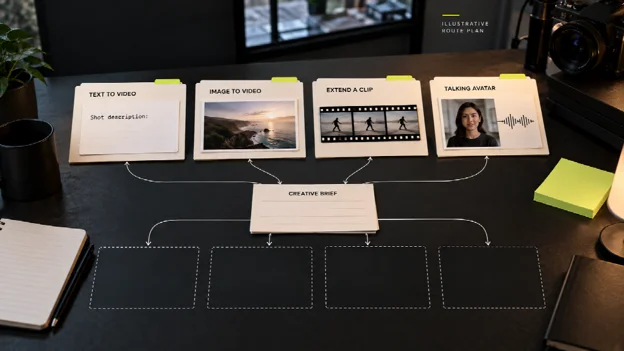
One model-selection option is Seedance 2.5 through WaveSpeedAI’s API, whose catalog separates text-to-video, image-to-video, video extension, and a talking-avatar route. For a campaign team, the useful difference is the input: each route starts with a different approved asset. Technical colleagues can submit a request and retrieve a completed prediction, then attach its output to the matching variant record.
Begin with text-to-video when the team has a shot description but no usable source frame. If the approved brief includes a product still, image-to-video accepts a start image and prompt; the still gives the shot a useful visual starting point, though a generated interface or logo may still come out inexact. An existing approved clip belongs in a video-extension request only when it needs a continuation. A presenter segment calls for a different decision, covered below.
Keep Brand Inputs and Regional Claims in Separate Records
In the hypothetical field-service campaign, a cleared product still could anchor both versions. The US shot might show a facilities setting; the Mexico shot might use an equipment-service setting. Those settings are creative context, while the claim about scheduling must come from the same approved source. A generated screen is not proof of a real feature.
The request record should point to the exact still and script version used for each draft. If a marketer changes the regional example, the corresponding script needs a new review, even when the product sentence is unchanged. The same rule applies to claims in on-screen copy: a generated label that looks plausible is still unverified. Use cleared screenshots or text overlays for information that must be exact, and inspect the exported frames at their intended viewing size.
This makes personalized video at scale an editorial task with traceable inputs and reviewers. A reference image alone cannot prove that a generated scene is faithful.
Decide When Native Audio or an Avatar Fits
WaveSpeedAI says Seedance 2.5 can generate video with native audio in multiple languages. For multilingual video marketing, a spoken regional draft is worth testing when the chosen endpoint supports the required inputs. A local reviewer must hear the audio against the approved script and check pronunciation, captions, and product terminology before release.
A presenter explaining a feature is a separate case. The Talking Avatar endpoint requires a portrait image and an existing speech recording; an optional prompt guides visible behavior. The page warns that generated audio may differ from the recording. For the hypothetical campaign, clear an authorized portrait and a licensed recording before the request, then check the finished speech and likeness again.
Without a cleared portrait or recording, use another format. A product still with narration from an existing recording process may fit the brief better than an avatar that creates another rights decision.
Extend Only a Clip That Passes the Core Review
Video extension starts with an existing clip. A prompt describes what should follow. This route suits a short approved scene that needs another action, such as moving from a technician’s schedule to the next service visit. Inspect the join with the source: movement, spoken words, and product details can change across the seam.
If the original clip contains a faulty claim or uncleared likeness, extend nothing. Correct the source first. Adding footage only multiplies the material to check, and an unapproved scene stays unapproved however long it runs. Log each continuation request under the same variant record so nobody treats it as a new, context-free asset.
Route Every Variant Through Human Checks
The production record should show who accepted each draft and why. An account-based marketing video aimed at one industry may carry a familiar setting, yet its product assertions still need review for that variant.
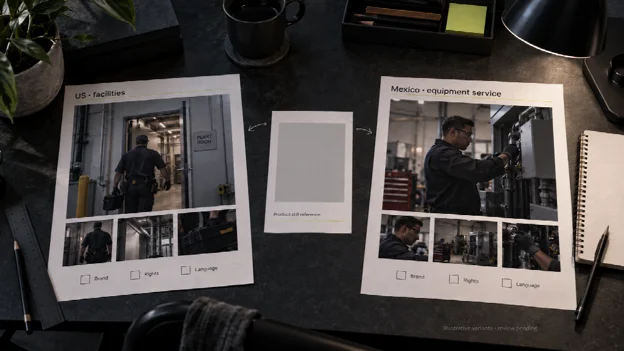
Two hypothetical industry and region variants await brand, rights, and language review. The storyboard sketches are not generated outputs or approved assets.
- Brand and product: Compare spoken and on-screen statements with the approved brief; reject invented UI, misplaced logos, or a scene that implies an unsupported feature.
- Rights and legal: Confirm the applicable model and platform terms, the permitted use of images, footage, music, and any public claims. Route unresolved questions to the people authorized to clear them.
- Likeness and language: Check permission for each visible person and voice, then ask a qualified regional reviewer to hear the audio and read captions in context.
Reviewers need the source assets and final export. If one owner rejects a draft, hold that variant outside the publication queue. A revised generation needs its own review trail and approval.
Hand Approved Versions Back to the Campaign
The final handoff records the approved script version, endpoint, input assets, output file, region, rights status, language reviewer, and final approver. Store rejected drafts separately to prevent a later editor from selecting the wrong export. Only versions with those fields resolved enter the active asset library.
If a local-language track, portrait, or product claim has no named reviewer and cleared source, that version stays a draft. The same rule applies with an AI video API or a conventional edit suite.

