


4 Best LMS & LXP Platforms for Small Businesses in 2026 (Real-World Tested)
We tested 30 LMS and LXP platforms to find the top 4 for small businesses. Compare GoSkills, TalentLMS, 360Learning & LearnWorlds by price, speed & features.


Small businesses move fast—your training has to keep up. When regulations change overnight or a new hire logs in from another time zone, a modern learning platform keeps everyone in sync. The right system hosts courses, personalises learning paths, and proves progress with clear reports; the wrong one drains hours and budget.
We put 30 LMS and LXP tools through hands-on tests, weighing setup speed, pricing, AI features, and real user reviews. Four platforms rose to the top. Use this guide to pick confidently and turn learning from a chore into a competitive edge.
How we picked the winners
Buying guides often dump every LMS on the planet and call it research. We wanted evidence. After testing 30 platforms, our five-point scorecard mirrors the pressure on a small team—limited time, tight budgets, constant change—and weights each factor accordingly.
- Setup speed (25 %)
We timed how long it took to sign up, upload an onboarding course, and enrol the first learner. A platform earned full marks only if it could launch in under 30 minutes, the benchmark set by GoSkills’ “Fastest Implementation” record. - True monthly cost (25 %)
Pricing was calculated for a 40-user cloud plan with no annual prepay. We tracked how rates changed when head count rose or dipped because small-business staffing is rarely static. - Feature impact (20 %)
Live AI authoring tools, mobile apps that work offline, and built-in course libraries scored higher than roadmap promises. Any buzzword without a working demo earned zero. - Integration depth (15 %)
We tested out-of-the-box links to Slack, Google Workspace, and BambooHR. Where no native connector existed, we looked for an open API or Zapier fallback to prevent future logjams. - Real-world satisfaction (15 %)
Only reviews tagged “Small Business” on G2 and Capterra were included. According to G2, GoSkills holds a 9.4 / 10 ease-of-setup score, while SoftwareFinder notes that many firms still take 3–9 months to roll out a cloud LMS.
We rolled those weighted scores into a composite index that produced the four platforms you’ll see next.
What’s changing in learning tech for 2026
Artificial intelligence has moved from buzzword to backbone. The eLearning Industry reports that 80 percent of enterprises plan to rely on AI-enabled eLearning tools by 2025, driving features like one-click course generation and real-time translation. For a small team, that means hours saved on slide design and faster localisation.
Personalisation is no longer a luxury. Modern platforms log every click and quiz score, then recommend the next lesson automatically. This approach can lift course-completion rates by up to 40 percent, according to eLearning Industry.
Microlearning is now the default delivery style for modern LMSs. Lessons are only a few minutes long; in the GoSkills course library the median video runs about four minutes, so an employee can finish a skill refresher while a report downloads. The eLearning Industry found that 93 percent of organisations plan to rely on these bite‑sized modules for corporate training in 2025 because they lift retention and learner satisfaction.
Mobile learning is mainstream. Studies show that two-thirds of U.S. companies already offer training on phones, and mobile modules boost knowledge retention by roughly 45 percent compared with desktop-only courses.
Pricing models have followed suit. Free tiers, pay-per-active-user billing, and bundled content libraries let you start small, prove value, and scale without sticker shock. In short, 2026 brings small businesses enterprise-level capability without the enterprise-level invoice.
These shifts guided every pick on our shortlist and will shape how your team learns in the year ahead. Keep them in mind as you compare the contenders.
1. GoSkills LXP: best all-in-one platform for small businesses
Why it tops our list
GoSkills strips learning down to the essentials: sign up, name your portal, and launch training in as little as 15 to 30 minutes, a speed validated by G2’s “Easiest Setup – Small Business” badge for Spring 2025 and Brandon Hall’s 2025 “Fastest-to-Implement” gold award. Small teams can get up and running while their coffee is still hot.
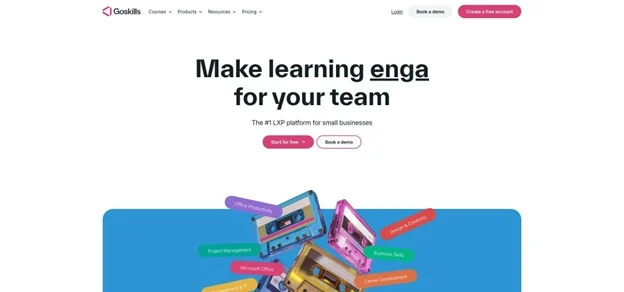
GoSkills LXP small business training dashboard screenshot
What you get out of the box
- A library of 100+ bite-sized courses on Excel, project management, data literacy, and more, each broken into 3- to 6-minute videos for quick wins.
- Genie, an AI assistant that drafts outlines, lessons, and quizzes from a simple prompt, letting a solo HR manager build bespoke content in minutes.
- Personalised Netflix-style recommendations, gamified points, badges, and certificates, all tracked in a single progress tab.
Proof it stays easy
On G2, GoSkills scores 9.6 / 10 for ease of use and 9.4 / 10 for support, well above category averages. Those scores translate into real adoption: GoSkills also holds G2’s “Highest User Adoption” badge for small businesses.
Integrations and pricing
Native connectors sync users from Google Workspace, push reminders into Slack, and launch Zoom sessions without extra plugins. The free-forever tier supports unlimited learners and core LMS features; paid plans start at US $9 per user per month for five seats and fall toward US $5 as head count grows, with no setup fees or contracts.
When it’s not a fit
If you need deep white-label branding or complex branching paths, you may outgrow the Pro tier and rely on SCORM uploads for niche technical topics.
Choose GoSkills LXP if time and budget are tight and you want one platform to host content, create new courses with AI, and keep compliance on track, fast.
Stand-out features, pricing, and watch-outs
The first thing you’ll see in the admin dashboard is a built-in library of 110+ business courses—from Excel and project management to data literacy—each broken into 3- to 6-minute videos for quick wins. Roll out harassment-prevention training before lunch, then assign a sales-skills refresher in the afternoon, no extra content budget required.
Need something custom? Select Create course, paste an outline, and Genie drafts lessons and auto-graded quizzes in seconds, turning an HR generalist into an instructional designer.
Learners land on a Netflix-style home screen that recommends the next skill as they finish modules. Gamified points, badges, and certificates keep momentum high, while automated nudges chase latecomers so you don’t have to.
A single Progress tab surfaces completions, quiz scores, and certificate expirations. One click exports a CSV, ideal for audits.
Integrations. Out-of-the-box connectors sync users from Google Workspace, drop reminders into Slack, launch Zoom sessions, and more.
Pricing.
- Free-forever tier: unlimited learners, core LMS, full course catalogue.
- Paid plans: from US $9 per learner per month for five seats, with volume discounts; no setup fees or contracts (billed monthly or annually).
Where it falls short. Advanced white-label branding and branched learning paths are limited, and highly technical topics may require SCORM imports.
Ideal fit. Choose GoSkills when you need a turnkey platform that combines ready-made content, AI authoring, and compliance tracking, fast.
2. TalentLMS: fastest path from sign-up to “course assigned”
Why it ranks second
TalentLMS is built for speed. In our test, we branded a portal, uploaded a SCORM file, and enrolled learners in under 10 minutes, matching the company’s “set up in minutes” benchmark and G2 reviewers’ median setup time of 0.2 hours.
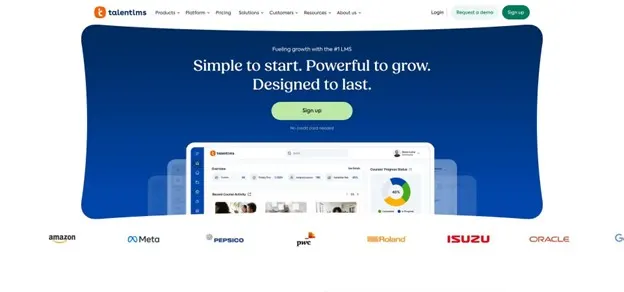
TalentLMS admin dashboard for fast course assignment
What makes it quick
The interface keeps only what matters: “Create course,” “Invite users,” “Assign.” Contextual tooltips let new admins skip webinars and start training right away.
Fresh AI tooling
- TalentCraft (launched October 2025) turns bullet points into full slide decks, quizzes, and royalty-free images in seconds.
- AI Coach (July 2025) lives inside each lesson, answering learner questions and reducing help-desk tickets before they appear.
Pricing built for small teams
- Free plan: up to 5 users and 10 courses.
- Starter: US $79 per month for 40 active users (billed monthly) or US $59 when billed annually.
Because TalentLMS bills only for users who log in during the month, you never pay for idle accounts.
Best use case
Pick TalentLMS when you must launch training yesterday, prove ROI this quarter, and prefer a platform that keeps adding AI features without adding complexity.
Key strengths, pricing details, and potential quirks
AI authoring on tap. Drop a topic sentence into the TalentCraft editor and the system produces a five-slide lesson with images and an auto-graded quiz in under a minute, according to the October 2025 release notes.
Mobile learning without the data bill. The iOS and Android apps cache PDFs, videos, and quizzes offline; progress syncs automatically once the device reconnects.
Branching at no extra cost. Clone your portal into sub-sites for each department or client while managing users from one master dashboard. Handy when one branch needs HIPAA compliance and another wants product tutorials.
Reporting that stays simple. Completion charts, quiz averages, and time-on-task sit on one screen. Schedule a weekly PDF export and you’re audit-ready without logging in.
Integrations. Native hooks pull employee lists from BambooHR, push notifications into Slack, and record customer certifications in Salesforce. Anything missing can flow through Zapier or the open API.
Pricing (USD).
- Free: 5 users, 10 courses.
- Starter: US $79 per month for up to 40 active users when billed monthly (US $59 when billed annually).
- Grow: US $149 per month for 100 active users.
Pay only for people who log in—ideal for seasonal teams.
Watch-outs.
Advanced analytics stop at CSV export, and pixel-perfect branding may require CSS tweaks or higher-tier plans.
Best for. Choose TalentLMS when you need to launch training in minutes and prefer friction-free authoring over deep design control.
3. 360Learning: best for turning team expertise into live courses
Why it stands out
Most LMS tools push content top-down, but 360Learning turns everyone into a co-author. Any user can edit a lesson in real time—an update rolled out in April 2025—and leave Google-Doc-style comments that stay inside the course workflow.
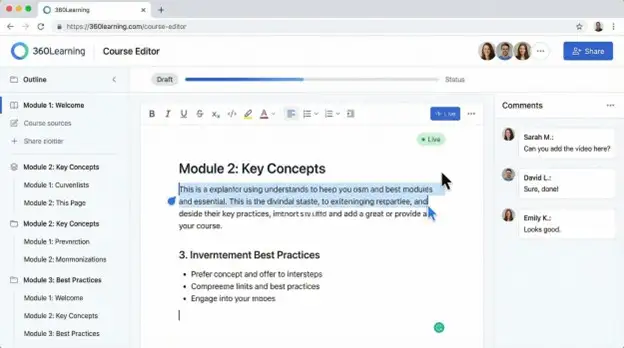
360Learning collaborative course editing interface screenshot
Collaboration in action
Publish, and learners respond with emoji reactions, threaded questions, and upvotes that reveal which slides resonate. After completion, the platform drip-feeds “Knowledge Check” quizzes at 3, 7, and 30 days to reinforce retention, a built-in spaced-learning loop.
You still get LMS staples (learning paths, certificates, SCORM) inside an interface that feels more like Slack than 1990s training software.
Cost and trial
- Team plan: US $8 per active user per month for up to 100 users, no contract, cancel anytime.
- Free 30-day trial: test peer learning before you pay.
When to choose it
Pick 360Learning if your sharpest content already lives in employees’ heads and you want software that nudges them to share it in minutes, not quarters.
Collaboration highlights, costs, and caveats
360Learning authoring starts with a blank lesson: paste a URL, PDF, or slide deck, and the platform converts headings into drag-and-drop cards. Teammates jump in to comment, propose quiz questions, or record a quick selfie video. Each change is time-stamped, so authorship stays transparent.
Learner engagement feels like a social feed. Slides accept emoji reactions and threaded chats, while notifications pull experts back to answer follow-up questions. Those threads become living FAQs for future cohorts. Heat-map analytics reveal where viewers pause or replay, and automated “Knowledge Check” pings at 3, 7, and 30 days surface retention gaps.
Integrations. One-click SSO with Google Workspace or Microsoft Entra, roster sync from BambooHR, and direct embeds from LinkedIn Learning or Coursera keep data flowing without manual uploads.
Pricing (USD).
- Team plan: US $8 per active user per month for up to 100 learners, billed annually.
- Business: custom quote for advanced analytics, private cloud, or more than 100 users.
A 30-day free trial unlocks all features so you can capture real completion data before committing.
Drawbacks. Top-down cultures may underuse social tools, and the built-in analytics stop at CSV export, so data-heavy teams may want a BI connector.
Best for. Choose 360Learning when peer teaching is core to your culture and you need software that nudges, tracks, and celebrates those knowledge exchanges.
4. LearnWorlds: best choice when training is also a revenue stream
Why it’s different
LearnWorlds pairs a full LMS with an e-commerce engine, including storefront, cart, coupons, and affiliate tracking, so you can sell courses to customers as easily as you assign them to employees.
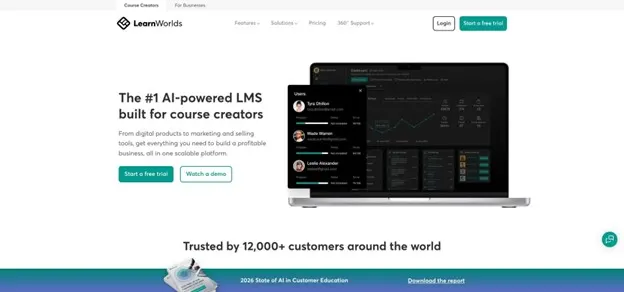
LearnWorlds online course storefront and e-commerce LMS interface
Interactive learning meets marketing muscle
Drag-and-drop page templates let you launch a branded “school” in minutes, while interactive video tools add timed hot spots, questions, and calls to action directly on the timeline. Global payments run through Stripe or PayPal, and you can bundle courses, offer subscriptions, or trigger one-click upsells.
Core LMS features without learner caps
Unlimited learners on most plans, SCORM support, certificates, progress reports, and learner groups mean you can serve customers and staff from the same portal.
Pricing (USD)
- Starter: US $29 per month plus US $5 per course sale (1 admin, 3-page site).
- Pro Trainer: US $99 per month, no transaction fees, 5 admins, bulk uploads, custom domain.
All plans come with a 30-day free trial, so you can build and even sell a beta course before paying.
When to choose it
Pick LearnWorlds when “training” doubles as customer education, partner enablement, or a new revenue stream. It sells courses as smoothly as it teaches them.
How the four platforms stack up at a glance
| Platform | Free tier | Built-in AI | Content library | Mobile app | Entry price (USD)* | Learner cap at entry |
| GoSkills LXP | Unlimited learners | Genie authoring, AI suggestions | 110+ courses | Excellent | US $9 per user per month | None |
| TalentLMS | 5 users, 10 courses | TalentCraft creator, AI Coach | Marketplace add-ons | Excellent | US $79 for 40 users per month | 40 active users |
| 360Learning | 30-day trial | AI question generator, engagement insights | Integrates LinkedIn Learning, Coursera | Very good | US $8 per active user per month | 100 users on Team plan |
| LearnWorlds | 30-day trial | AI outline and quiz helper | Bring your own—focus on selling | Good | US $29 per month plus $5 per sale | Unlimited learners |
*Prices shown are monthly rates billed annually, current as of December 2025. Always confirm on the vendor’s site before purchase.
Use the table as a cheat sheet:
- Need a forever-free tier? GoSkills or TalentLMS.
- Want peer-generated content? 360Learning.
- Plan to monetise courses? LearnWorlds offers the e-commerce edge.
With those factors in mind, the decision path below will help nail the final choice.
Quick decision path: which platform fits your next step?
- Will you train only employees, or customers too?
- Need billing, coupons, or public course pages? Choose LearnWorlds, the only pick with a built-in e-commerce engine. For a broader look at LXP platforms built specifically for small businesses, this side-by-side benchmark shows how other vendors price and package monetisation tools.
- If you’re staying internal, how will content be created?
- Zero time to build. You want ready-made courses and an AI helper. Go with GoSkills LXP and its free-forever plan.
- Some time, but you dislike complexity. You prefer the fastest interface, mobile apps, and pay-as-you-grow pricing. Pick TalentLMS.
- Expertise lives in your team’s heads. You value peer-generated courses and social feedback. Choose 360Learning.
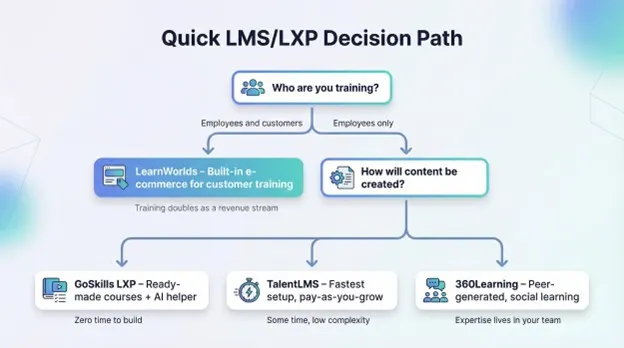
Use this quick decision path to match your training needs to GoSkills LXP, TalentLMS, 360Learning, or LearnWorlds
Still undecided? Run the free trials in parallel for a week. Assign the same onboarding lesson to five testers on each platform, then compare completion rates and setup times. Numbers beat gut feelings.
Whichever route you take, remember that switching costs rise once hundreds of learners and dozens of courses pile up. Test early, measure carefully, and lock in the platform that feels effortless for both admins and learners.
Conclusion
The LMS and LXP market has never offered small businesses more power, speed, and flexibility. By focusing on rapid setup, real-world pricing, and AI-driven features, the four platforms highlighted here can help any growing company level up its training in 2026. Match their strengths to your priorities, trial the front-runners, and choose the one that makes learning feel like second nature for every employee—or customer—you serve.
FAQ
1) What’s the difference between an LMS and an LXP?
An LMS (Learning Management System) is built to assign training, track completion, and prove compliance with reports and certificates.
An LXP (Learning Experience Platform) focuses more on personalized learning journeys, recommendations, and engagement (often “Netflix-style” discovery).
Many modern platforms (like GoSkills) blend both into one system.
2) Which platform is best for a small business with zero time to build courses?
GoSkills LXP is the best fit if you want:
- Ready-made course library (110+ micro-courses)
- AI course creation (Genie)
- Fast setup and simple reporting
It’s the most “turnkey” option.
3) Which LMS is the fastest to set up and start assigning training?
TalentLMS is the speed champion for pure LMS workflows.
It’s designed around quick actions like:
- Create course
- Invite users
- Assign learning
In your testing, it reached “course assigned” in under 10 minutes.
4) Which platform is best if learning content should come from employees?
360Learning is the top choice if:
- Team expertise is the main source of training
- You want collaborative editing and commenting
- You want peer learning and engagement features
It’s especially strong for fast-growing teams where knowledge lives in people, not manuals.
5) Which platform is best if you want to sell courses to customers?
LearnWorlds is the only pick built to handle training as a revenue stream with:
- Storefront + checkout
- Coupons, bundles, subscriptions
- Affiliate tracking
- Interactive video tools
It works well for customer education, partner enablement, and paid course products.
6) Do any of these platforms have a free tier?
Yes:
- GoSkills LXP: free-forever tier with unlimited learners (core LMS + catalogue)
- TalentLMS: free plan for up to 5 users and 10 courses
The others focus on free trials rather than free tiers.

