


The Sound Between the Slides: Better Music Choices for B2B Marketing Videos
Discover how the right music choices improve B2B marketing videos, build brand connection, enhance storytelling, create a strong experience.

The screen opens on a product dashboard. A narrator explains what the software does, but the music underneath sounds like a dramatic movie trailer. Twenty seconds later, the viewer is still waiting to understand the product. This is a familiar problem in B2B video: the soundtrack may be polished while the message feels uncomfortable. Tools such as AI Song make it possible to explore music ideas from a written description, but choosing the right sound still requires editorial judgment. A better question than “Does this sound impressive?” is “Does this help a busy buyer follow the story?”
Match the Music to the Work the Video Must Do
A product demonstration, a conference recap, and a customer story should not share a soundtrack merely because they carry the same company logo. They ask viewers to do different things. The product demonstration needs clarity. The recap needs momentum. A customer story needs enough space for a real person’s voice to matter.
Imagine a cybersecurity vendor showing an access-control feature. Heavy percussion and alarming effects may suggest danger, but they can also make an ordinary settings screen feel ridiculous. A restrained instrumental with a steady pulse often serves the demonstration better. For an event recap, a brighter rhythm might suit scenes of conversations, applause, and a crowded exhibition floor.
Before searching for music, write one sentence that describes the viewer’s intended response. “Understand the setup process” is more useful than “feel inspired.” A clear purpose immediately rules out several unsuitable styles.
Build an Audio Brief That an Editor Can Actually Use
Marketing teams usually write detailed briefs for visuals and almost nothing for sound. Correct that imbalance with a short audio brief. It need not contain musical terminology. It should explain the feeling, the pace, and what must remain audible.
1. Describe the scene, not just a genre
“Electronic music” could mean an aggressive dance track or a quiet pattern of soft keys. Instead, try “calm electronic instrumental for a product walkthrough, steady pace, minimal percussion, no vocals.” That description gives a useful starting point without pretending to specify every note.
2. Mark the moments that need space
Review the video script and underline product names, numbers, and calls to action. These are moments when viewers should hear the speaker clearly. A busy melody competing with a statistic can make even a carefully edited explanation harder to follow. Plan for a quieter passage or lower music volume around these points.
3. Specify where the energy should change
A 90-second recap may begin with a calm establishing shot, move into quick event footage, then close on a speaker’s main message. Describe that arc to the editor. If one music track cannot support the changes, consider separate musical sections rather than forcing a single loop over every scene.
4. Decide what the soundtrack must avoid
A useful brief includes exclusions: no lyrics under narration, no sudden bass drops, no cinematic tension, or no triumphant ending. Exclusions often communicate more than a vague request for something “modern.” They also give reviewers a concrete standard when discussing drafts.
Use Generated Music as a Drafting Option, Not an Editing Shortcut
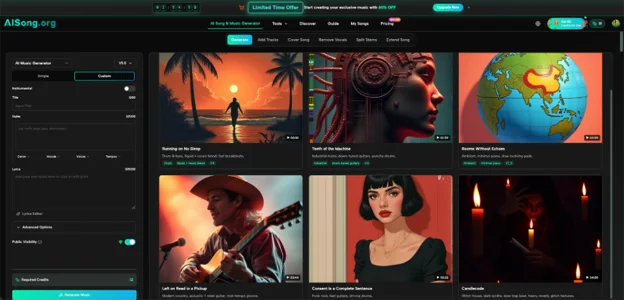
A team preparing several video concepts may want to hear possible directions before commissioning a final soundtrack or searching a music library. An AI Music Generator can support that early exploration. The service offers text-based music generation and an instrumental option, allowing a user to describe a mood and create a candidate track without first composing it note by note.
Start with one real scene. For example, write a description for a 30-second product teaser that needs a restrained, confident instrumental. Listen against the video rather than judging the audio alone. Make notes about where the beat distracts, where the track feels empty, and whether the ending suits the final frame.
This approach does not automatically match cuts, adjust spoken dialogue, or solve licensing questions. The editor must still place the audio, control levels, and decide whether the track belongs in the final video. Treat each generated result as material to evaluate, not a finished campaign deliverable.
Three Places Where Soundtrack Choices Commonly Fail
The product demo that sounds like an advertisement. A technical buyer clicks because they want to understand a feature. Loud, urgent music may tell them they are watching a commercial instead. Use quieter music or none at all during the most detailed steps. Silence can be a deliberate choice.
The testimonial that competes with its speaker. Customer interviews rely on trust. If a thoughtful answer sits beneath a swelling emotional score, the edit may appear to push the viewer toward a feeling rather than let the story speak. Keep the track simple and test comprehension without headphones.
The event recap with no change in pace. A repeated high-energy loop may work for the opening montage but become tiring over two minutes. Arrange the footage into arrival, activity, and takeaway. Then choose music that supports those sections, even if that means a quieter middle.
These are editing problems first. Music selection becomes easier once the team agrees on what the video should communicate.
Check the Sound Under Real Viewing Conditions
Teams often approve videos on large monitors with good speakers. Their audience may watch on a phone at low volume, on a laptop between meetings, or with the sound muted entirely. Test all three conditions.
First, listen quietly through ordinary speakers. Can you understand the narration without increasing the volume? Next, watch with headphones and notice whether high notes or heavy bass become irritating. Finally, mute the video. Captions, on-screen labels, and visual sequencing should still explain the key point. Music should improve an understandable video, not rescue a confusing one.
Check the handoff between scenes, too. A track that begins abruptly after a spoken introduction may feel like a mistake. A fade that lasts longer than the closing graphic can make the video seem unfinished. These are small details, yet they influence whether an otherwise useful presentation feels carefully made.
For any public or paid placement, review the music provider’s current usage terms and the distribution platform’s rules. A licensing claim on a product page is not a substitute for checking the terms that apply to a specific account and use case. Keep a record of which track was used in which video.
Give Reviewers a Better Way to Respond
“Make it more exciting” sends an editor back to guesswork. Give stakeholders three direct questions instead: Does the soundtrack suit the audience? Does it compete with the message? Does the ending feel intentional? Ask reviewers to identify timestamps rather than debate the entire track.
For example, “At 0:24, the beat pulls attention away from the pricing explanation” is actionable. “I don’t like this music” is not. Two alternatives are usually enough for a meaningful comparison; presenting ten tracks often shifts attention away from the actual video.
Marketing, product, and sales colleagues can evaluate the same clip for different reasons. Marketing may focus on mood, product on accuracy, and sales on buyer objections. Keeping those responses tied to specific moments prevents a routine audio review from becoming an argument about personal musical taste.
Conclusion
Good B2B video soundtracks are rarely the loudest or most fashionable. They help viewers understand a demonstration, trust a customer story, or remember the point of an event. Begin with the audience’s task, write a short audio brief, and compare candidate tracks against the real edit. Generated music can widen the set of options, but it cannot replace careful listening, sensible mixing, or usage checks. For your next video, try reviewing the first thirty seconds with the soundtrack turned down and ask whether every sound has earned its place.

