


What Should You Check Before Uploading Your Selfie to an AI Styling Tool?
Learn how to check privacy policies, image storage, data security, and consent before uploading your selfie to an AI styling tool.

Millions of people use artificial intelligence every week to test out new looks. You snap a picture, upload it to an app and wait to see what you look like with a buzz cut or a bright red bob. The process sounds simple. But the results often look less like a helpful preview and more like a badly edited cartoon. Worse you might be handing over your biometric data to a company with zero data protection policies.
What drives these tools is the input you start with. If the photo you upload is poor, the result will also look poor. Before you run the app, take a few minutes to prep the file so you can get an image you can actually use.
Lighting and Background Realities
The software has to know your face shape to work right. If you snap a picture from inside your car and one side is dark, it has to make an estimate. It then has to figure out where your jaw ends and where your hair starts. In most cases, the hair part comes out wrong. You can end up with strands that look like they sit a bit above your head.
Stand near a window and face it. The daylight outlines where your hair starts and how your face is shaped. Switch off the overhead fluorescent lights. Those lights leave dark patches under your eyes and around your nose. The dark areas can throw off the detection points the system uses to map your head into a 3D model.
Your background matters just as much. A messy bedroom or a wall with busy wallpaper forces the software to work harder to separate you from the clutter. A plain solid colored wall is the best option. Taking ten seconds to find a blank wall completely changes the accuracy of the image you get back.
The Angle Makes the Cut
Camera height is where most users ruin their results. Holding your phone down near your chest and looking down at it gives the software a distorted view of your proportions. Your forehead looks smaller and your jaw looks wider. The AI maps the new hair onto this distorted shape.
Hold the camera exactly at eye level. Look straight ahead and keep your chin parallel to the floor.
This alignment is incredibly important if you want to test a drastic change. Getting an accurate short hairstyle preview relies entirely on the software knowing the true shape of your skull and neck. If you take the photo from a low angle a pixie cut or a high fade will look disproportionate and heavy at the bottom. The AI cannot fix a bad camera angle. It just builds the new hair on top of the foundation you gave it.
What You Wear Changes the Result
People rarely think about their clothes when taking a selfie for a hair app. But bulky clothing interferes with the rendering process. If you are wearing a thick hoodie, a winter coat or a high collared shirt the software struggles to figure out where your neck ends and your shoulders begin. This is a major issue if you are testing longer hairstyles. The AI will often render long hair so it clips through your collar or sits awkwardly on top of your hood.
Wear a simple flat shirt with a basic crew neck or v-neck. This gives the software a clean neckline to work with. The less visual noise around your neck and shoulders the more realistic the final image will look.
Data Privacy and Storage Policies
This is the part most users ignore. When you upload a photo to a free styling app you are handing over biometric data. A clear image of your face is valuable information.
Before you upload anything look for a privacy link. You would like to see a clear statement that your photos are deleted as soon as the image is created. Any app that claims to keep the uploaded images for marketing or for training new models, should be removed from your device right away.
There are many pop up apps that are available on the app stores and are nothing but data collection devices masquerading as games. Not by telling you what type of haircut you should get, they make money off you giving them your information. Use known platforms which explicitly disclaim responsibility for user uploads. If the privacy policy is difficult to access, or is in the legalese common to lawyers, leave and go elsewhere.
Realistic Expectations for AI Output
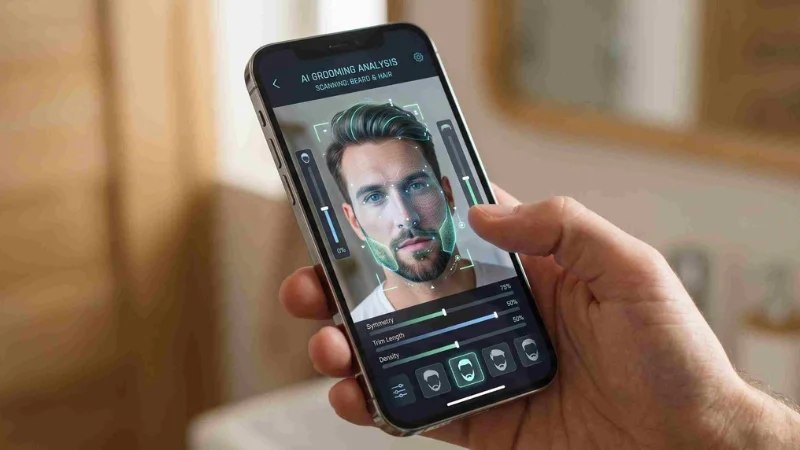
You should have an understanding of what the software is doing. It doesn’t mean to say that it’s actually cutting or dyeing your hair in 3D. It’s merging an existing template together with the pixels of your picture. This makes it so hair texture is typically the primary failing area. The software may not work well with thick, curly hair as it attempts to straighten it out digitally first and then add a straight style. Ghosting can be seen a lot when you have natural curls behind the new digital curls.
The technology of Online grooming visualization is rapidly advancing. In spite of that, it still has difficulties with details such as the density of hair and light reflecting off various hair colors. Dark colours may appear dull and lifeless. Blonde hair could be considered as a solid yellow helmet. This is a good starting point to have a preliminary discussion with your stylist. Please do not use it as a “blueprint.
Final Prep Before You Click Upload
Pull your hair away so it does not get in the way. If you want to preview a new look, pull it back firmly, or wet it and press it flat. The cleaner the hair area is, the fewer edits the app has to make, and the result looks better.
Take off your glasses. Even when the app says it can work with them, the frames can throw off the key reference points near your eyes and your temples. You can put them back on later in your mind when you look at the picture.
Keep your expression neutral. A massive smile changes the shape of your cheeks and squints your eyes. A neutral relaxed face gives the algorithm the best possible canvas to work on. The technology is a useful tool when applied correctly. Just put a little effort into the photo you feed the system and pay close attention to who keeps that photo once you close the app.

