


What Should Salon Owners Look for When Choosing an AI Hair Preview Tool?
Discover how salon owners can evaluate AI hair preview tools for realistic results, hairstyle options, client experience, privacy, and cost.

Clients sit in the chair every day and pull out their phones to show you a heavily filtered photo from social media. They want that exact cut and color. As a salon owner or stylist you already know the struggle of explaining that the photo is edited, the model has extensions and the client’s current box dyed black hair will not lift to that shade of icy blonde in one session.
Technology providers are pushing software tools as the solution to this consultation headache. The pitch is simple. You hand the client a tablet, snap a picture and show them exactly what they will look like before you mix a single bowl of color.
It sounds great in a sales meeting. The reality on the salon floor is much different. A bad preview tool causes more problems than it solves. If you are looking at bringing one of these systems into your business you need to look past the marketing videos. The consultation is the most important part of any service because it sets expectations. A digital tool must support your expertise; not create false hope. Here is what actually matters when evaluating these tools for daily use.
Lighting and Texture Accuracy
Most basic photo filter apps fail instantly because they treat all hair like a flat surface. A proper tool needs to understand dimension, texture and density. If a client with tight curls wants to see a layered bob the software cannot just stamp a straight haired wig over their head. Shrinkage is a real factor in our daily work. When curly hair is cut it jumps up. A flat visualization will miss this entirely.
You want to test how the system handles different curl patterns, fine hair versus coarse hair and realistic volume. AI hairstyle visualization is only useful during a consultation if it respects the client’s actual hair type. If the app makes every generated preview look like a freshly blown out set of extensions you are setting yourself up for an angry client at the end of the appointment.
Pay attention to how the tool reacts to your salon lighting. Most salons have overhead lighting that casts shadows. If the tool requires studio perfect front lighting just to recognize where the client’s hairline starts it will be useless during a busy Saturday shift.
Hardware Requirements and Processing Speed
Time is your most limited resource. A standard consultation usually takes five to ten minutes. If a stylist has to spend three minutes taking the perfect photo, uploading it and waiting for a server to generate an image, the tool is too slow.
The system needs to work smoothly on the devices you already have. Some tools require specific high end tablets or massive amounts of processing power. Find out exactly what hardware is required before signing anything. You don’t want to buy a software subscription only to realize you need to spend thousands on new tablets for every station. The interface must be straightforward enough that a stylist can operate it with one hand while holding a section of hair in the other.
Handling Client Indecision
Some clients sit in the chair with no idea what they want. They just know they want a change. This is where a digital preview can be genuinely helpful provided it offers quick options. A good tool will let you rapidly cycle through three or four distinct styles to gauge their comfort level.
There is a risk of choice paralysis though. If the software offers five hundred slightly different shades of blonde the client will freeze. You want a tool that allows the stylist to curate the options before showing the screen to the client. The professional should still be driving the consultation. You show them three viable options based on their face shape and maintenance budget rather than handing them the tablet to play with like a video game.
Managing Color Correction Realities
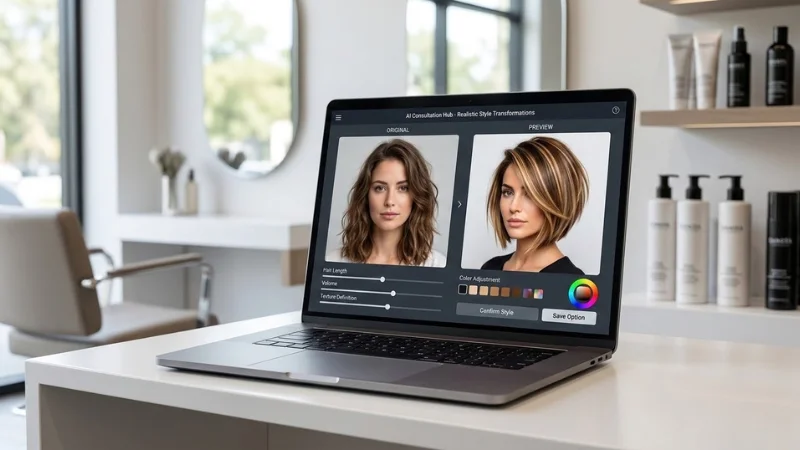
Color is where these tools either earn their keep or cause a disaster. Showing a client a preview of vibrant copper hair is easy. Actually achieving it depends entirely on their current canvas.
The biggest risk with a digital preview is over promising. If a client has years of dark brown dye built up, they cannot go platinum in one visit. A smart AI hairstyle transformation tool allows the stylist to input the client’s current hair history or adjust the preview to show realistic stages of a color journey.
If the app automatically generates a flawless blonde regardless of the starting point it’s going to make your job harder. You will spend the entire consultation arguing with a screen. Look for tools that let the stylist control the outcome perhaps by toning down the vibrancy or showing a multi-session process. The technology should support your professional judgment.
Privacy and Data Handling
You are taking photos of your clients’ faces. This brings up immediate privacy concerns that vary depending on where you operate in the world but the core issue is the same everywhere. Clients need to know what happens to their pictures.
Ask the software provider exactly where the photos go. Are they stored locally on the device? Are they sent to an external server to process? Does the software company use your clients’ faces to train their algorithms?
You need a simple clear answer to give clients when they ask if their photo is safe. A tool that deletes the photo immediately after the consultation is usually the safest bet for protecting client trust. If the app stores images for a client profile ensure the data is secure and that you own the rights to your client list not just the software vendor.
Training Your Stylists
Bringing a new piece of technology into a salon requires buy in from the staff. If the stylists hate it the tablet will end up sitting in a drawer in the breakroom within a week. Evaluate the learning curve. Does the tool require a long training seminar or can a junior stylist figure it out in ten minutes? The software should be intuitive. Stylists are visual people and they work with their hands. They don’t want to navigate through complex menus just to change a hair color on a screen.
Test the tool with your most skeptical stylist. If they can use it to successfully navigate a tricky consultation with an indecisive client you have probably found a workable system.
Subscription Costs Versus Value
Software pricing models are all over the place. Some charge a flat monthly fee per salon location. Others charge per stylist or per image generated. You need to calculate the actual cost based on your salon volume. A pay per image model might sound cheap until you have a fully booked week of color consultations. A flat fee per user is often easier to budget for but make sure you are not paying for front desk staff or assistants who won’t use the tool.
Look at the terms of the contract. Are you locked in for a year or is it month to month? Technology changes rapidly. A tool that looks great today might be outdated in six months. Avoid long term contracts if possible. You want the flexibility to switch providers if a faster more accurate system hits the market.
More importantly, tie the cost back to revenue. Does this tool help close high ticket color services? Does it reduce the number of redos because the client and stylist are finally on the same page? If the tool stops even one miscommunication that would have resulted in a massive color correction, it has likely paid for itself that month.

