


The First-Frame Fallacy: Why AI Video Quality Is Won in the Image Editor
Learn why AI video quality depends on image editing before generation and how the first frame shapes the final output.


In the current landscape of generative media, there is a prevailing belief that the secret to high-fidelity AI video lies in the complexity of the video prompt. Creators spend hours refining motion descriptors—”cinematic pan,” “slow-motion fluid dynamics,” “hyper-realistic lighting”—only to be met with temporal flickering, warped limbs, and backgrounds that melt into a digital slurry. The industry mistake is treating the video generator as the primary creator, when in reality, the video model is merely an interpolator of a static source.
Success in Image-to-Video (I2V) workflows is rarely determined by the motion prompt alone. Instead, it is a direct consequence of the technical cleanliness and compositional logic of the starting image asset. If the first frame is flawed, no amount of prompt engineering can save the downstream output. To achieve professional-grade results, we must shift our focus from “prompting the movement” to “engineering the asset.” This requires treating the first frame as a structured data asset rather than just a picture, utilizing surgical pre-editing to prevent the most common motion artifacts before they occur.
The Latent Space Anchor: Why AI Models Are Pixel-Obsessed
In I2V workflows, the first frame acts as a spatial constraint. When a diffusion model attempts to animate an image, it is essentially trying to predict where each pixel will move in the next several frames while maintaining the identity of the objects. If the source image contains visual ambiguity—such as a blurry edge or a low-contrast background—the model has to “guess” what those pixels represent.
This is where temporal flickering begins. If the model cannot definitively identify where a subject ends and the background begins, it will likely animate those pixels inconsistently across time. The uncertainty of diffusion models is a hard reality of the current technology; even with high-quality inputs, specific textures like fine hair, intricate lace, or rushing water remain notoriously unpredictable. A stray pixel in the source image can easily become a swirling visual glitch in a four-second clip because the model interprets that noise as an intentional detail that needs to be “tracked.”
To minimize this, the initial frame must serve as a stable anchor. We are not just giving the model an image; we are providing it with a blueprint of physics. If the blueprint is messy, the construction will be unstable. Operators who understand this spend more time ensuring their source image is technically “clean” than they do tweaking their motion strength settings.

Surgical Pre-Processing with an AI Photo Editor
The most effective way to stabilize a video is to remove the elements that cause confusion in the latent space. Background clutter is the primary culprit. A “busy” background with overlapping objects or indistinct shadows forces the video generator to make millions of micro-decisions about what should move and what should remain static. By using an AI Photo Editor to simplify the composition before it ever reaches the video generation stage, you significantly reduce the chance of hallucination.
Consider a scene where a person is standing in front of a crowded street. If you want the person to turn their head, the video model might accidentally animate the cars in the background or, worse, “meld” the person’s clothing into the sidewalk. By utilizing an AI Photo Editor to clean up the background, remove distracting objects, or even replace the entire backdrop with a cleaner, high-contrast version, you provide the model with a clear “cutout” to work with.
Lighting consistency is another critical factor. Harsh, unmotivated shadows in a static image often lead to “light popping” or “flickering shadows” once animated. When the model tries to calculate how a shadow should shift as a subject moves, any ambiguity in the original shadow’s shape can cause it to jump across the frame. Correcting these shadows—softening them or ensuring they align with a single light source—is a prerequisite for smooth motion. PicEditor AI provides tools like the object eraser and background remover that serve as this primary layer of defense. Cleaning a “busy” frame here is often the difference between a usable shot and a mess of artifacts.
Eliminating Motion Noise at the Source with an AI Image Editor
Beyond just cleaning the frame, we must optimize the image for the specific way AI interprets depth and movement. Contrast and edge definition are the “languages” that AI video models speak. When a subject has sharp, well-defined edges, the model can easily differentiate it from the background. This prevents the “bleeding” effect, where parts of the background seem to stick to the subject as they move.
Using an AI Image Editor to selectively sharpen the focal point of your image is an essential step. However, this must be done with restraint. Over-sharpening can introduce high-frequency noise, which the video model may interpret as grain or “shimmer” in the final video. The goal is to create a clean separation of layers. If the subject is a bird, the individual feathers need to be distinct enough for the model to “understand” they are part of a wing, but not so noisy that the model thinks each feather is a separate moving object.
Strategic upscaling also plays a role. Most video models generate at a specific internal resolution and then upsample the result. If your source image is low-resolution, the video model is starting with a deficit. It has to invent detail that isn’t there, and it has to do that invention consistently across 24 or 30 frames per second. By ensuring the base pixel density is high and clean—free of JPEG artifacts—using an AI Image Editor, you give the video model a much stronger foundation. It is far better to feed a 2K, clean image into a video generator than a 4K image that is full of compression noise.
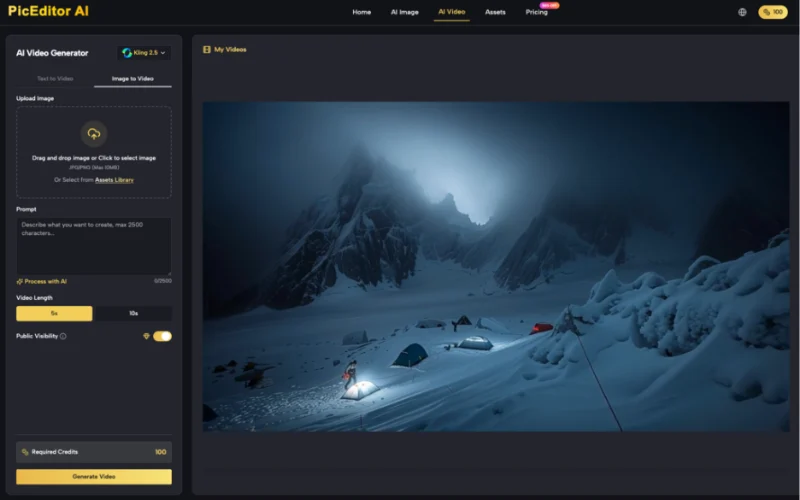
Compositional Guardrails: Directing the Model’s Eye
The way you frame your initial image dictates the “path of least resistance” for the AI’s motion algorithms. Certain compositions are naturally more stable than others. For example, a shallow depth of field is a creator’s best friend in AI video. By using bokeh (a blurred background) in the first frame, you effectively tell the AI: “Don’t worry about animating the details back here; just focus on the foreground subject.” This simplification allows the model to dedicate more of its processing power to the main movement, resulting in higher fidelity.
Center-weighted subjects also tend to yield more stable results. While the “rule of thirds” is a staple of traditional photography, AI video models often struggle with subjects positioned at the extreme edges of the frame. An off-center subject is more likely to suffer from perspective distortion or “edge-pulling” as the model tries to calculate how the subject should move relative to the edge of the frame. Center-weighting the subject in the AI Photo Editor before generation provides a “safe zone” for the model to operate.
We must also acknowledge the limits of control. Even with a perfectly composed and edited first frame, perspective shifts in AI video still frequently break the laws of physics. If you ask a model to perform a complex 360-degree rotation around a subject, it will likely lose the subject’s facial structure at some point. No image editor can fix a fundamental lack of temporal coherence in the video model itself. The goal of the AI Image Editor is not to fix the video model, but to give the video model the best possible chance to succeed within its current technical constraints.
The Shift from Prompting to Asset Engineering
The transition from “AI enthusiast” to “AI professional” is marked by a shift in workflow. The amateur focuses on the video generation phase, burning through credits and iterations by changing the prompt. The professional focuses on the asset preparation phase.
An efficient modern workflow is roughly 70% image preparation and 30% video generation. This means using an AI Photo Editor to remove distractions, an AI Image Editor to refine edges and depth, and a careful compositional eye to frame the shot for stability. Indie makers who adopt this “clean plate” approach find that they reduce their credit burn significantly. Instead of generating ten versions of a video to find one where the arm doesn’t disappear, they generate two versions because the first frame was technically sound.
The future of generative media doesn’t lie in bigger prompts; it lies in the seamless bridge between static editing and temporal motion. By treating the first frame as the most important part of the video, we move away from the randomness of latent space and toward a disciplined, repeatable production pipeline. The AI Video Generator is merely the engine; your image editor is the steering wheel. If you don’t get the image right, you are essentially driving blind. Focus on the frame, and the motion will follow.

