


GPT Image 2.5 for B2B Campaign Assets: Variations, Edits and Brand Control
Explore how GPT Image 2.5 helps B2B teams create campaign asset variations, edit visuals, and maintain consistent brand identity.

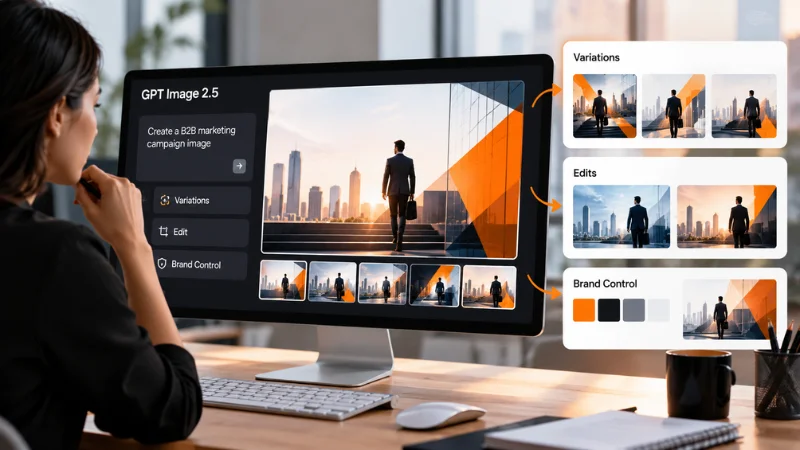
B2B marketing teams produce a steady stream of visuals: webinar banners, account-based ad sets, event signage, one-pagers. OpenAI’s GPT Image 2.5, released in September 2026, targets the part of that work that eats the most time: making controlled variations and precise edits without losing the brand.
Quick summary
- GPT Image 2.5 comes in two versions: Flare, a smaller model tuned for speed, and Sunburst, the base model tuned for quality.
- Both versions accept the same request, so switching is a change of model name.
- Editing models take up to 16 reference images, which suits product shots, logos and approved creative.
- Output runs at 1K, 2K or 4K, across 13 aspect-ratio options including 16:9, 9:16 and 21:9.
- A background setting can return transparent PNGs for cut-outs and overlays.
Where image models usually break in B2B work
Consumer marketing can live with a model that invents a fresh scene each time. B2B campaigns usually cannot. An account-based campaign might need the same product screenshot framed six ways for six industries. A webinar series needs a speaker card that keeps the same layout every week while the name, date and headline change. Event teams need one booth graphic resized for a banner stand, a LinkedIn post and an email header.
The failure pattern with earlier image models was familiar. Ask for a small change and the whole composition shifts. Supply a product photo and the product comes back slightly redesigned. Ask for a headline and the text arrives misspelled. Each of those turns a five-minute task into a design ticket.
OpenAI’s announcement for this release, which it calls Images 2.5, focuses on exactly these points. It says the model is better at preserving the subjects in reference photos, better at editing only what was asked while keeping the rest the same, and produces more natural lighting and texture.
Flare or Sunburst: matching the model to the task
OpenAI positions Flare as the small model, optimized for speed, with image quality comparable to GPT Image 2. Sunburst is the base model, optimized for quality, with higher image quality than GPT Image 2. On the LMArena leaderboard, where both scores were still marked preliminary in early October 2026, Sunburst scored 1425 for text-to-image against 1398 for Flare, and 1524 for single-image editing against 1481.
For a marketing team, that suggests a simple split:
- Flare for volume work: blog headers, social variations, internal decks and concept rounds where the team is still choosing a direction.
- Sunburst for assets that ship to customers: hero images, paid ad creative, product edits and anything a sales team will reuse for months.
Because both versions take identical parameters, a team can draft in Flare and re-run the approved prompt in Sunburst without rewriting anything.
Three workflows that fit campaign operations
- Industry variations from one approved visual
Start with an approved hero image for the campaign. Pass it as a reference and ask for a version per vertical: the same product and layout, with the background changed to a hospital corridor, a factory floor or a retail counter. The editing models take references in a field called input_urls, and the request can carry up to 16 images. Including the logo file and a product photo alongside the hero image gives the model more to hold on to.
- Single-element edits on live creative
Prices, dates, CTAs and headlines change more often than layouts. OpenAI’s claim that the model edits only what you asked for is the feature that matters here. Kie.ai’s model page shows an example of this: asked to change one price on a chalkboard menu, Sunburst changed that price and left the other dishes, the drawing and the frame as they were. For campaign teams, that is the difference between regenerating an asset and correcting it.
- Transparent cut-outs for layout tools
Setting the background parameter to transparent returns a PNG with an alpha channel. That makes product renders and illustrated icons ready to drop into a landing page builder, a slide template or an email module. One caveat from the documentation: at 2K or 4K, the prompt should also describe an isolated subject with no backdrop or shadow, and image-to-image requests should explicitly ask to extract the subject.
Practical settings for marketing formats
The aspect-ratio list covers most channel formats directly. Use 16:9 for webinar slides and YouTube thumbnails, 9:16 for stories and vertical video covers, 1:1 for feed posts and 21:9 for website banners. Four extra ratios (27:16, 16:27, 9:8 and 8:9) are available at 1K only, so check which resolution a format needs before choosing it.
Prompts can run up to 20,000 characters. That leaves room to paste brand guidance straight into the request: palette, typography style, photography rules and words that must appear exactly. When text has to appear in the image, put it in quotation marks and state where it goes.
Building it into a marketing stack
Most marketing operations teams will not want to run image models themselves. The practical route is a hosted API that a designer can test in the browser and a marketing engineer can wire into a DAM, a CMS or an internal request form. The GPT Image 2.5 API on Kie.ai exposes four model names: Flare and Sunburst, each in a text-to-image and an image-to-image version. The page includes a playground for running the same prompt on both versions side by side before anyone writes code.
Requests are asynchronous. An integration creates a task, then either polls for the result or supplies a callback URL that receives it when generation finishes. Callbacks can be verified with an HMAC signature, which matters if the receiving endpoint sits inside a marketing system that touches customer data. Generated files are retained for 14 days, so copy approved assets into your own storage.
Guardrails before anything goes live
Better editing does not remove the need for review. A few checks are worth building into the approval step:
- Look for added objects. In one documented example, a prompt about sunlight on a loaf of bread came back with a jug, a plate and a bowl of salt that nobody asked for. In a product shot, an extra object can imply a feature the product does not have.
- Proofread every word. Text rendering has improved, but legal names, product names and claims still need a human read.
- Check reference fidelity. Compare the product in the output against the source photo, especially ports, buttons and labels.
- Use the right field. References go in input_urls. Kie.ai notes that a test request using a different field name still returned an image but ignored the reference, which is easy to miss in an automated pipeline.
The takeaway for B2B teams
GPT Image 2.5 will not replace a brand designer, and it should not approve its own work. What it can do is take over the repetitive layer of campaign production: the sixth industry variant, the updated date on the webinar card, the transparent product cut-out for next week’s email. Teams that pair Flare for drafts with Sunburst for final assets, and keep a short human review step, can move that work out of the design queue.
For teams that already use more than one AI model, Kie.ai offers GPT Image 2.5 alongside other image, video and language models under a single API key and credit balance, which keeps procurement and integration in one place. A sensible first test is one live campaign asset: create variants in Flare, finish the chosen one in Sunburst, and compare the time against your current process.

