


How Does a Retail Queuing System Work?
Discover how a retail queuing system handles walk-ins, estimates wait times in real time, notifies customers, and gives store teams a live queue view.

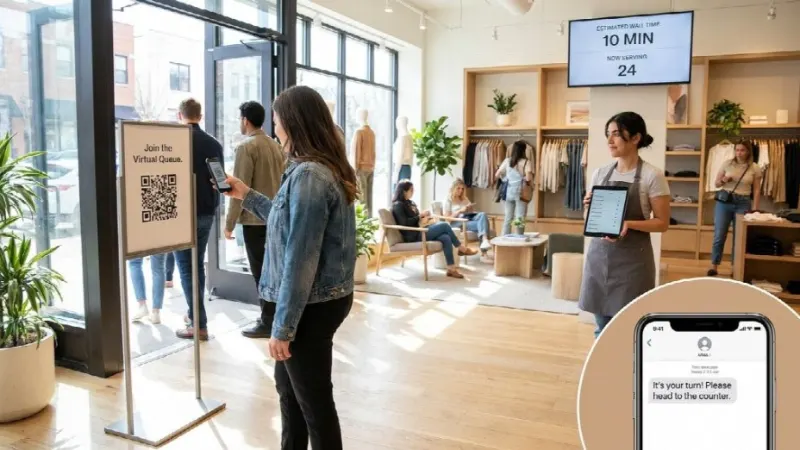
Walk-in traffic is the least managed part of most store networks. Appointments are planned, staffing is planned, inventory is planned, but the customer who simply walks through the door at 4 pm on a Saturday is handled by whoever happens to be free. A retail queuing system fixes that gap by replacing the physical line with a digital one that tracks who’s waiting, what they need, and how long they’ve been there. Here’s how the technology works in practice, what store teams see on their side, and which numbers it puts in front of head office.
What Is a Retail Queuing System?
A retail queuing system is software that captures walk-in customers as they arrive, holds them in a virtual queue, and routes them to the right staff member when capacity opens up. Instead of standing in a physical line, the customer checks in once and receives updates while they keep browsing.
Waiting is only half the cost of an unstructured floor. Without a record of who arrived and what they came for, the loss stays invisible in the sales report, which is why platforms like Booxi run walk-in traffic through a retail queuing system that logs every arrival, estimates wait time from live capacity, and texts customers when their turn comes. For a store team, that means the sequencing runs on its own and the floor stays calm through the busiest hours.
The difference between a queue and a queuing system is visibility. A line tells you nothing beyond its length, while a queuing system records arrival time, requested service, waiting duration, and outcome for every single visitor.
Which Components Make Up a Retail Queuing System?
Most platforms combine 6 layers that work together in real time:
- Check-in point: a QR code, an in-store kiosk, a host with a tablet, or a link from the store page
- Queue engine: the logic that orders visitors by arrival, service type, and priority
- Wait time estimation: a live calculation based on service duration and available staff
- Notification layer: SMS or email updates that tell the customer where they stand
- Staff interface: the screen where associates see the queue and claim the next visitor
- Reporting layer: the record of every interaction, aggregated per store and per network
- Remove any one of these and the system degrades into a digital version of a paper waiting list.
How Does Queue Management Differ From Appointment Scheduling?
Appointments and queues solve 2 different problems with the same staff and the same floor space. An appointment is a planned one-to-one booking made in advance, so the associate can prepare. A walk-in is unplanned demand that arrives without warning, which is why it needs real-time routing rather than a calendar.
The commercial stakes explain why retailers manage both. According to Booxi’s Voice of Appointment report, booked visits convert at around 70%, while average walk-in conversion sits under 20%. Walk-ins are the larger share of traffic and the weaker converter, so structuring them is where the fastest gains sit.
How Does a Retail Queuing System Work Step by Step?
The mechanics are simple from the customer’s point of view and tightly sequenced behind the scenes.
How Do Customers Join the Queue?
The customer joins by scanning a QR code at the entrance, tapping a kiosk, or being added by a host on a tablet. Some retailers also let shoppers join remotely from the store’s web page before they arrive, which turns travel time into waiting time.
Check-in captures 3 things: who the customer is, what service they need, and how to reach them. That service selection is what allows the system to route them correctly later on.
How Are Wait Times Estimated in Real Time?
The estimate comes from 3 live variables: the average duration of each service type, the number of staff currently available for that service, and the number of people ahead in the queue. A 10 minute consultation with 2 advisors free clears far faster than a 45 minute fitting with one specialist on the floor.
Because those variables shift constantly, the estimate recalculates as associates finish interactions and as new visitors check in. The customer sees a moving position, not a fixed promise.
How Are Customers Notified When Their Turn Comes?
The system sends progressive updates by SMS or email: a confirmation at check-in, a heads-up when the turn approaches, and a call to the counter or fitting area when an associate is ready. Nobody has to stay within earshot of a number being called.
That freedom is the point. A customer who can keep shopping while they wait stays in the store instead of leaving to fill the time somewhere else.
What Happens Once the Customer Is Served?
The associate marks the visitor as served, which closes the record and logs the actual service duration. Abandoned queues and no-shows get logged too, so the store can see how many people gave up rather than only how many were helped.
Those closed records feed the reporting layer. Over a few weeks they produce a reliable picture of demand by hour, by service, and by store.
What Do Store Teams See on Their Side?
Adoption decides whether a queuing system survives its first month, so the staff view matters as much as the customer view.
What Information Appears on the Staff Interface?
Associates see a single live list: who’s waiting, what each person requested, how long they’ve been in the queue, and who’s already assigned. Filters and search keep it usable when the queue holds 30 names on a peak Saturday.
The interface is typically mobile-first, because associates work on the floor rather than behind a desk. A team member can claim the next visitor from a phone while walking toward the entrance.
How Are Walk-Ins Routed to the Right Associate?
Routing works on skills and availability. A frame fitting goes to an optician, a skincare diagnosis goes to a trained advisor, and a simple pickup goes to whoever’s free, which keeps specialists on the interactions only they can handle.
Without that logic, the most qualified staff member absorbs whatever arrives first. Skill-based routing protects specialist capacity during the hours when it’s scarcest.
How Are Priority Customers Handled?
High-value clients can be flagged so they surface at the top of the queue or bypass it entirely. In luxury boutiques the queue is often invisible by design: the client is greeted, seated, and served while the sequencing happens in the background.
Priority rules are configured by the retailer, not improvised on the floor. That’s what makes the treatment consistent across every store in the network.
What Changes for Retailers That Manage Walk-In Traffic Digitally?
The operational change is visible within weeks. The measurement change is what gets the project funded a second time.
How Does Queue Data Help Reduce Walk-Outs?
Unmanaged waiting is expensive. Facit.ai reports that 73% of customers walk away after waiting 5 minutes, and a walk-out never shows up in a sales report because nothing happened.
A queuing system turns that invisible loss into a number. Once a store can see abandonment by hour and by service, staffing and routing can be adjusted at exactly the moments where customers give up.
Which Metrics Can Head Office Track Across Stores?
Head office gets 5 metrics it usually doesn’t have: average wait time, queue abandonment rate, service duration by type, visitors handled per associate, and demand curves by hour and day. Each one is comparable store to store.
That comparability is where network-level decisions come from. When 2 stores of similar size show a 4 minute gap in average wait, the difference is a process problem, not a mystery.
What Should Retailers Look For in a Retail Queuing System?
Bain research indicates that store teams spend only 30 to 40% of their time with customers, so any system that adds administrative work will be abandoned. Practical selection criteria follow from that:
- A unified queue that holds appointments, walk-ins, and event arrivals in one view rather than 3 disconnected tools
- Frontline simplicity, trainable in minutes, mobile-first, and available in the languages the staff actually speaks
- Integrations with the POS, CRM, and clienteling apps already in the stack, so queue data reaches the systems that decide budgets
- Head office visibility with store-level configuration, because a single national setup never fits every location
- Reporting tied to revenue, not just operational counters, since wait times alone rarely win an internal business case
A pilot in 2 or 3 contrasting stores, one flagship and one high-traffic mall location, exposes adoption problems before a full rollout does.
Key Takeaways for Retail Queue Management
A retail queuing system works by capturing every walk-in at arrival, estimating wait time from live capacity, notifying the customer while they browse, and routing them to the right associate. The customer trades a physical line for a text message, and the retailer trades guesswork for a record of what actually happened on the floor.
The operational win is shorter waits and fewer abandoned visits. The strategic win is that walk-in traffic, historically the least measured part of retail, finally produces data that can be compared, staffed against, and defended in a budget review.
Frequently Asked Questions About Retail Queuing Systems
Do Customers Need an App to Join a Virtual Queue?
No. Most systems work through a QR code or a short link that opens in the phone’s browser, and updates arrive by SMS or email. Removing the download step is what keeps join rates high.
Can a Queuing System Handle Several Services in One Store?
Yes, and that’s usually the main reason retailers adopt one. Each service type carries its own average duration and its own qualified staff, so the queue can hold consultations, pickups, and repairs at the same time without mixing them up.
How Long Does It Take to Roll Out Across a Store Network?
Deployment depends on integrations rather than on the queue itself. A cloud platform with a standard POS and CRM connection can run a pilot in a few stores within weeks, then extend store by store once the configuration is validated.
Does a Queuing System Replace In-Store Staff?
No. It removes the coordination overhead that keeps associates from selling, which is the opposite of replacement. The system decides who’s next and the associate handles the interaction.

