


Mastering Modern XPath in Selenium: A 2026 Strategy for Resilient Automation
Expert guide by testomat.io: Learn how to write stable XPath in Selenium. Master relative paths, axes, and dynamic locators to eliminate flaky tests in 2026


In modern test automation, the challenge is no longer just locating elements — it’s building stable, maintainable locator strategies that survive UI changes. XPath in Selenium remains one of the most powerful tools for this. But in 2026, success depends on how you use it, not just that you use it.
“Choosing the right XPath is crucial for test case stability. Being a powerful tool, it provides a flexible way to build robust Selenium test scripts that can handle a variety of web page structures with dynamic content and make sure they won’t fail if any of these locators change later.” — Michael Bodnarchuk, CTO of testomat.io
What Is XPath and Why It Still Matters
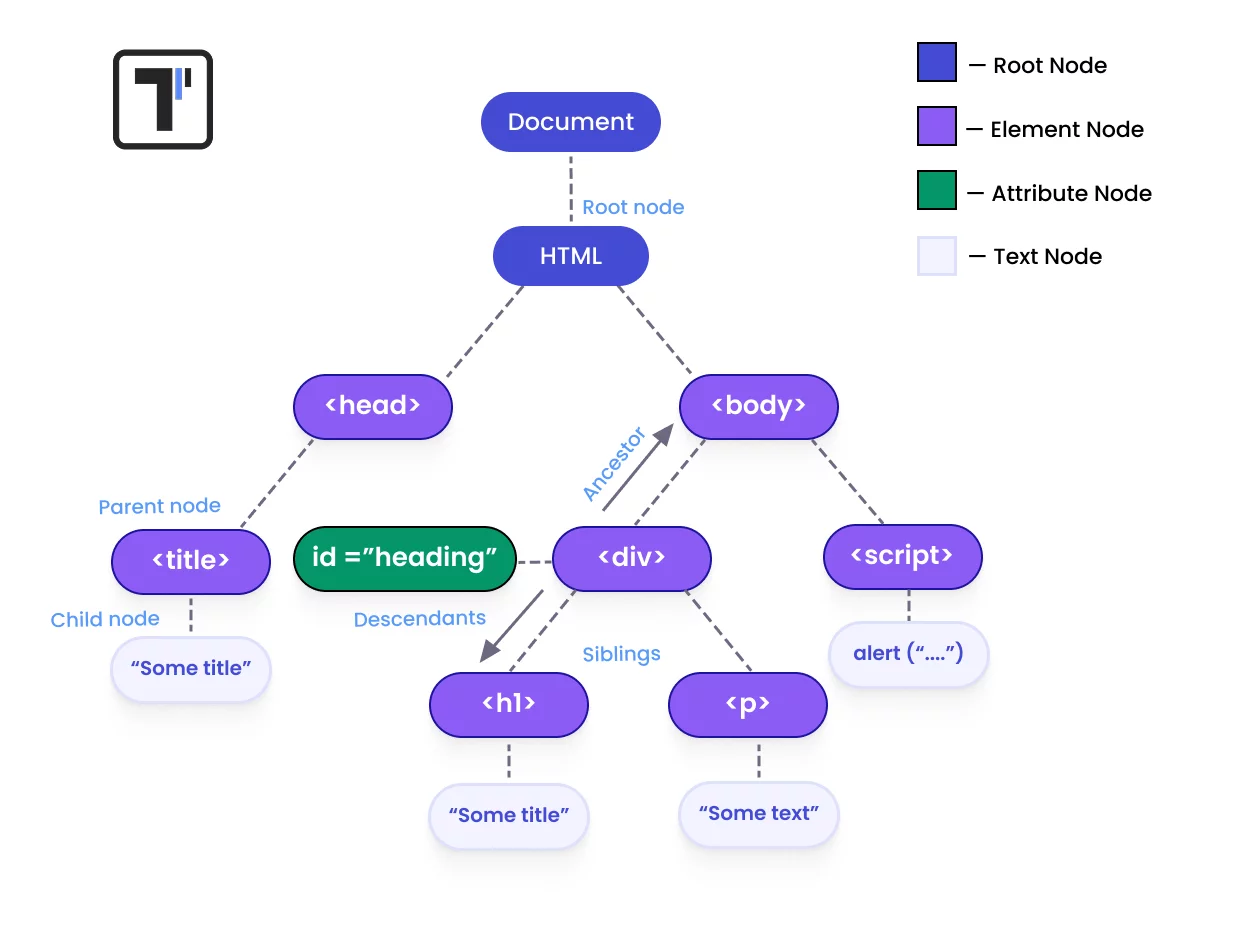
XML Path Language (XPath) is a query language used to locate elements inside the DOM. Unlike basic locators (ID, name, class, CSS), XPath allows you to navigate the complex hierarchy of an HTML document with surgical precision.
Why experts prefer XPath in 2026:
- Navigate complex DOM structures: Move bidirectional (up to parents, down to children).
- Work with dynamic elements: Handle IDs that change on every page reload.
- Locate elements without unique attributes: Find buttons based on their relationship to other stable elements.
- Build relationships between elements: Use xpath syntax to create semantic links between headers and input fields.
This is critical in modern applications built with React, Angular, and other dynamic UIs where attributes are often obfuscated or auto-generated.
XPath Strategy in 2026: What Actually Works
Modern automation is not about copying XPath from Browser DevTools. It’s about building resilient locators that don’t break during the next CI/CD run.
What to avoid:
- Absolute XPath:
/html/body/div[1]/div[2]/input(Breaks with any UI change). - Index-based locators: Relying on
div[3]is a recipe for flaky tests. - Overly complex expressions: If you can’t read it, you can’t maintain it.
What to use instead:
- Relative XPath (Default Choice):
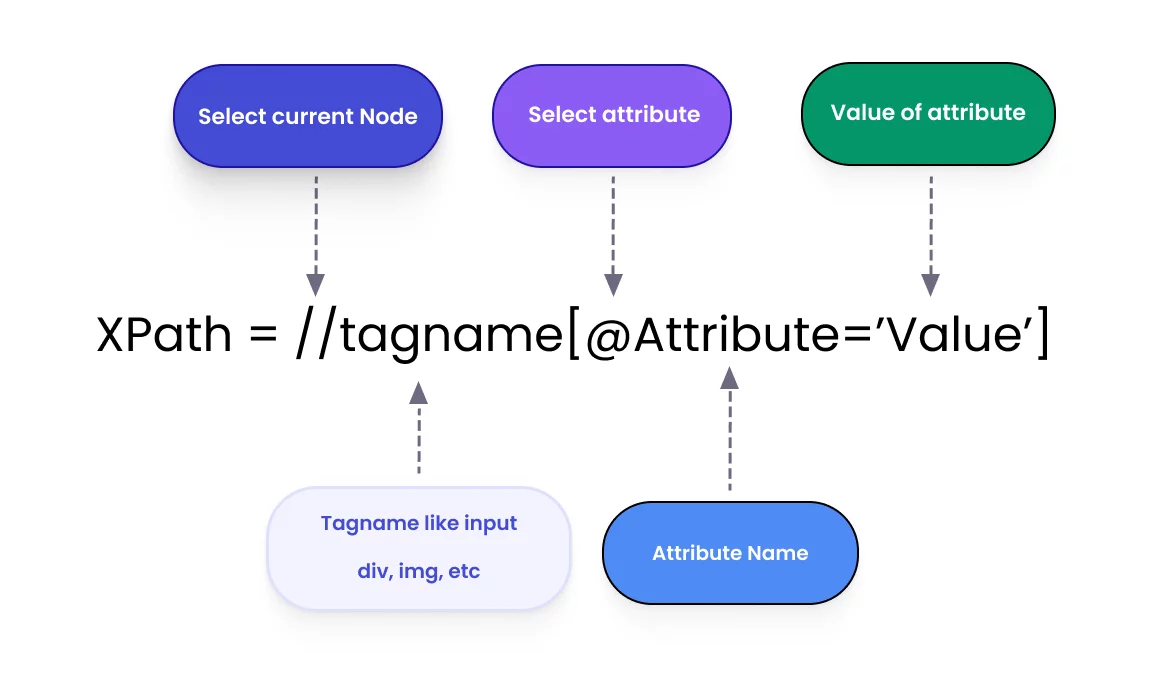
//input[@id='username'] - Dynamic attributes with contains():
//input[contains(@id,'user')] - Text-based targeting:
//button[text()='Submit'] - Logical conditions:
//button[@type='submit' and contains(@class,'primary')]
These patterns match core selenium xpath best practices and drastically improve suite stability.
How to Write XPath in Selenium for Stability
A strong locator strategy is based on context, not position. To understand how to write xpath in selenium effectively, follow these core principles:
- Prefer relative paths (//): Never start from the root node.
- Keep expressions short: The shorter the path, the less likely it is to break.
- Use stable attributes: Prioritize
id,name, or customdata-testattributes. - Avoid deep DOM traversal: If you can find an element in one step, don’t use five.
Advanced XPath: Practical Use Cases
Learning how to write relative xpath in selenium is essential for handling professional-grade web applications. Here are three common scenarios:
- Working with dynamic elements:
//input[contains(@id,'email')]Works even if IDs have partially generated prefixes or suffixes. - Using XPath axes for complex UI:
//span[@class='label']/parent::divUse this axis when the target element has no unique attributes but its parent does. - Finding nested elements:
//div[@class='form']//input[@name='password']Cleaner and more stable than absolute paths because it skips irrelevant intermediate nodes.
Common XPath Mistakes That Break Tests
Even with the right xpath syntax, certain habits lead to high maintenance costs:
- Using Absolute XPath (always a “legacy trap”).
- Overusing complex functions where a simple attribute would work.
- Relying on volatile indexes like
div[3]. - Ignoring DOM changes in modern shadow DOM environments.
In real-world projects, simpler XPath always means more stable tests.
Scaling Automation with testomat.io
Even the best selenium xpath strategy requires a professional infrastructure. Mastering how to use xpath in selenium is only the first step; managing those tests at scale is the second.
testomat.io helps quality teams transform their locators into a scalable QA system:
- Unified Workspace: Manage automated and manual tests in one place.
- Flaky Test Tracking: Automatically identify unstable locators and flaky tests.
- AI Insights: Analyze test stability and get suggestions for better maintenance.
- Structure: Maintain clear project structure across large-scale automation frameworks.
FAQ
How to write xpath in selenium for dynamic elements? Use functions like contains(), starts-with(), and always start with a relative path (//).
What is the biggest XPath mistake? Using absolute paths (starting from /html). They are extremely fragile and break with any layout update.
How to locate elements without an ID? Learn how to use xpath in selenium to target elements via visible text(), stable class substrings, or relative axes like parent and sibling.
Bottom Line
Mastering XPath is not about complexity; it’s about writing simple, stable locators, understanding DOM relationships, and building long-term automation strategies. When combined with a powerful test management tool, this approach ensures your automation remains a valuable asset rather than a maintenance burden.

