


Should Your B2B Marketing Team Use Open Source AI Video Generators?
Explore whether open source AI video generators are right for B2B marketing teams, including benefits, risks, costs and use cases.


The ABM plan for next quarter looks good on paper: 40 target accounts, each getting a 15-second personalized opener set in its own industry, a warehouse floor for the logistics prospect and a nurses’ station for the hospital system. Then the cloud video tool’s credits run out in the first week, and legal sends over a question nobody had considered. Can screen recordings of an unreleased product interface be uploaded to a third-party server?
That is usually when someone suggests open source AI video generators. Run the models on your own machines, stop paying per clip, keep every file inside the company. It sounds like a fix for both problems at once.
Sometimes it is. The models are good enough for real marketing assets now.
For a B2B team, though, image quality rarely settles whether running them in-house makes sense. Three other things do: how many videos you need, whether your material can leave the company, and whether anyone on the team can keep the setup running.
Understand What Open Source Means for Your Team
With an open source AI video generator, you download the model weights and run them on your own hardware. After setup, you can render as many clips as your machine handles without paying per clip.
The model is all you get. There is no polished interface, no hosting and no support desk. When an update breaks something, or a clip comes out with a warped logo, your team does the troubleshooting. You are trading lower running costs and more control for ongoing work.
Compare the Open Source AI Video Generators on Offer
A comparison of open source AI video generators by the CrePal team sorts the main model families by hardware tier and use case, which is the most useful way for a marketing team to look at them.
LTX Video is the quick one. It runs on modest hardware and suits fast tests of a creative direction, though complex motion and fine detail show its limits. Wan delivers better image quality and noticeably stronger camera movement, and it asks for a more capable graphics card in return.
HunyuanVideo has the highest quality ceiling of the group, with steadier faces and human motion, and it is also the hungriest for hardware. SkyReels is the pick for longer clips that need to keep a scene or character consistent.
Most of these run through ComfyUI, a node-based interface where you wire model steps into a workflow. It is flexible, and it looks nothing like the drag-and-drop editors most marketers use, which matters when you think about who will operate it.
Test Your Team Against Volume, Data and People
Take a three-person demand generation team at a SaaS company. They run a quarterly ABM campaign aimed at 40 accounts, and each account needs two or three video versions: one for the first email, one for LinkedIn, sometimes another for a second stakeholder. Part of the footage shows product screens that haven’t launched yet. One marketing ops manager knows a bit of Python. Nobody else does.
Start with volume. AI video for ABM multiplies quickly because you count accounts times versions, then add the attempts that never get past review. If your account-based marketing program depends on personalized video at scale, per-clip pricing climbs with every new variant. For this team, that’s a yes.
Data comes next. B2B companies already keep unreleased interfaces and customer logos inside their own systems to meet compliance requirements, and a local AI video generator means those files never reach an outside server. That is another yes, but only for the clips showing unreleased screens.
People are where it gets harder. The first setup often takes the better part of a day, and after that come updates and workflows that suddenly stop working. With one person who knows Python, every one of those problems lands on the same desk, and that person also owns the CRM and campaign reporting. Here the team’s answer turns into “partly.”
When all three answers are a clear yes, running models locally tends to pay off. When any of them wobbles, a cloud tool or a hosted API is usually the more realistic route.
Weigh Local, Cloud and Hosted API Side by Side
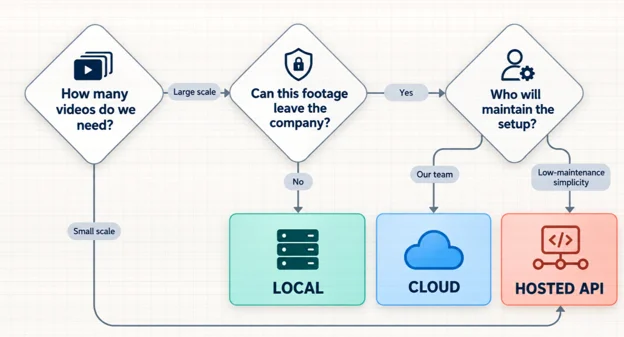
There are three practical ways to get AI video made, and open source models show up in two of them.
| Local open source | Cloud video tool | Hosted open source API | |
| Cost structure | Upfront hardware and setup, little per clip | Subscription or credits | Pay per call, no hardware |
| Speed | Depends on your GPU | Fast, no setup | Fast, no setup |
| Where footage goes | Stays on your machines | Uploaded to the vendor | Sent to the API provider |
| Quality ceiling | As high as your hardware allows | Set by the vendor’s model | Open source quality, no local limits |
| Maintenance | Yours: updates, drivers, fixes | Handled by the vendor | Mostly handled by the provider |
Teams tend to overlook the third column. Several platforms now offer API access to open source models such as Wan and LTX Video, so you get their output quality without buying or babysitting a GPU. Footage still leaves your network, so this route doesn’t answer the legal question, but it handles volume for anything that isn’t sensitive.
Fit Open Source Video Into Your Campaign Workflow
Whichever route you choose, split the work by model strength. Use a fast model to batch-test script directions, such as which opening line or industry setting lands best. Then render the finals with a higher-quality model. Testing on the slow model just burns hardware time.
Shot planning comes before any of this. If your team hasn’t settled it yet, start with this guide to an AI storyboard workflow for B2B explainer videos.
Before anything ships, add the checks an open source setup won’t do for you. Put every clip through the same brand review you would give an agency deliverable, looking for mangled logos and interface details that don’t match the product. Don’t generate the face or voice of a real employee or customer without their consent. Label AI-generated video wherever a channel or your own policy requires it. Write these rules down once as part of your AI video governance, so the review doesn’t depend on who happens to be checking that week.
Count Next Quarter’s Videos Before You Build Anything
In the end, the SaaS team didn’t go fully local. Only the clips showing unreleased screens were generated on the marketing ops manager’s workstation. The industry scenes and LinkedIn variants stayed with the cloud tool the team already used. That kept the local setup small enough for one person to maintain, and it gave legal a straight answer.
Before next quarter’s campaign, list how many videos you actually need and which assets can’t leave the company. If both lists are short, your current tools will probably do. If both are long and someone on the team is willing to own the setup, that is when a local environment for marketing video production starts to earn its keep.

