


Why SPF Flattening Doesn’t Always Work—And What To Do Instead
SPF flattening solves the 10 DNS lookup limit, but creates stale IP risks. Learn why static SPF fails and discover dynamic SPF, subdomain segmentation, and audit strategies.


SPF flattening is the process of replacing an SPF record’s include references with the actual IP addresses those includes resolve to. Instead of publishing a DNS TXT record such as v=spf1 include:_spf.google.com include:sendgrid.net ~all, a team may publish a flattened record containing direct ip4 and ip6 values.
The goal is simple: reduce DNS-dependent SPF mechanisms so the domain does not exceed the DNS lookup limit defined in RFC 7208 by the IETF. In practice, SPF flattening is often used by organizations sending through Microsoft 365, Google Workspace, Mailchimp, Mandrill, Salesforce, SendGrid, Zendesk, Zoho, Amazon SES, Sendinblue, and other third-party vendors.
Why flattening looks attractive
For teams under pressure to fix SPF failures quickly, SPF flattening appears to offer operational efficiency. A static SPF record with fewer live DNS queries can help avoid a PermError during authentication checks. It can also improve the apparent SPF pass rate when too many vendors have been added to the domain over time.
This is why many admins search for an SPF tool, SPF flattener, or SPF Flattening Tool when they see messages failing email authentication.
The role of the include mechanism
The include mechanism is useful because it lets a sender delegate SPF authorization to a provider. For example, Google Workspace, Microsoft 365, and SendGrid publish SPF capabilities through their own records, and your SPF record can reference them with include.
However, each include mechanism may lead to nested includes. Those nested includes can trigger more DNS lookups, even when they are not obvious in the top-level SPF configuration. SPF flattening tries to replace those nested includes with IP addresses, creating a flattened record that avoids runtime DNS expansion.
The 10 DNS Lookup Limit: The Problem Flattening Tries to Solve
SPF has a hard DNS lookup limit: no more than 10 DNS lookups during SPF evaluation. The 10 DNS lookups rule applies to mechanisms such as include, a, mx, ptr, exists, and redirect. If an SPF record exceeds the DNS lookup limit, the result is typically PermError, which can cause authentication failure and damage email deliverability.
Why 10 DNS lookups are easy to exceed
A domain may begin with a simple SPF record:
v=spf1 include:_spf.google.com include:spf.protection.outlook.com ~all
Then marketing adds Mailchimp, sales adds Salesforce, support adds Zendesk, engineering adds Amazon SES, and product notifications use SendGrid or Mandrill. Before long, the organization has SPF bloat: one SPF record with too many third-party vendors and too many nested includes.
Even if the visible SPF record has only five includes, the real count may exceed 10 DNS lookups after public DNS resolution expands every include mechanism. This is why an SPF audit is essential before changing anything.
SPF failure modes caused by lookup overuse
When a receiver checks the MAIL FROM domain, it evaluates SPF as an authentication standard. If the SPF record exceeds the DNS lookup limit, the receiver may return a PermError. Under a strict DMARC policy, especially when SPF alignment is expected and DKIM does not compensate, those SPF failures can contribute to messages being quarantined or cause receivers to reject email.
The difference between softfail and fail
Many SPF records end with ~all, which means softfail. Others use -all, the fail directive, which tells receivers that unauthorized sources should fail decisively. A flattened record with the wrong ending can create unintended consequences: ~all may be too permissive, while -all can break legitimate email streams if the flattened record is stale.
Why SPF Flattening Can Fail: Stale IPs, Provider Changes, and Hidden Maintenance Risks
Stale IP addresses and vendor-side changes
Providers change infrastructure. SendGrid, Amazon SES, Microsoft 365, Google Workspace, Mailchimp, Zoho, and other platforms may add, rotate, or retire IP addresses. If your manual flattening process captured yesterday’s IP addresses, tomorrow’s legitimate messages may fail SPF.
This is the biggest weakness of static SPF. A static SPF record may be valid at publication but become outdated as third-party vendors update their own SPF mechanism records. The result can be authentication failure, lower SPF pass rate, and email deliverability issues that are difficult to trace.
Manual flattening increases domain maintenance burden
Manual flattening requires someone to re-check every include mechanism, every nested include, and every vendor’s SPF record on a schedule. That means resolving records through public DNS, comparing changes, updating the DNS registrar, and avoiding syntax errors in the DNS TXT record.
A single mistake in manual flattening can create a broken SPF record. Worse, SPF flattening can hide the business context behind each sender. Six months later, no one knows which IP addresses belong to Salesforce, which belong to Sendinblue, and which are unused legacy systems.
Flattening can create oversized or fragile records
A flattened record can also exceed DNS length limits or become operationally fragile. SPF record optimization is not just about staying below 10 DNS lookups; it is also about keeping the record understandable, supportable, and resilient.
Tools such as dmarcan’s Detail Viewer, Domain Overview, and resources from Tim Draegen, Asher Morin, dmarc.io, the dmarcan Forum, SPF video content, and SPF survey discussions often emphasize that flattening is not a cure-all. It may solve the 10 DNS lookups issue temporarily while creating a harder SPF management problem later.
Better Alternatives: Dynamic SPF Management, Subdomain Segmentation, and Vendor Audits
Use dynamic or hosted SPF management
Automatic SPF flattening and hosted SPF can reduce the risk of stale IP data by updating the flattened record behind the scenes. A hosted SPF provider monitors vendor includes, resolves nested includes, and keeps the published SPF answer current without constant manual flattening.
SPF Flattening Tool may help if they include SPF monitoring, change detection, and safe publishing controls. The key is to avoid turning a dynamic vendor ecosystem into unmanaged static SPF.
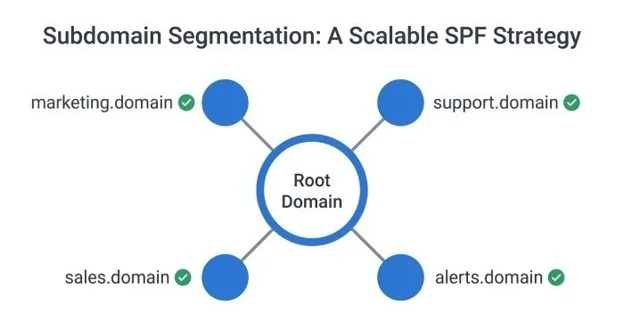
Subdomain Segmentation: A Scalable SPF Strategy
Subdomain segmentation is one of the strongest SPF best practices. Instead of forcing every vendor into the root domain’s SPF record, separate email streams:
marketing.example.comfor Mailchimp or Sendinbluesupport.example.comfor Zendesksales.example.comfor Salesforcenotifications.example.comfor SendGrid, Mandrill, or Amazon SES
Each subdomain gets its own SPF record and DMARC/DKIM configuration. This reduces SPF bloating, keeps each SPF record below the DNS lookup limit, and improves visibility into SPF failures.
Run vendor audits and remove unused entries
A recurring SPF audit should identify every include mechanism, every nested include, and every sender using the domain. Then remove unused entries. Record cleanup often solves the 10 DNS lookups problem without SPF flattening.
During the SPF audit, confirm whether each vendor is still active, which MAIL FROM domain it uses, whether DKIM is configured, and whether SPF alignment is required for DMARC. Some providers may be SPF-incapable for certain flows, making DKIM alignment more important.
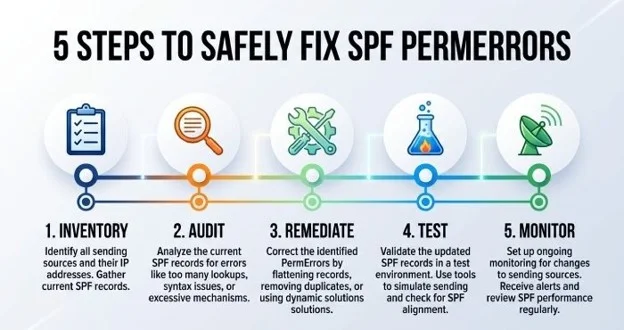
Practical Action Plan: How to Fix SPF Safely Without Breaking Email Authentication
Step 1: Inventory the current SPF record
Start by collecting the live DNS TXT record from public DNS. Confirm there is only one SPF record beginning with v=spf1. Multiple SPF records cause errors. Map every SPF mechanism, including each include mechanism, nested includes, a, mx, and redirect. Use an SPF tool from dmarcan, PowerDMARC, or another reputable provider to calculate the DNS lookup limit and identify whether the record exceeds 10 DNS lookups.
Step 2: Perform a real SPF audit
A real SPF audit connects technical entries to business owners. Identify which team owns Microsoft 365, Google Workspace, Salesforce, Zendesk, Amazon SES, SendGrid, Mailchimp, Mandrill, Zoho, or Sendinblue. Remove unused entries and document approved senders.
The SPF audit should also review DMARC policy, DKIM coverage, SPF alignment, and historical authentication checks. If DMARC aggregate reports show SPF failures from unknown IP addresses, investigate before adding anything to the SPF record.
Step 3: Choose the right remediation path
If the domain is only slightly over 10 DNS lookups, record cleanup may be enough. If vendors are legitimate but numerous, subdomain segmentation is usually better than manual flattening. If the business requires many shared services on one domain, dynamic SPF management or hosted SPF may be appropriate.
Use SPF flattening only when the maintenance model is clear. Avoid static SPF unless you have SPF monitoring, scheduled review, and a reliable owner for domain maintenance.
Step 4: Test before enforcing
Before switching from ~all to -all, validate the SPF configuration across all email streams. Check authentication results, SPF pass rate, DMARC reports, and vendor documentation. If you publish a flattened record, verify that the flattened record still represents current IP addresses and does not exceed DNS size constraints.
Step 5: Monitor continuously
SPF is not set-and-forget. Third-party vendors change. Nested includes change. Business teams add tools. A safe SPF management process includes continuous SPF monitoring, recurring SPF audit cycles, and clear change control at the DNS registrar. That is how you avoid the trap where SPF flattening fixes today’s 10 DNS lookups problem but creates tomorrow’s authentication failure.

